You can schedule an eBay listing to go live on a day and time you choose, up to three weeks in advance, by switching on the scheduling option in the Pricing section of the listing tool. Once saved, the listing waits in your scheduled items, where you can reschedule or cancel it until it starts. This guide covers the exact steps, how to choose a start time, what scheduling does and does not do for visibility, and how to check that each listing reads well on a phone before it goes live.
How to schedule a listing on eBay
The option lives in the Pricing section of the listing form, and its label depends on which tool you use. eBay's help page describes both paths.
In the quick listing tool
- Open the Pricing section of the listing tool.
- Select Schedule your listing's start time. If it is not visible, select More options first.
- Set the start date and time, then complete and submit the listing.
In the advanced listing tool
- Go to the Pricing section.
- Set Schedule your listing to on. If you do not see it, select See all options and turn Scheduling on first.
- Set the start date and time and submit.
Both steps come from eBay's listing durations and timings page. Sellers who moved to the newer unified listing experience have also reported that the scheduling control sits under the Price section, as documented in this walkthrough of the unified tool. Because eBay changes its listing forms periodically, the wording on your screen may differ slightly from the steps above. The location, the Pricing section, has been the stable part.
Choosing a start time
The three-week window gives you room to build listings in one working session and let them release over several days. The start time itself is a separate decision, and three details matter.
Time zone. eBay states that listing times on eBay.com are shown in Pacific time. If you work in Eastern time, a listing set for 7:00 p.m. in the form is not 7:00 p.m. on your clock, so check the conversion before saving.
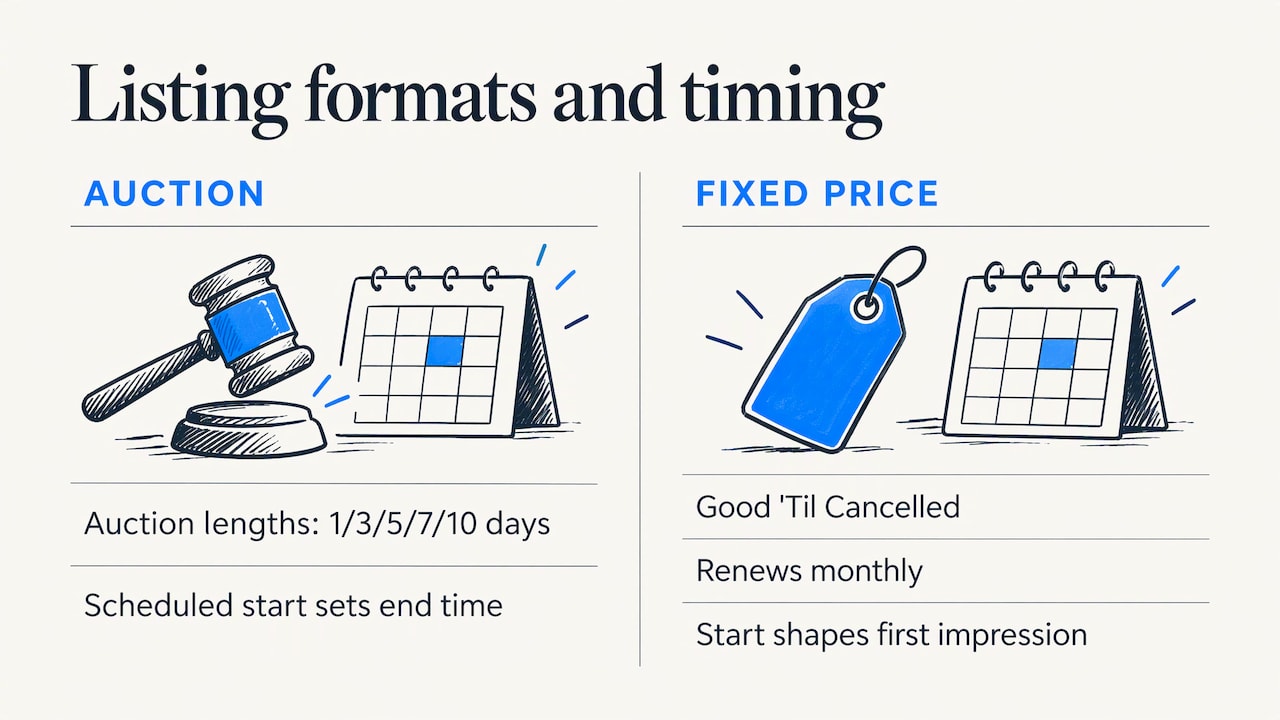
Listing format. Auction-style listings run for 1, 3, 5, 7 or 10 days, and the scheduled start also determines when they end. A 7-day auction that starts on a Thursday evening ends on a Thursday evening. Fixed-price listings are Good 'Til Cancelled and renew monthly, so the start time matters mainly for the first impression rather than for an ending.
Your buyers' habits. There is no universal best hour. Your own sales history, visible in Seller Hub reports, shows when your category sells. A seller of tools may see weekday evening orders, while a seller of collectibles may see weekend peaks. Pick a start time that matches your data, and revisit it after a few weeks.
Where to find, change and cancel scheduled listings
Scheduled listings appear in your scheduled items in My eBay. According to eBay, you can select a listing there and then choose Reschedule to change the date and time, or Delete to cancel it. A report of scheduled listings can be downloaded in Seller Hub, which is useful when you have dozens queued and want to audit them in a spreadsheet.
Sellers often report that a scheduled listing does not appear where they expect it, particularly in the mobile app, where the Selling tab does not always show scheduled items in the same way as the desktop view. If a listing seems missing, work through this order:
- Check scheduled items in My eBay on a desktop browser, which is the location eBay's help page names.
- Confirm that the listing was submitted rather than saved as a draft. A draft has no start time and will never go live by itself.
- Search for the item number. Listings that are live can be found by number even when a dashboard view lags.
- If the listing is still not where it should be, contact eBay customer service with the item number.
Selling limits still apply
Every account has monthly selling limits, and eBay reviews and adjusts them automatically each month based on performance and feedback, as described on eBay's selling limit page. Plan a large batch with your limits in mind. If you queue more listings than your limit allows, some may fail to go live. Check your limit in Seller Hub before building a three-week queue, and request an increase through eBay if your sales justify it.
Does scheduling help search visibility?
This is the question behind most forum threads on the topic: does spreading listings across the week improve ranking? The evidence supports a measured answer.
eBay has said that recency helps frequent buyers find newly listed items, but that it is a smaller factor than relevance, competitiveness and engagement. The same reporting notes that frequent ending and relisting can reset performance data, break offsite search connections and reduce impressions, views and sales over time (Value Added Resource's coverage of eBay's statement).
The practical reading is this:
- Scheduling is a workflow tool first. It lets you photograph, write and price in one block, then release listings steadily instead of all at once.
- Steady releases give new listings their own moment. If you publish 30 listings on Sunday, none of them has a separate chance to appear as newly listed on Tuesday. A daily trickle spreads that attention.
- Quality sets the ceiling. A scheduled listing with weak titles, missing item specifics or thin photos will not outperform a strong listing published without scheduling. Recency only matters when the listing is relevant enough to show up.
Before you queue anything, strengthen what matters most to ranking. Our guide to eBay SEO and the ranking signals behind Cassini walks through the fixes worth making first, and the eBay item specifics guide explains how to fill the required fields so listings match buyer searches. For a quick check of any draft, the free eBay listing analyzer scores a listing and points out visibility gaps.
A practical weekly batching routine
A routine makes scheduling worth the effort. This one suits a seller with a steady stream of inventory.
- Source and photograph once. Dedicate one session a week to photos for every new item, with consistent backgrounds and the same shot order.
- Write listings in bulk. Use a consistent title structure, fill in item specifics and use product identifiers where they apply. eBay Inc. has noted that structured data in Seller Hub speeds up listing creation by pre-filling fields when identifiers are used.
- Assign start times. Release a few listings per day at times that match your sales history, and leave a gap for items you may add later.
- Review the queue once a week. Open scheduled items, remove anything sold elsewhere and adjust timing for seasonal shifts.
- Keep time-sensitive items out of the queue. If a listing depends on a holiday, a season or a price that may change, schedule it close to the date rather than three weeks early.
When to publish immediately instead
Some sellers find that scheduling far ahead adds little for inventory that is ready to sell. If an item is photographed, priced and in hand, a listing that goes live now can start earning impressions now. Scheduling suits staggering and planned launches, not delaying ready stock without a reason. Treat it as a way to shape the release pattern, and test it against your own results.
Making scheduled listings mobile-friendly
A scheduled listing is only useful if it reads well when it goes live, and a large share of eBay browsing happens on phones. eBay's guidance for the app points to a few habits (eBay's selling with the app page):
- Use simple formatting, with black text at 12 to 14 pixels on a white background, and avoid active content.
- Put shipping, payment and returns information in eBay's dedicated fields rather than in the description.
- Upload up to 12 photos with eBay's photo uploader.
- Check the listing on a mobile device.
eBay also generates a mobile description summary automatically, so correct product identifiers and item specifics are what make the key facts appear properly on a small screen. Active content stopped rendering by default after the 2017 Spring Seller Update, and eBay has recommended dedicated listing fields for shipping and returns since then, as its mobile-friendly listing guidelines explain.
If you manage large catalogs, structured product data helps in the same way: consistent attributes make listings easier to display on any screen. A guide to structuring product listing data shows how standardized fields keep product information uniform across channels. For checking your own store from a phone, SafeBay for iPhone puts your eBay store on your handset.
Related tasks that pair with scheduling
- Time away. If you will be unavailable while scheduled listings go live, set up your store so orders and messages do not suffer. See how to schedule eBay Time Away.
- Ended items. Listings that end unsold can be brought back automatically with an auto-relist tool. Keep in mind eBay's comments on frequent end-and-relist cycles above, and relist after improving the listing rather than on a fixed loop.
- First-time listing workflow. If you are building listings from photos upward, this walkthrough from item photos to publication covers the sequence before scheduling comes in.
- Visibility gaps. The seven-step listing optimization checklist helps you find what holds a listing back.
Our perspective on scheduling
We see scheduling as a way to separate two jobs that sellers often mix up: preparing listings and publishing them. Preparation takes concentrated time, and publishing benefits from steady timing. Scheduling lets you do each at the right moment.
The risk we see is queuing weak listings in bulk. A queue of three weeks of listings with thin titles and missing item specifics simply delays the same problem. That is why SafeBay Companion works inside eBay's listing workflow, with AI-assisted descriptions and proofreading, so the draft is stronger before it is queued.
Sellers also lose time and money on the buyer side. Because sellers cannot leave negative feedback for problem buyers, return fraud and false claims can follow a seller from listing to listing. Our community blacklist syncs reported buyers to the eBay Blocked Buyers list through the free Chrome extension, so the listings you schedule are protected without extra work each week.
Mykola
Protect and speed up your scheduled listings with SafeBay
Scheduling covers when a listing goes live. SafeBay covers what happens around it: listing drafts, buyer risk and routine messages. The free plan includes basic features and limited AI usage, and paid plans start at $9.95 per month (Basic), with Pro at $59.95 per month and Enterprise at $599.95 per month for higher limits. The SafeBay Companion extension adds AI listing generation and proofreading on eBay itself, plus buyer risk alerts and syncing to your Blocked Buyers list.
You can compare plans on the SafeBay home page and start on the free tier before deciding whether paid limits fit your volume. The community buyer blacklist is where reported buyers are reviewed, with evidence and appeals supported.
FAQ
How far ahead can I schedule an eBay listing?
You can schedule up to three weeks in advance, according to eBay's help page on listing durations and timings. You pick the date and time in the Pricing section of the listing tool.
Can I change or cancel a scheduled listing?
Yes. Open your scheduled items in My eBay, choose the listing, and select Reschedule to change the time or Delete to cancel it. In Seller Hub you can also download a report of your scheduled listings, which helps with bulk reviews.
Why is my scheduled listing not showing on the page I expected?
First look in scheduled items in My eBay on a desktop browser, since the mobile app does not always show scheduled items in the Selling tab. Confirm the listing was submitted and not left as a draft, then search by item number. If it still cannot be found, contact eBay support with the number.
Does scheduling listings improve my ranking?
Not by itself. eBay has indicated that recency is a smaller factor than relevance, competitiveness and engagement, so scheduling mainly helps you release listings steadily. Strong titles, complete item specifics and good photos matter more.
What time zone does eBay use when I set a start time?
Listing times on eBay.com are shown in Pacific time, according to eBay's help page. Convert your preferred local hour before you save the schedule.
Sources
- Listing durations and timings, eBay
- Schedule Start Time in the new eBay Unified Listing Tool, Value Added Resource
- Selling limits, eBay
- The End and Relist myth, Value Added Resource
- eBay's Seller Hub now live for all U.S. sellers, eBay Inc.
- Selling with the eBay app, eBay
- Mobile-friendly listings, eBay
- Jewelry designer product listing guide