
Your packing list, on the big screen.
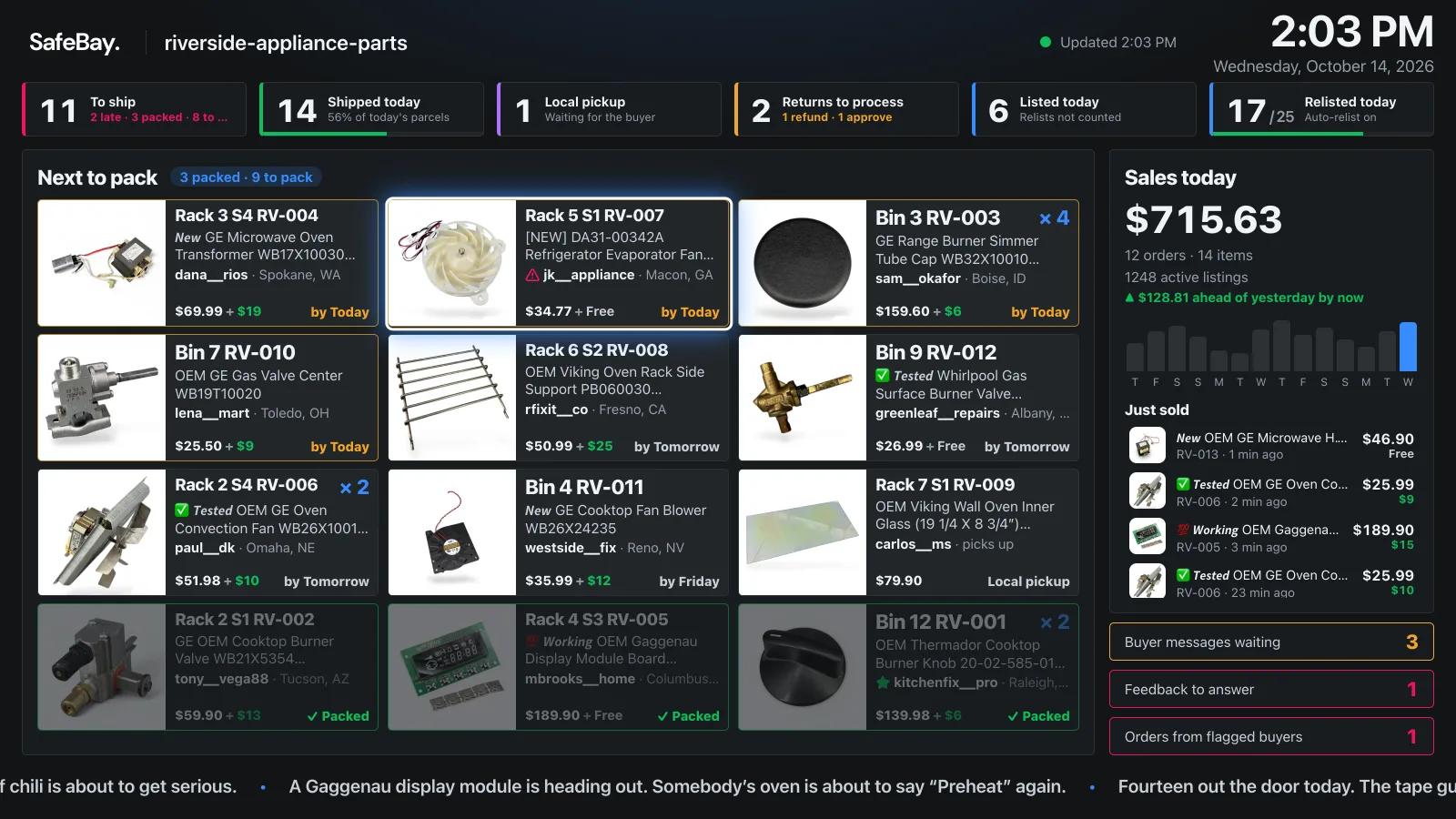
SafeBay TV turns the TV in your packing room into a live board of your eBay orders: what to pack next, by eBay’s ship-by date, with today’s sales and returns waiting beside it. Mark orders packed with the remote.
- Free on every plan
- Roku channel
- Any TV with a browser
What’s on the board
Everything the packing room needs, readable from across it.
- Next to pack
- Orders waiting to ship, in eBay’s ship-by order: the photo, the SKU without the dates sellers add to it, the quantity, and “by Today”, “Tomorrow” or “Late”. Local pickups are tagged.
- The day at a glance
- To ship, shipped today, local pickups, returns waiting on you, listed today, and relisted today against your plan’s target.
- Sales against yesterday
- Today’s sales next to yesterday’s at the same time, and the last 14 days. A setting hides the amounts on a TV your customers can see.
- What needs you
- Buyer messages, feedback to answer and orders from reported buyers, shown only when there are any.
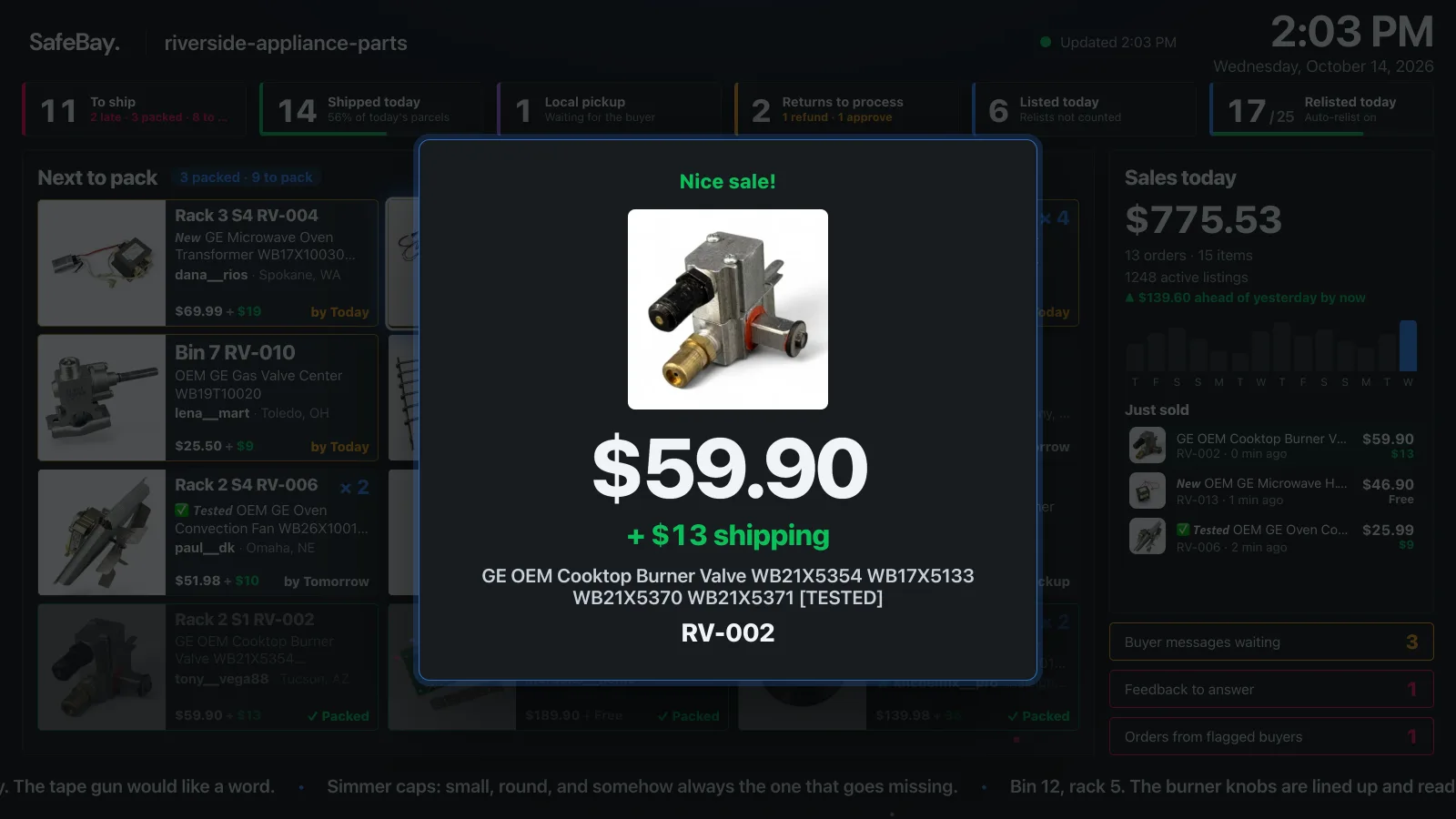
- Every new sale, celebrated
- The photo and the amount fill the screen for a few seconds, with more confetti the bigger the sale. No sound.
- A ticker that knows your store
- Short lines written by AI about what you sell and how the day is going. It gets counts and item titles, never buyer details.
Pack first, print the labels later
Until its label is printed, eBay still lists an order as awaiting shipment. If you pack everything first and print the labels at the end, the board still shows how far you’ve got.
-
With the remote
The arrows move a highlight across the orders; OK marks one packed and jumps to the next. Packed orders fade and move to the end of their group.
-
From a packer’s phone
“Pack from your phone” on the TV shows a QR. Anyone who scans it can tick orders packed, without a SafeBay account, until midnight or for 12 hours.
-
In your shelf order
Sort by due date or by the shelf in your SKU, and group by ship day, so the list follows your walk through the room.
Set up in a minute
Like signing in to a streaming app: a code on the TV, approved from your phone.
-
Open SafeBay TV on the TV
Install the SafeBay TV channel on a Roku, or open safebay.store/tv in the TV’s web browser. The screen shows a short code and a QR.
-
Link it from your phone
Scan the QR or enter the code at safebay.store/tv/link while signed in to SafeBay. On Roku you can also sign in on the TV itself.
-
The board appears
It refreshes itself all day. Remove the TV at safebay.store/tv/link and it goes back to showing a code.
Questions about SafeBay TV
Which TVs, what it shows, and who can see it.
Which TVs does it work on?
There is a SafeBay TV channel for Roku. On any other smart TV, streaming stick or a monitor with a computer, open safebay.store/tv in the web browser: the board is made to run on older TV browsers too.
Is it free?
Yes, on every SafeBay plan, Free included. You need a SafeBay account connected to your eBay store, and you can link up to 20 TVs.
Does the TV get my password?
No. The browser board and the Roku channel link with a code you approve from your phone, and the TV can only read its board. Removing it at safebay.store/tv/link signs it out. On Roku you may instead sign in on the TV, as Roku’s rules require.
Can customers walking by see my sales?
Only if you want them to. Each TV has its own options: hide the sales amount, hide prices, sort by due date or by shelf, and group orders by ship day.
What does it show about buyers?
The buyer’s eBay ID and the city and state the order ships to, as on a packing slip, never their name or street address. A buyer the community has reported, or that you blocked, gets a “Check buyer” tag.
How fresh is the board?
It reloads every 20 seconds, and an order marked packed on another TV or phone shows up within seconds. Ship-by dates are eBay’s own for each order.
Put today’s orders on the wall.
Free on every plan. A Roku, or any TV with a browser, and a minute to link it.