Time Away is the eBay seller setting formerly known as vacation mode. You open your Time Away settings, choose Schedule time away, decide whether item sales stay open or pause, set a start and end date, and select Apply. The harder part is deciding which of the two modes fits your store and what to prepare before you step away. This guide covers the exact steps, the limits eBay sets, what buyers see, how to write the automatic response, and a pre-departure checklist for sellers who ship real inventory.
What Time Away does
eBay introduced Time Away so that sellers could take a break while buyers still get realistic expectations. According to eBay's announcement of the feature, the tool displays an away message and updates estimated delivery dates when a seller keeps selling, and the seller can change the end date or cancel it later. In practice it replaces the older habit of manually raising handling time on every listing, an approach that was slow for large catalogs and easy to forget to reverse.
The feature is a communication and scheduling tool, not an order processor. Orders that arrive while you are away still exist, buyers still expect them to ship by the date shown, and any messages still arrive in your inbox. The setting changes what buyers are told and, in pause mode, whether they can buy at all.
How to schedule Time Away, step by step
The steps below follow eBay's Time Away help page. The path is My eBay, then Account settings, then Time Away settings.
- Open your Time Away settings.
- Select Schedule time away.
- Choose Allow item sales or Pause item sales.
- Set a Start date and an End date. To start immediately, select today's date.
- Select Apply.
A few timing details matter more than the steps themselves:
- If you choose today's date, the away message at the top of your listings appears within minutes, but the estimated delivery dates take a few hours to update. In pause mode, listings take a few hours to disappear from search.
- If you choose a later start date, Time Away begins at 12:01 a.m. on that date and finishes at 11:59 p.m. on the end date.
- eBay suggests starting one day before you actually leave, to catch last-day orders, and ending one day after you return, to process pending orders.
That last recommendation is worth following literally. A seller who returns on a Monday and ends Time Away on Monday morning will often open the day to a queue of orders that have not been picked, packed or labeled. One extra day absorbs that backlog.
Allow item sales or pause item sales
This is the real decision. The two modes produce different buyer experiences and different workloads when you return.
| Factor | Allow item sales | Pause item sales |
|---|---|---|
| Maximum length | Up to 15 days | Up to 30 days |
| Can buyers purchase? | Yes, listings stay visible | Fixed price listings are hidden and cannot be purchased |
| Delivery dates | Estimated dates update automatically | Estimated dates update for auction-style listings that remain visible |
| Work waiting on return | Orders received while away | Little new work, but a gap in sales |
| Search visibility | Unchanged | Listings reappear automatically a couple of hours after the break ends |
Source for the table: eBay Help, Time Away.
When allowing sales makes sense
Allowing sales suits short absences, such as a long weekend or a week of travel, where you would rather keep revenue flowing and can ship quickly afterward. Listings stay visible and buyers can still buy, while eBay extends the estimated delivery date so you are not committing to ship during the break. The tradeoff is that some buyers will skip a listing with a long delivery estimate, so conversion may slow. A seller in the r/eBaySellerAdvice discussion describes keeping sales on several times a year and ending the break a day or two after returning; treat that as one seller's habit rather than a rule.
When pausing makes sense
Pausing suits longer absences, illness, a move, or any period in which you cannot ship at all. Fixed price listings are hidden from search, and a buyer who previously saved an item to a watchlist or cart cannot complete the purchase and instead sees a note that you are not processing orders until the end date. Because hiding is not instant, eBay recommends scheduling in advance when possible.
Auction-style listings behave differently. Even when you pause sales, buyers can still see and bid on or buy auction-style listings, and they see a message at the top that you are on Time Away, with the delivery date updated. If you run auctions that end during your break, plan for those orders.
How long Time Away can last, and ending it early
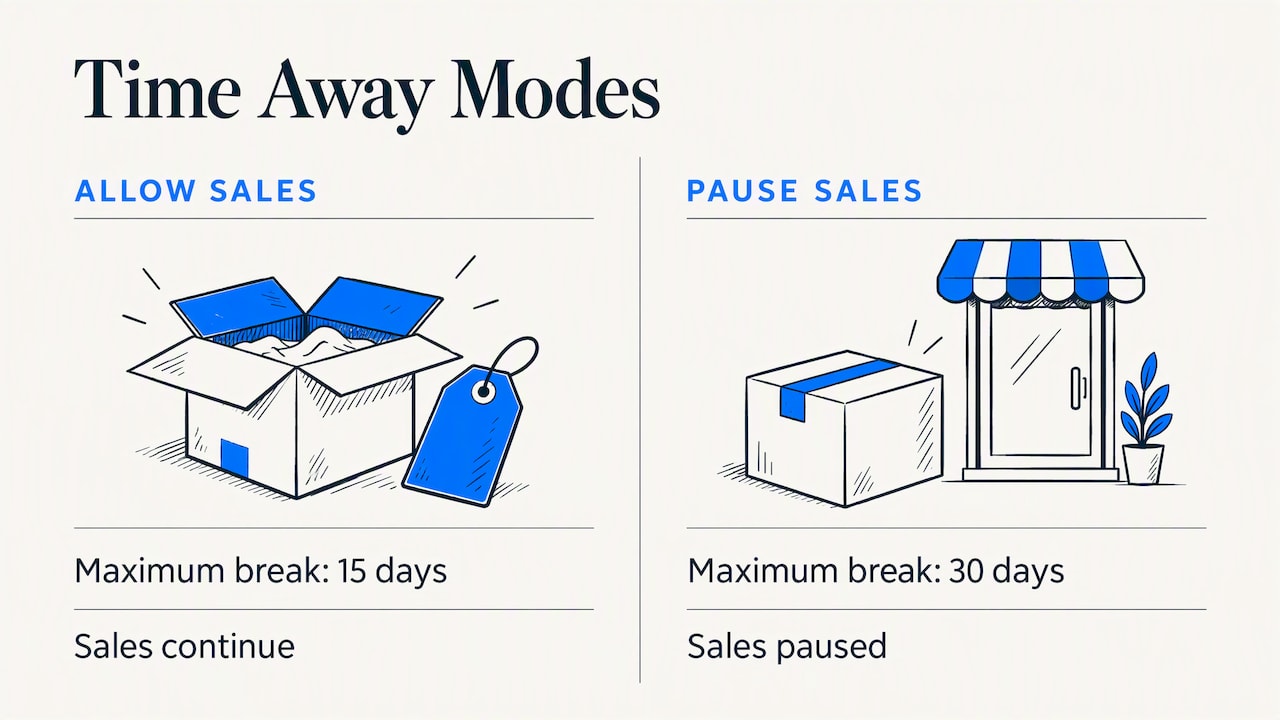
The limits depend on the mode you select. Allowing item sales gives you up to 15 days, and pausing item sales gives you up to 30 days (eBay Help). If you need longer than 30 days, the setting does not extend further, so you would need a different plan, such as a staffed handoff or ending listings and relisting them on return.
To end the break early, return to Time Away settings and either select Cancel time away or move the End date to an earlier day, then select Apply. The same page lets you change the end date, which is useful when a trip extends by a day or two.
What the delivery date update does not cover
The automatic delivery date update is the main benefit of the feature, but eBay lists several situations in which it will not update dates. According to the official help page, these include:
- Second Chance Offers
- Auto-accepted offers
- Pending counter-offers
- Seller-initiated offers accepted during Time Away
- Items with local pickup or in-store pickup as the shipping option
- Digital items
- Athletic shoes eligible for Authenticity Guarantee
EBay notes that you may want to change the shipping format or handling times on these items while away. The practical consequence is that a buyer accepting an old offer or a pending counter-offer is working from the terms you set earlier, not from your break. If you have offers open, either respond to them before leaving or remove the offer settings that auto-accept.
Set an automatic response for buyers
Scheduling Time Away does not write your buyer message. That is a separate setting. The steps from eBay Help are:
- Open Time Away settings.
- Select Automatic response.
- Select Message when on time away.
- Set a start date and an end date for the message.
- Type your message in the Automatic response box.
- Select Apply.
Buyers who contact you through eBay Messages will then receive your text with the date you return. A useful message is short and answers the three questions buyers actually have: when will you reply, when will the order ship, and what should they do if the matter is urgent.
A workable template:
Thank you for your message. I am away until [return date] and will reply within [number] business days after that. Orders placed now will ship by [ship date]. If your order has a problem that cannot wait, please open a case through eBay so it is recorded.
Keep the date range of the message aligned with the dates of the break. If the message ends before the break does, buyers will get silence for the final days, which is the exact gap the setting is meant to close.
For day-to-day messaging outside of breaks, sellers who send the same thank-you and shipping notice after every order can look at eBay auto messages after purchase, which keeps the post-purchase note consistent while you are not at your desk.
A checklist before you start
Time Away protects expectations, but it does not clear your queue. Run through the following before the start date.
- Ship what you can. Pack and send every paid order. The fewer open orders you leave, the fewer problems you carry into the break. Sellers who track their on-time performance should read the late shipment rate guide, which explains thresholds and how late shipments are counted.
- Resolve unpaid items. An unpaid order sitting open during your break is hard to manage remotely. The unpaid item guide covers what to do and when.
- Settle offers. Accept, decline or counter pending offers, and review auto-accept thresholds, since those are not covered by the automatic delivery update.
- Check auctions. Note any auction ending during the break and decide whether to end it early.
- Review local pickup and digital items. These keep their existing terms, so change the shipping format or handling time if you cannot honor them.
- Set the automatic response with start and end dates that match the break.
- Choose a start date a day early and an end date a day late, as eBay recommends.
- Arrange cover. If a family member or assistant will ship while you are away, make sure they have access to labels, packing supplies and a clear process.
Buyer risk during and after a break
A break creates one risk that Time Away does not address: buyer behavior you cannot watch. A seller returning to a stack of orders is more likely to process them quickly and miss warning signs such as a new account, an unusual shipping address or a pattern of past disputes. Reviewing buyer red flags before shipping is a sensible first pass when you are catching up. Sellers can also use buyer requirements to filter who can purchase before the break begins, though the article also explains where those settings stop.
Our view: treat the break as an operations project
We build tools for eBay sellers, and the pattern we see is that Time Away goes wrong less often because of the setting and more often because of what surrounds it. Sellers schedule the dates correctly and then discover that an old auto-accepted offer, a pending counter-offer or a local pickup item is still running on terms they set months ago. The platform's delivery date update handles the ordinary fixed price listing well; the exceptions are where the problems appear.
We also think the choice between allowing and pausing should follow your ability to ship, not your revenue anxiety. If you cannot ship within the extended window eBay displays, pausing is the more honest option, even though it costs sales, because a late shipment is a worse outcome than a gap. Since eBay has not allowed sellers to leave negative feedback for buyers since 2008, sellers have few ways to recover from a bad transaction that happens while their attention is elsewhere. That is why we put weight on screening buyers before and after a break rather than relying on the dispute process afterward.
Finally, a break is a good moment to tidy listings. Once the queue is clear, our listing optimization steps are a reasonable way to use the quiet period, and the same applies to relisting items that ended while you were away.
— Mykola
Keeping the store working while you are away
SafeBay is a toolkit for eBay sellers with a free plan and paid plans at $9.95, $59.95 and $599.95 per month for Basic, Pro and Enterprise. Its community-reviewed buyer blacklist syncs to your eBay Blocked Buyers list through the free Chrome extension, so repeat problem buyers are blocked before an order lands in a queue you are not watching. The SafeBay Companion is the extension itself, and the buyer blacklist explains how reports, evidence and appeals work. You can start on the Free plan and move up only if the limits get in the way.
If you want to check a specific buyer before shipping a backlog, the buyer status checker shows the risk information SafeBay holds for that account.
Common mistakes with Time Away
Starting it on the day you leave. Listings can take hours to show the away message or to hide. Schedule ahead.
Leaving the end date on your travel day. Pending orders will need a day of work. End it a day after you return.
Forgetting that the message is separate. The automatic response needs its own dates and text.
Assuming everything updates. Offers, local pickup and digital items are listed exceptions.
Expecting a break longer than 30 days. The setting caps out at 30 days in pause mode and 15 days when sales stay on.
Ignoring bulk tools. Sellers who use third-party listing software should check how it handles an away period. The guide on choosing a bulk listing tool discusses keeping control of listings while automation runs.
FAQ
Is eBay vacation mode the same as Time Away?
Yes. eBay now calls the feature Time Away, and sellers still search for it as vacation mode. It lets you schedule a break, choose whether sales continue, and show buyers an away notice. The settings live under My eBay, Account settings, Time Away settings.
How long can you have Time Away on eBay?
Up to 15 days if you allow item sales and up to 30 days if you pause item sales, according to eBay Help. You can end it sooner by canceling it or by setting an earlier end date. Adjust the end date in the same settings page if your plans change.
What happens to my listings when I pause item sales?
Fixed price listings are hidden from search and cannot be purchased, and buyers who try to buy from a watchlist or cart see a note that you are not processing orders. Auction-style listings stay visible with a message about your break. Listings return automatically after the break, usually within a couple of hours.
Do I need to change my handling time during Time Away?
For most listings, no, because eBay updates the estimated delivery date automatically when sales are allowed. The exceptions are items with local or in-store pickup, digital items, certain offers and Authenticity Guarantee athletic shoes, where you may want to adjust shipping format or handling time yourself.
How do I tell buyers I am away?
Set an automatic response in Time Away settings by selecting Automatic response, then Message when on time away, entering the dates and your text, and selecting Apply. Buyers who message you through eBay Messages receive it during the dates you set.