

When a buyer does not pay on eBay, the seller's job is to wait out the payment window, remind the buyer, and then cancel the order with the reason "Buyer hasn't paid" before the 30-day deadline. That sequence relists your inventory, protects your final value fee credit, and records an unpaid item on the buyer's account. The details matter, because cancelling too early, too late or with the wrong reason each carries a cost. This guide covers the timeline, the exact steps, the mistakes that cost sellers money, and the longer-term question of how to keep repeat non-paying buyers away from your listings.
How eBay's unpaid item policy works
The rule is simple on paper. According to eBay's unpaid item policy, buyers must pay for the items they purchase within 4 calendar days. If they do not, the seller can cancel the order and an unpaid item is recorded on the buyer's account. The same page treats failure to pay as a violation of eBay's abusive buyer policy, which means that a pattern of unpaid items can lead to restricted buying privileges or suspension.
The policy applies to the usual ways a buyer commits: winning an auction, using Buy It Now, or having an offer accepted. The clock starts at the moment of commitment, not at the moment the listing ends or you send an invoice. That distinction explains most of the confusion sellers have about why the cancellation option is not yet visible.
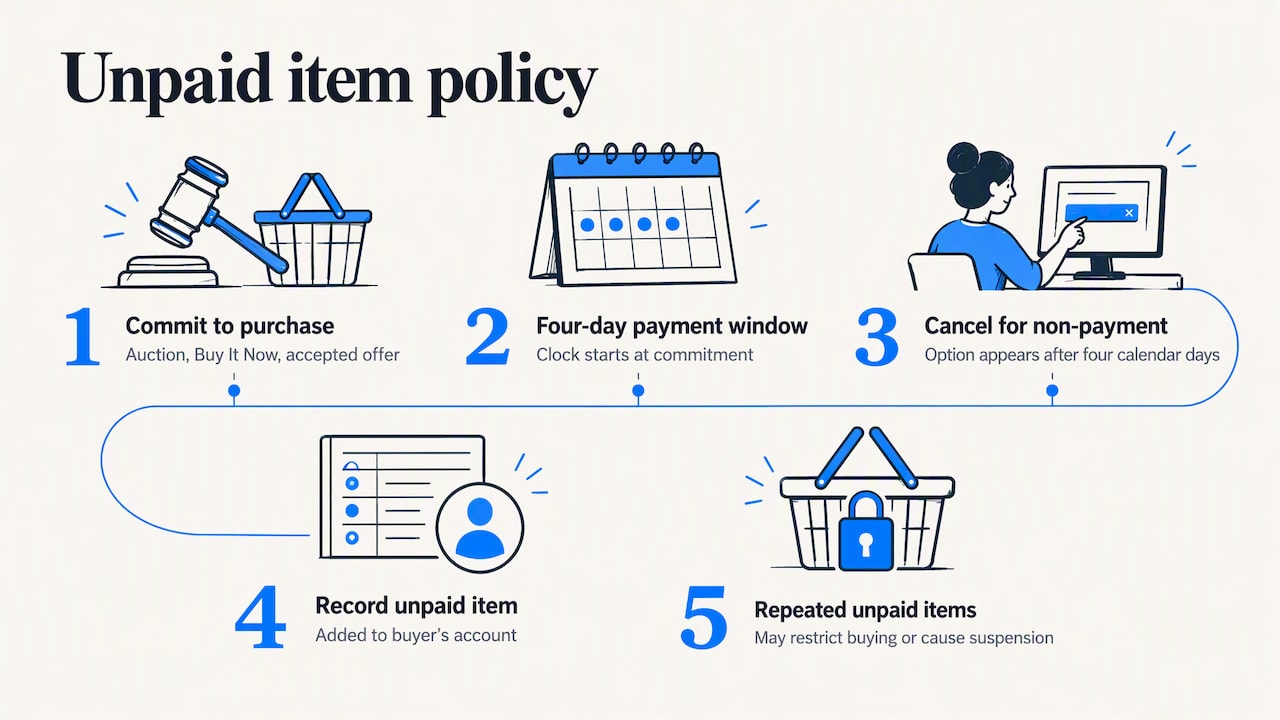
Two terms are used interchangeably by sellers and buyers: "unpaid item strike" and "unpaid item case". The strike is the record on the buyer's account. The case is the older Resolution Center process for flagging a non-paying buyer. In practice, today's workflow centers on cancelling the order from your order list, as described below.
The timeline: day 0 to day 30
The table below summarizes the checkpoints a seller works against. All dates count from the day the buyer commits to buy.
| Day | What happens | What you should do |
|---|---|---|
| Day 0 | Buyer commits (bid won, Buy It Now, accepted offer). | Confirm the order appears in Seller Hub or My eBay. |
| Days 1 to 3 | Buyer is still within the payment window. | Send a short, polite payment reminder through eBay messages. |
| Day 4 onward | Payment window has passed. The "Buyer hasn't paid" reason becomes available after 4 full calendar days, per eBay's order cancellation help. | Check that no payment is pending, then cancel if the buyer is silent. |
| Up to day 30 | Last window to cancel and still recover the final value fee credit, according to eBay's guidance on resolving unpaid items. | Do not let the order sit unresolved. |
| After day 30 | The seller loses the final value fee credit for that transaction. | Avoid this entirely by setting a personal cancellation date. |
The gap between day 4 and day 30 is where judgment comes in. Some experienced sellers wait a little beyond the minimum to allow for banking delays or an honest mistake, provided they stay well within the 30-day limit. Others, particularly high-volume sellers, cancel on day 4 or 5 because inventory sitting in a dead order is inventory that cannot sell to someone else. Both approaches are defensible. What is not defensible is having no rule at all.
How to cancel an unpaid order step by step
The process runs through your order list and takes under a minute once the window has opened. eBay's seller cancellation page describes the same sequence.
- Open Orders in Seller Hub or My eBay.
- Find the unpaid order and, under More actions, select Cancel order.
- Choose "Buyer hasn't paid" as the reason. If the option is not listed, fewer than 4 full calendar days have passed.
- Select Submit to finish.
After the cancellation, your item can be relisted and, if you cancelled within the 30-day window, the final value fee for the transaction is credited. For auction-style listings, check that the relisted item carries your intended starting price and duration, since a relist does not always reproduce the settings you would choose today.
What the buyer sees and what happens to feedback
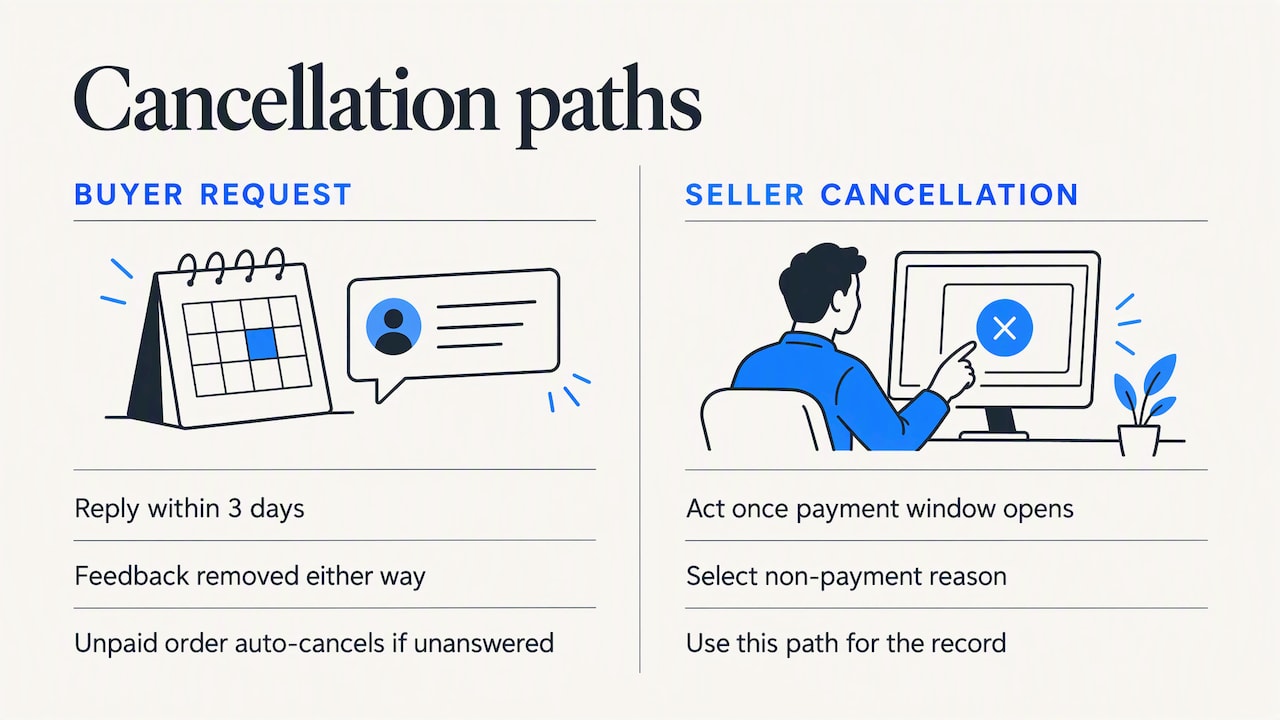
Cancelling for non-payment records an unpaid item on the buyer's account. eBay also removes negative or neutral feedback left by the buyer for that order, so a buyer who does not pay cannot use feedback as retaliation against a seller who enforces the rules, as the unpaid item policy explains.
If the buyer asks to cancel first
A buyer may request cancellation before you act. Per eBay's help page, you have 3 days to approve or decline, and eBay removes related negative or neutral feedback either way. If you do not respond, the request closes, and if the buyer has not paid, the order is cancelled automatically. One practical consequence: a buyer-requested cancellation is a different path from a seller cancellation citing non-payment, so do not assume it will be recorded as an unpaid item against the buyer. If your goal is the record, use the non-payment reason yourself once the window opens.
Mistakes that cost sellers money
Missing the 30-day deadline
This is the most expensive error because it is silent. Nothing alerts you that the fee credit has lapsed. A recurring weekly check of orders older than 20 days is a low-effort safeguard.
Using the wrong cancellation reason
Sellers sometimes pick a different reason, such as out of stock, to avoid conflict with a buyer. That choice can create a transaction defect, which eBay notes may affect your seller performance level. If the real cause is non-payment, use the reason that matches it, once it is available.
Claiming non-payment when the buyer did pay
The policy page is explicit that misusing the option can lead to severe penalties, including reversal of fee credits, loss of access to the fee credit system and possible account suspension. Before you cancel, open the order and confirm that the payment status really shows nothing received, including any pending or held payment. Keep screenshots of the order status and your message history. Precise documentation is your protection if the buyer disputes the cancellation.
Cancelling without a reminder
A reminder is not required, but it resolves a meaningful share of cases that are honest oversights, and it creates a record that you gave the buyer a fair chance. A two-line message is enough: the item, the amount due and the date the order will be cancelled.
Preventing unpaid items before they happen
Managing the aftermath through cancellations is reactive. The more efficient approach, especially for higher-volume stores, is to reduce the number of unpaid orders you receive at all. Several levers are available.
- Listing format. Fixed-price listings with immediate payment required remove the payment gap for those sales. Auctions will always carry some non-payment risk because the buyer commits first and pays later. Check your payment preferences in Seller Hub to see which options are available for your category.
- Automated reminders and cancellations. eBay offers unpaid item preferences and an assistant that can handle part of this process automatically, and its seller center overview describes the Unpaid Item Assistant as a time saver when a buyer does not pay. Review the settings so that the number of days matches your own policy rather than a default you never chose.
- Clear listing terms. Shipping costs and handling terms that are visible before purchase reduce the buyers who commit and then retreat on seeing the total.
- Order-time communication. A prompt confirmation message after purchase tells the buyer what is expected next. Our auto message tool for eBay orders is built for this step.
- Buyer screening. The most durable prevention is not accepting orders from buyers with a documented history. That is covered next.
Why the unpaid item record is not enough on its own
The unpaid item record sits on the buyer's eBay account and is governed by eBay's own thresholds. As a seller you cannot see how many strikes a buyer holds, and you cannot leave negative feedback for a buyer, a limitation that has been in place since 2008. The consequence is that a buyer who skips payment on your listing can move on to the next seller, and that seller has no visibility into what happened on yours.
Public criticism of the platform has long pointed to this asymmetry between how sellers and buyers are held accountable, as summarized in the Wikipedia overview of criticism of eBay. Whatever your view of that criticism, the practical conclusion for a professional seller is the same: keep your own records of buyer behavior, and use them.
Ebay does provide a Blocked Buyers list in your account. The weakness of a private list is that it starts empty and only grows from your own bad experiences. A shared list that draws on many sellers' reports shortens that learning curve considerably.
Our perspective: treat non-payment as a data problem
We built SafeBay because eBay sellers lost the ability to leave negative feedback for problem buyers in 2008, and the gap has been filled by lost fees, wasted listing time and, in the worse cases, return fraud and false claims. Non-payment is the mildest version of that pattern, which makes it a useful early signal.
Our view is that a single unpaid item should not define a buyer. Honest mistakes, card problems and changes of mind happen, and a seller who treats every case as fraud will waste effort and may block legitimate customers. A repeated pattern is a different matter. For that reason our community blacklist asks for evidence with each report, keeps the reasons and dates attached to a block, separates private blocks from public ones and supports appeals. Those design choices exist because a shared list is only valuable if sellers can trust it and buyers can contest it.
We would also advise sellers to keep their own standard before relying on any tool: decide how many days you wait, what reminder you send, and what pattern justifies a block. The software should execute your rules, not replace them. You can read more about how reports are handled in why reporting bad buyers protects all sellers.
— Mykola
Blocking repeat non-paying buyers
Once you have cancelled an unpaid order, you have three options for the buyer, in rising order of severity.
- Do nothing. Appropriate for a first-time, low-value case where the buyer replied politely or the cause looks like a misunderstanding.
- Add the buyer to your private block list. This keeps that account from buying from you again. eBay's Blocked Buyers list is the native place for this.
- Report the buyer with evidence. If the behavior is a pattern, such as repeated non-payment, a report allows other sellers to be warned. You can report an eBay buyer with the order details and your message history as supporting evidence.
Before accepting a suspicious order or offer, you can also check an eBay buyer's status against the community's reviewed reports. Reports are reviewed before they are shared, which is intended to keep the list factual rather than a record of personal disputes.
Syncing blocks to eBay automatically
Copying usernames by hand into eBay's list is slow and easy to forget. The free SafeBay Companion Chrome extension syncs blacklisted buyers to your eBay Blocked Buyers list so the block applies on your account without manual entry. It also supports real-time buyer risk alerts. Sellers who want to understand the broader protection, including return abuse, can read about our community buyer blacklist and return abuse protection.
What SafeBay offers for this problem
SafeBay is a freemium toolkit. The plans published on our site are:
| Plan | Price |
|---|---|
| Free | $0 per month |
| Basic | $9.95 per month |
| Pro | $59.95 per month |
| Enterprise | $599.95 per month |
The free plan covers basic features with limited AI usage, which is enough to try the blacklist workflow and the extension. Paid plans raise limits and unlock advanced features. Beyond buyer screening, the toolkit includes auto-relisting of ended items, which complements cancelling unpaid orders, because a cancelled item still needs to return to the marketplace. See the auto-relist tool for how that works, or browse the free seller tools without committing to a plan.
A practical routine for unpaid orders
For most sellers, a short written routine is more effective than any single feature. A workable version looks like this:
- Daily: scan new orders for payments still outstanding after day 2 and send the reminder.
- Day 4 or 5: cancel with "Buyer hasn't paid" if there is no payment and no reply. Allow an extra day or two only when the buyer has written to you and a delay is credible.
- Day 20: review any order still open and decide. Do not approach day 30 with an unresolved case.
- After each cancellation: note whether the buyer has a history. If it is a second or third incident, block and, where appropriate, report with evidence.
- Monthly: count your unpaid items against total orders. If the rate is rising in a category, check whether the listing format or shipping costs are the cause.
This takes very little time per order and keeps the fee credit, the inventory and the buyer data in order.
FAQ
How long does a buyer have to pay on eBay?
Buyers must pay within 4 calendar days of committing to a purchase, according to eBay's unpaid item policy. The seller can cancel with the non-payment reason after 4 full calendar days. The cancellation must happen within 30 days to keep the final value fee credit.
What happens if a buyer does not pay for an item on eBay?
Once the seller cancels the order for non-payment, an unpaid item is recorded on the buyer's account. Repeated unpaid items can lead to restricted buying privileges or suspension under eBay's abusive buyer policy. Any negative or neutral feedback the buyer left for that order is removed.
How do I report an unpaid item on eBay?
Open the order in Seller Hub or My eBay, choose Cancel order from More actions, and select "Buyer hasn't paid" once it becomes available. That cancellation is what records the unpaid item. If you also want other sellers to be warned about a repeat offender, you can submit a report with evidence to a community list such as SafeBay's.
What happens if I miss the 30-day window?
You lose the final value fee credit for that transaction, as eBay's resolving unpaid items page states. Set a reminder to review any open unpaid order by day 20 so the deadline does not pass unnoticed.
Can I cancel for non-payment if the buyer says they paid?
Not until you have verified the payment status in the order. Misusing the non-payment reason can lead to reversed fee credits, loss of access to the fee credit system and possible suspension, per the unpaid item policy. If there is a genuine dispute, keep screenshots and contact eBay support before cancelling.