

Automating eBay feedback means three separate things, and sellers often mix them up. First, eBay can post positive feedback for you on eligible orders. Second, you can switch on the Automate feedback setting so your own positive feedback to buyers goes out without manual work. Third, you can use a tool to reply to feedback and send requests, as long as a person stays in control of the workflow. This guide covers each layer, what eBay's rules allow, and where automation stops being useful.
TL;DR
- eBay now posts automatic positive feedback on eligible orders in the US, so you no longer have to leave feedback by hand to get credit for clean sales.
- The Automate feedback setting in Selling preferences lets you leave positive feedback for buyers automatically, either after payment or after the buyer leaves feedback first.
- Requests for feedback are allowed. Demands, or offers of anything in exchange, are not. Skip any buyer with an open issue.
- Automation that assists a human is compliant. Fully autonomous, agentic flows are increasingly flagged under eBay's updated user agreement.
- Automation does not fix abusive buyers. Report them, document the evidence and block repeat offenders.
Table of Contents
- The three kinds of feedback automation
- What eBay's automatic positive feedback does
- Setting up the Automate feedback preference
- Requesting feedback without breaking the rules
- Replying to feedback at scale
- Where automation must stay supervised
- What automation cannot fix: abusive buyers
- Our perspective
- Where SafeBay fits
- A weekly routine that combines all three layers
- Feedback is not the only reason sales stall
- FAQ
- Sources
The three kinds of feedback automation
Before you change any setting, separate the three layers, because each has different controls and different risks.
| Layer | Who acts | Where it is controlled | Main risk |
|---|---|---|---|
| Automatic positive feedback from eBay | eBay | Eligibility rules set by eBay | None for you, but you cannot choose which orders qualify |
| Automate feedback (feedback you leave for buyers) | You, through a setting | Selling preferences | Generic comments, feedback left before the order is settled |
| Replies and requests via a tool | You, through software | Third-party tools or extensions | Policy breaches if requests are pushy or the tool acts without oversight |
Most searches for this topic come from sellers who noticed feedback appearing on their account that they did not leave, or who want to stop leaving it manually. The first layer explains the former, and the second answers the latter.
What eBay's automatic positive feedback does
eBay announced that automatic positive feedback would reach all US sellers in September 2025 as part of its seller update. The feature had already appeared in other markets, and the rules there are a useful guide to how the system behaves.
According to the Australian Seller Centre notice, the feedback is applied only when the order uses a tracked service, arrives on time and the buyer has raised no issue. It is posted seven days after successful delivery, provided the buyer has not already left feedback. If the buyer later leaves their own feedback, it replaces eBay's automated message. The UK announcement describes the same idea: eligible transactions receive automated positive feedback to improve the seller's feedback score. Those pages describe other countries, so check the US policy page in your Seller Hub for exact timing and eligibility on your account.
The practical consequences for a US seller are these:
- Tracking is now a feedback lever. Orders without a tracked service are not eligible, so cheap untracked shipping carries a hidden cost in lost feedback.
- Late delivery removes the benefit. An order that arrives after the estimated date will not qualify.
- Real feedback still wins. A buyer's own comment replaces the automated one, which is good, because a specific comment about an item reads as more credible than a generic line.
Sellers on community forums have reported inconsistencies, such as orders that should have qualified but did not receive feedback. Treat those reports as anecdotes. If you believe an eligible order was missed, contact eBay support with the order number rather than changing your own processes.
Setting up the Automate feedback preference
Separate from anything eBay does on its own, you can automate the feedback you leave for buyers. Per eBay's help page on automatic feedback settings, the option sits in the All listings and orders section of Selling preferences. You select Edit next to Automate feedback, then choose when feedback is left.
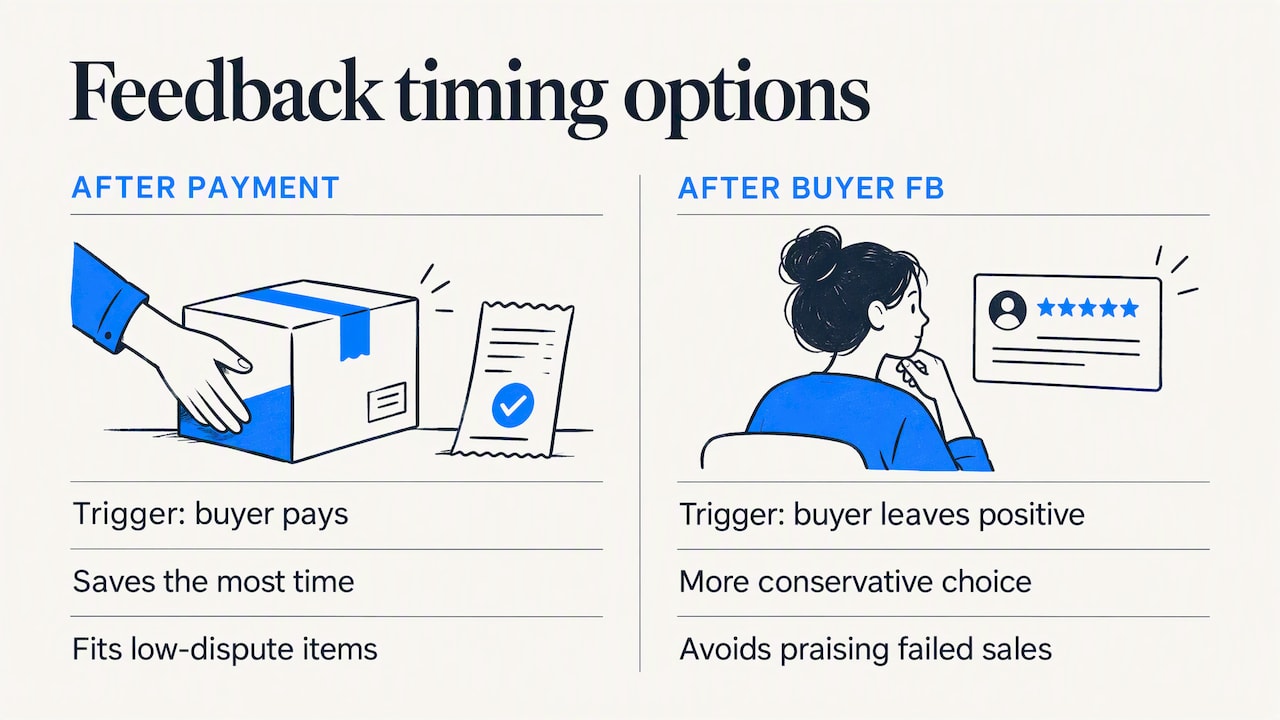
The page lists two timing options:
- After the buyer has paid.
- After the buyer has paid and left you positive feedback.
You can also edit a range of positive comments, which the system uses at random.
Which timing option to choose
The second option is the more conservative choice. It means you only thank buyers who have already given you positive feedback, so you never post a positive comment on a transaction that later goes wrong. Positive feedback you leave cannot be used to evaluate how the sale actually went, and a positive comment on a buyer who then files a false "not as described" claim looks careless in your own history.
The first option saves the most time and may encourage some buyers to respond in kind. It suits sellers of low-value, low-dispute items such as media or small accessories, where problem orders are rare.
Writing the comment pool
Because the system draws comments at random, write at least five to eight variations. Keep them short, factual and free of anything that suggests a bargain was struck. Avoid wording that implies the buyer must reciprocate. A pool of near-identical lines is not harmful, but it adds nothing to the credibility of your profile.
Requesting feedback without breaking the rules
Automation is where sellers most often cross a line. According to edesk's guide to eBay star ratings, eBay allows sellers to request feedback but not to demand it or offer anything in return. The same guidance points out that sensible tools skip any buyer who has raised an open issue, so a request is never sent in response to a poor experience.
A compliant request sequence has these properties:
- One message, after delivery. Send it after the tracking shows delivery, not at payment.
- A condition check. Skip the message if there is an open return, case or unresolved message thread.
- No incentive. No discounts, free items or promises of future favors.
- No pressure. Thank the buyer, invite them to share their experience and give a way to contact you first if something is wrong.
A short post-purchase message is also useful in itself. Our guide to automatic messages after purchase explains thank-you messages that confirm shipping and set expectations, which is often what prevents a negative rating from happening in the first place.
Replying to feedback at scale
Feedback you receive is also a workload. Negative or neutral comments deserve a response, and eBay's policy has changed in ways that make replies more important. According to the UK Seller Centre update, eBay no longer automatically removes negative or neutral feedback solely because the seller offered free returns, handled the return and issued a refund. The valueaddedresource report on the US August 2025 seller update describes the same change, along with new rules for mixed feedback where only part of a comment qualifies for removal.
If removal is less likely, a visible, calm reply becomes the main tool. Future buyers read those replies as a trust signal. The practical standard is:
- Reply publicly to every negative or neutral comment, ideally within a day or two.
- Acknowledge the specific problem, state what you did to resolve it and avoid arguing with the buyer.
- Keep positive replies short and varied.
Doing this by hand for a store with hundreds of monthly orders is slow. This is where an AI-assisted tool helps, provided you review what it drafts. Our AI feedback autoreply generates replies to buyer feedback inside eBay's own pages, so you can approve or adjust each response rather than writing from scratch. For removal questions, our guide to checking eligibility before you file walks through what eBay will and will not remove.
Where automation must stay supervised
eBay has been tightening its position on automated activity. A January 2026 report on eBay's updated user agreement says it prohibits LLM-driven bots and end-to-end flows that place orders without human review. That language is aimed at buying agents, not at seller tools, but it signals the direction of enforcement. The safe reading for sellers is to use tools that assist a human decision and to avoid anything that acts on your account with no oversight.
A short checklist for evaluating any feedback automation:
- Does it draft or does it decide? Drafting with approval is lower risk than fully unattended posting.
- Does it work inside eBay's interface or through your own session? Browser extensions that run in your logged-in session keep you in control. Check the tool's privacy policy for what data it reads.
- Can you turn it off per buyer? You need an exception path for disputes.
- Does it log what it sent? You want a record if eBay ever asks.
What automation cannot fix: abusive buyers
Automated positive feedback improves a profile in the normal case, but it does nothing about buyers who file false claims. Sellers have not been able to leave negative feedback for buyers since 2008, which leaves return fraud and bad-faith claims without a public record. eBay's own seller protection policy says that when it finds a buyer's behavior abusive, it takes action on the buyer and removes negative and neutral feedback and defects, including opened cases in service metrics. That page is the Australian version, and the US policy has a similar structure, so read the US page before you rely on it. In either case, the protection depends on you reporting the incident through the returns flow or the seller help portal, with evidence.
That is the gap our own tools address. Our community blacklist lets sellers report problem buyers with evidence, then reviews and shares the reports so that other sellers can block the same account. You can check a buyer's status before you ship, or report a buyer after an incident.
Our perspective
We build tools for eBay sellers, and the most common mistake we see with feedback automation is treating feedback as a score to maximize instead of a record to protect. A high count of generic positive comments helps less than it appears to, because eBay's own automatic feedback now covers the routine, clean transactions. The sellers who gain most from automation are therefore those who spend the time they save on the exceptions: the late parcel, the damaged item, the buyer who claims something was not as described.
Our view rests on three principles:
- Automate the routine, not the judgment. Thank-you messages, comment pools and drafted replies are safe to automate. Deciding whether a buyer is acting in bad faith is not.
- Keep a human approval step. eBay's direction on bots makes supervised tools the sensible choice, and your replies are public, so they should reflect your business.
- Protect the account before optimizing it. One repeat abuser can cost more than a month of feedback gains. Blocking known problem buyers is a feedback strategy, because it prevents the negative outcome rather than answering it afterward.
We also keep reports accountable: reports carry evidence, private and public blocks are separate, reasons and dates are retained, and buyers can appeal. A blacklist without those features would only move the unfairness from sellers to buyers.
— Mykola
Where SafeBay fits
If you want to automate the parts of feedback that are safe to automate, our plans start with a Free tier at $0 per month, which covers basic features with limited AI usage. Basic is $9.95 per month and Pro is $59.95 per month, and Enterprise is $599.95 per month for larger operations. The feedback reply generator, automatic messages and buyer blacklist sync work through the SafeBay Companion Chrome extension, which runs in your eBay session so you stay in control. You can compare plans on the SafeBay home page, or look at the Companion extension first. Start with the free tier and check how much of your feedback workload it covers before you pay for anything.
A weekly routine that combines all three layers
The three layers work best as a short, repeatable routine rather than a one-time setup. A simple version for a seller handling a few hundred orders a month:
- Once: set Automate feedback to the conservative timing option and write a comment pool of at least five variations.
- Once: configure one post-delivery message, with a condition that skips any buyer who has an open case.
- Weekly: review new negative and neutral feedback, and approve or edit drafted public replies.
- Weekly: check orders that should have qualified for eBay's automatic feedback and did not, and note the order numbers for support.
- After any dispute: report the buyer with evidence and, where the pattern is clear, block them.
This takes less than an hour a week for most stores. The point is to reserve attention for the transactions that need it.
Feedback is not the only reason sales stall
Sellers often assume that weak sales come from feedback, when the cause is something else. According to ZIK Analytics, visibility losses are often mistaken for feedback problems and tend to persist until listings are optimized to match current search weightings or defects are resolved. The same source reports that January and February are historically slow months, with general volume often down 15% to 25% compared with peak periods. If your feedback is clean and sales are still down, look at listings first. Our guides on optimizing eBay listings and eBay SEO signals cover the checks to run.
FAQ
Does eBay leave automatic feedback for sellers?
Yes, for eligible orders. In the US, automatic positive feedback rolled out to sellers from September 2025. Based on the policy described in other markets, an order generally needs tracked shipping, on-time delivery and no buyer issue, and a buyer's own feedback replaces the automated one. Confirm the exact US conditions in your Seller Hub.
How do I turn on or off automatic feedback for buyers?
Open Selling preferences and go to All listings and orders, then select Edit next to Automate feedback. You can choose to leave feedback after the buyer pays or after they leave you positive feedback, and edit the comments the system uses, as eBay explains on its automatic feedback settings page.
Can I ask buyers for feedback automatically?
You can request it, but you cannot demand it or offer anything in exchange. The safest setup sends one message after delivery and skips any buyer with an open issue, so the request never follows a poor experience.
Will eBay remove negative feedback if I refunded the buyer?
Not automatically. eBay's policy no longer removes negative or neutral feedback solely because you offered free returns and issued a refund, as the UK Seller Centre update explains. Reply publicly and professionally, and report the buyer if the claim was abusive.
Sources
- eBay Introduces Automatic Positive Feedback For Sellers, Value Added Resource
- Automatic feedback settings, eBay Help
- Feedback Policy Update, eBay Australia Seller Centre
- Feedback update, eBay UK Seller Centre
- eBay Star Ratings: What They Mean & How to Get Them
- Ebay updates legalese to ban AI-powered shop-bots, MSN
- Seller protections, eBay Australia Help
- Slow Sales on eBay, ZIK Analytics