

AI can draft an eBay title, description and item specifics in seconds, but it cannot verify that the item in your hands matches the draft, and eBay holds you responsible for the result. The most reliable way to use it is to let the software handle formatting and first drafts while you confirm every identifying detail yourself. This guide covers what eBay's own tools do, which types of third-party tools exist, how to review an AI draft, and where AI stops being useful.
What eBay's own AI listing tools do
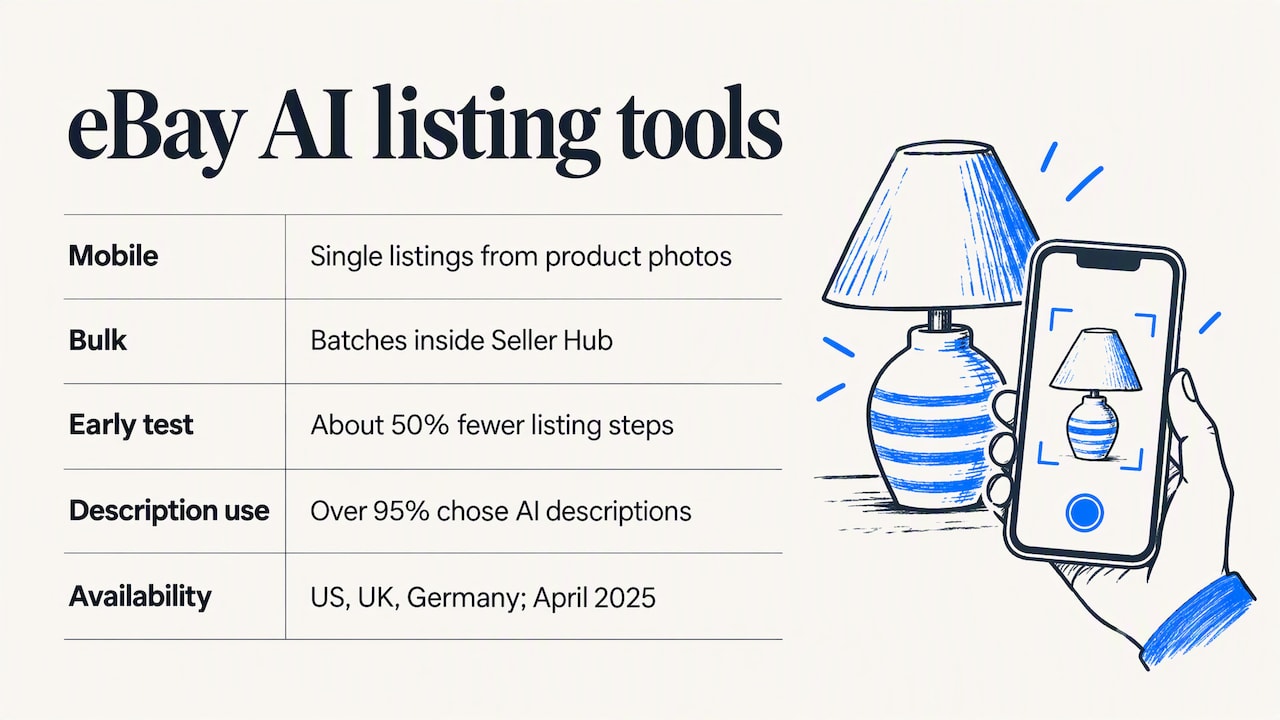
eBay's "magical listing" technology reads product photos and fills in much of the listing. According to eBay's announcement of its simplified mobile listing flow, a seller takes or uploads a photo and the AI helps fill in the listing details. The company reported that early testing showed roughly a 50% reduction in listing steps, and that over 95% of sellers who tried the feature chose to use the AI-generated description.
The tool exists in two forms: a mobile version for single listings and a bulk version inside Seller Hub for batches. Availability has been uneven. After a delay of about a year and a half, the tool reached all private accounts in the US, UK and Germany in April 2025, with business accounts planned afterward. If you sell through a business account, check inside Seller Hub whether the feature appears for you before building a workflow around it.
The quality question is separate from the availability question. Seller forums are mixed: some sellers describe the generated descriptions as generic paragraphs that read the same across listings. That is a fair criticism of any default draft, and it is the reason the review routine below matters more than the choice of tool.
Types of AI tools for eBay sellers
Most tools fall into a handful of categories. Knowing which category you need prevents paying for features that do not match how you sell.
| Tool type | What it drafts | Best for | Main risk |
|---|---|---|---|
| eBay's built-in AI | Title, category, item specifics, description from photos | Sellers listing items they own, in modest volume | Generic wording; availability varies by account type |
| General-purpose chatbots | Descriptions and titles from text you supply | Rewriting and tightening copy you already have | No knowledge of your item; may invent attributes |
| Photo-to-listing apps | Full drafts from a photo, sometimes with sold-price comparisons | Resellers of used, vintage or thrifted stock | Misidentified items, wrong brand or model |
| Supplier-feed tools | Listings built from product data supplied by a wholesaler | Dropshippers | Inherits supplier errors and stock gaps |
| Browser-based assistants | Drafts, proofreading and messaging inside the eBay interface | Sellers who want to stay in the eBay workflow | Depends on the quality of the input you give it |
None of these categories is universally better. A seller with a few dozen one-off items has different needs from a seller with repeat SKUs and a parts catalog. Our own comparison of which eBay AI listing tool fits your selling workflow goes deeper on that decision, and a separate piece covers choosing a bulk listing tool without losing control.
What eBay's rules say about AI-written listings
Two points from eBay's policies shape how you should use AI. According to an analysis of eBay's policies, the images policy contains no AI-specific ban and no disclosure requirement, and content is acceptable as long as it is truthful, accurate and does not infringe third-party rights. The same analysis notes that the User Agreement assigns responsibility for listing accuracy, including content made with generative AI tools, to the seller.
The practical reading is straightforward:
- You do not need to label a description as AI-assisted, based on current policy as summarized by that source. Policies change, so confirm in eBay's Help pages before relying on this.
- If the AI states a feature the item lacks, the error is yours, not the tool's.
- If a draft copies protected wording or logos, the infringement risk is also yours.
That last point has a direct commercial consequence. A listing that overstates an item gives a dishonest buyer an easy argument for an "item not as described" claim, and it gives an honest buyer a legitimate one.
A fact-first routine for reviewing AI drafts
Experienced sellers tend to settle on the same approach: let the AI handle layout and a first draft, then manually validate the fields that identify the item. The reasoning is that plausible but incorrect attributes, such as a wrong finish, an invented logo or accessories that are not included, are the most common failure. Use the physical item as the reference for every check.
- Confirm the identity. Compare the brand, model number and part number on the item's label with the title and item specifics. Do not accept an AI guess in place of the printed number.
- Check compatibility claims. If the draft says a part fits certain models, verify it against the manufacturer's data or your own records. Remove any line you cannot confirm.
- Describe condition in your own words. State scratches, missing pieces, wear and whether the item was tested. Add a plain statement of what is and is not included.
- Cut filler. Delete superlatives and generic benefit statements that do not describe this specific item.
- Match photos to text. Every attribute in the description should be visible or verifiable in the photos you upload.
- Run a final read-through. Read the listing as a skeptical buyer would, asking which sentence could be used against you in a dispute.
A free check can help at the end. The SafeBay eBay listing analyzer scores a listing so you can spot visibility gaps before publishing, and our guide to optimizing eBay listings in seven steps explains how to act on the result.
Writing prompts that produce usable drafts
When you use a general-purpose assistant, the quality of the output follows the quality of the facts you supply. Give it the verified brand, model, part number, measurements, condition notes and included items, and ask it only to organize them into a title under eBay's 80-character limit and a clear description. Instruct it not to add features that are not in your notes. This reverses the usual pattern: instead of asking AI to find facts, you give it facts and ask it to format them.
Where AI helps most, and where it helps least
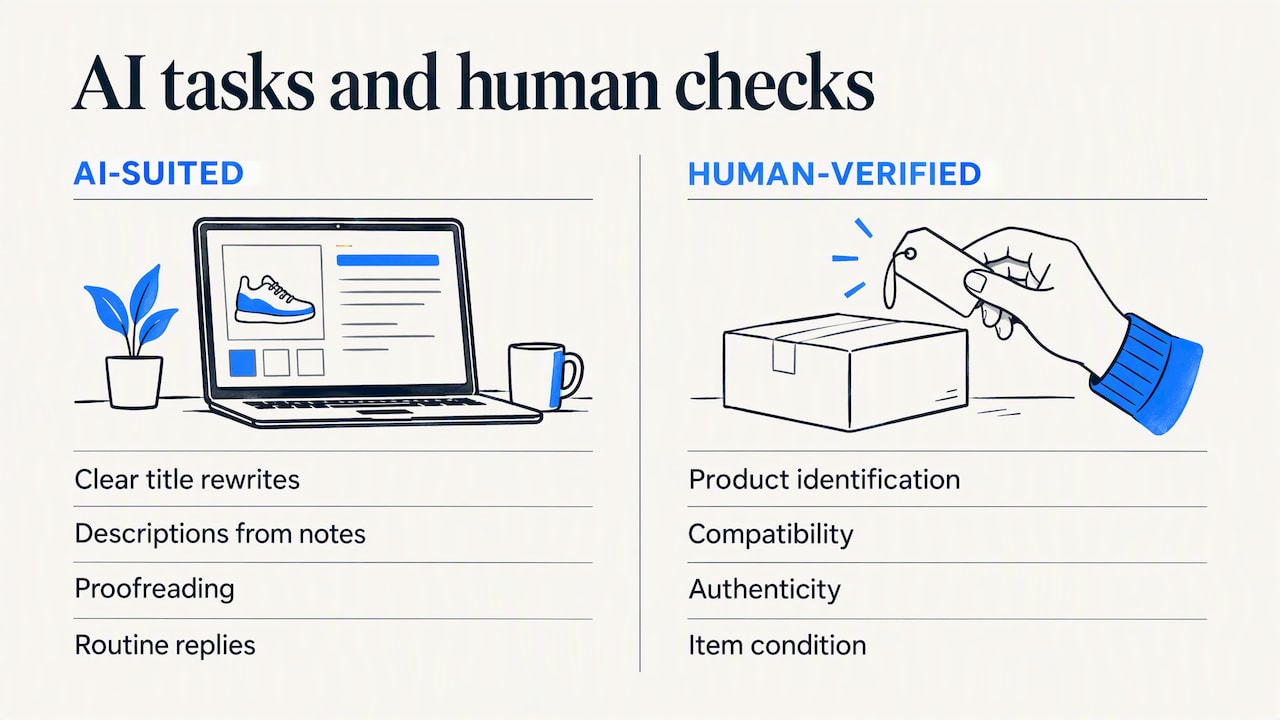
AI is strongest on repetitive, low-risk work: rewriting a title for clarity, turning bullet notes into a readable description, proofreading, and drafting replies to routine questions or feedback. It is weakest wherever a mistake carries a cost, namely identification, compatibility, authenticity and condition.
This matters in parts categories in particular. A buyer who orders an appliance part that does not fit will return it, and a listing that implied a fit it could not support is hard to defend. For these sellers, a compatibility lookup tied to real model data is more useful than a more eloquent description. Visibility is a separate concern from accuracy, and our article on eBay SEO and the ranking signals that matter explains the structured fields that influence search placement.
Sellers who want generative systems themselves to recommend their store or content may also find this practical guide to optimizing content for AI citation useful. It is written in Portuguese, but it addresses the same underlying principle: AI systems are more likely to surface pages that state accurate product information clearly.
Do paid AI tools pay for themselves?
The answer depends on volume and on how much of your time is currently spent on listing copy. A seller who lists a handful of items a month is unlikely to gain much beyond what eBay's built-in tool provides. A seller with hundreds of listings, repeat products and a steady flow of buyer messages has more to automate, and the saving comes from workflow tasks such as relisting, replies and proofreading, not only from first drafts.
Before paying, ask four questions:
- Does it work where you already work, or does it require copying text between apps?
- Does it let you review and edit everything before publishing?
- Does it cover the tasks that actually consume your time, such as relisting and messaging?
- Can you test it on a free tier first?
If you are weighing outside help instead of software, our review of whether eBay listing optimization services are worth paying for sets out the trade-offs.
Our perspective: accurate listings are a fraud-prevention tool
We built SafeBay around a problem that sellers face once the listing is live. Since 2008 eBay sellers have not been able to leave negative feedback for buyers, and that has left return fraud and false claims with few consequences for the people who commit them. Our view is that listing quality and buyer risk are linked, and that most sellers treat them as separate problems.
Here is the link. A vague or inflated listing weakens a seller's position in a dispute, because the buyer can point to the seller's own wording. AI makes it easy to produce confident, polished text, which is exactly why unchecked AI text is dangerous: it reads as authoritative while containing errors the seller never saw. The defense is the fact-first discipline described above, with model numbers, compatibility and condition confirmed by a person, and the listing written so that it can be defended line by line.
The second half of the defense is knowing who you are selling to. Even a precise listing does not stop a buyer who intends to claim an item was not as described. That is why our AI tools sit alongside a community-reviewed buyer blacklist, risk alerts and a Chrome extension that syncs blocks to your eBay Blocked Buyers list. We think of AI drafting as the part of the workflow that saves time, and accuracy plus buyer screening as the part that protects revenue.
We also want sellers to stay skeptical of any tool, ours included. Read the output, edit it, and keep the physical item as the final authority.
— Mykola
Using SafeBay alongside your listings
SafeBay Companion is a Chrome extension that adds AI listing generation and proofreading inside eBay's own interface, so drafts are reviewed where they will be published. Beyond listings, the platform includes auto-relisting, AI-assisted messaging and feedback replies, sales analytics, appliance parts compatibility lookup and the community buyer blacklist.
There is a free plan with basic features and limited AI usage. Paid plans are listed on the SafeBay site at $9.95 per month (Basic), $59.95 per month (Pro) and $599.95 per month (Enterprise). Starting on the free plan lets you test the drafting workflow against your own items before committing.
If you want to see how a given buyer has been rated before you ship, the buyer status checker is the place to start.
Mistakes to avoid
- Publishing the first draft. Default AI wording is generic, and generic wording is hard to defend and easy for buyers to skim past.
- Trusting identification from a photo alone. Misread labels lead to wrong titles and wrong item specifics.
- Copying supplier text unchanged. Errors and exaggerations then become yours.
- Ignoring AI-generated images. Blurry or distorted images can be rejected, and misleading ones create accuracy problems, according to the same policy analysis.
- Treating AI as a substitute for buyer screening. A perfect listing does not prevent a bad-faith claim.
FAQ
Is there an AI tool built into eBay for creating listings?
Yes. eBay's magical listing technology uses photos to help fill in titles, categories, item specifics and descriptions, in a mobile flow and a bulk tool. Availability has depended on account type and country, so check Seller Hub to see what your account offers.
Does eBay allow AI-generated descriptions?
Based on a 2026 analysis of eBay's policies, there is no AI-specific ban or mandatory disclosure. The content must still be truthful and accurate, and the seller is responsible for it. Confirm the current wording in eBay's own policy pages, because rules can change.
How do I use AI for eBay listings without hurting my account?
Supply verified facts, let the AI organize them, and then check every identifying field against the physical item. Edit the wording so it describes your specific item, and state condition and included accessories plainly. Never publish a claim you cannot confirm.
Which kind of AI tool is best for eBay sellers?
The best choice depends on your workflow. Sellers of owned items in modest volume can begin with eBay's built-in tool, while sellers with larger catalogs, parts data or heavy messaging may benefit from an assistant that works inside eBay and covers relisting and replies as well. Test any tool on a free tier first.