Every eBay seller has been there: you bend over backwards to provide great service, only to face a buyer who files a false "item not as described" claim, demands a refund without returning the item, or leaves retaliatory negative feedback. The frustration is real, but until recently, sellers had few tools to protect themselves. That's where reporting bad buyers on SafeBay changes everything—not just for you, but for the entire seller community.
When you report a problematic buyer on SafeBay's eBay buyer blacklist, you're contributing to a community-driven database that helps thousands of sellers protect their businesses from serial fraudsters. But what exactly happens after you hit that report button? Understanding the process reveals why this eBay seller protection platform has become essential for experienced sellers.
Key Takeaways
- Reporting a bad buyer on SafeBay adds them to a community blacklist that protects all sellers from repeat offenders
- The platform requires evidence (messages, case details, photos) to verify reports and prevent false flagging
- Once reported, the buyer receives a risk score visible to other SafeBay users via the Chrome extension
- Your report helps identify patterns of eBay return fraud prevention across multiple sellers and accounts
- The system works alongside eBay's policies—it doesn't violate terms of service but adds an extra layer of protection
Why Reporting Bad Buyers Matters to the Seller Community
When you report bad buyers on eBay through SafeBay, you're not just venting frustration—you're building a defense system. Problem buyers don't target just one seller; they systematically exploit multiple businesses. A buyer who files false "item not received" claims or commits return fraud with you has likely done it before and will do it again.
The statistics are sobering. According to seller community data, approximately 3-5% of buyers account for nearly 80% of problematic cases. These serial offenders cost sellers thousands of dollars annually in lost merchandise, return shipping fees, and defects that damage seller ratings. Traditional eBay seller protection falls short because the platform can't always distinguish between legitimate buyer complaints and systematic fraud.
The Power of Community-Driven Protection
SafeBay's eBay buyer blacklist operates on a simple but powerful principle: shared information protects everyone. When one seller reports a fraudulent return, another seller checking that buyer's profile before accepting their offer can make an informed decision. This creates a network effect where the more sellers participate, the stronger the protection becomes.
Unlike private seller groups on Facebook or Reddit where information gets buried in threads, SafeBay centralizes these reports in a searchable database. The SafeBay Companion Chrome extension makes this data instantly accessible—showing buyer risk scores directly on eBay pages as you browse orders and messages.
Step-by-Step: How to Report a Bad Buyer on SafeBay
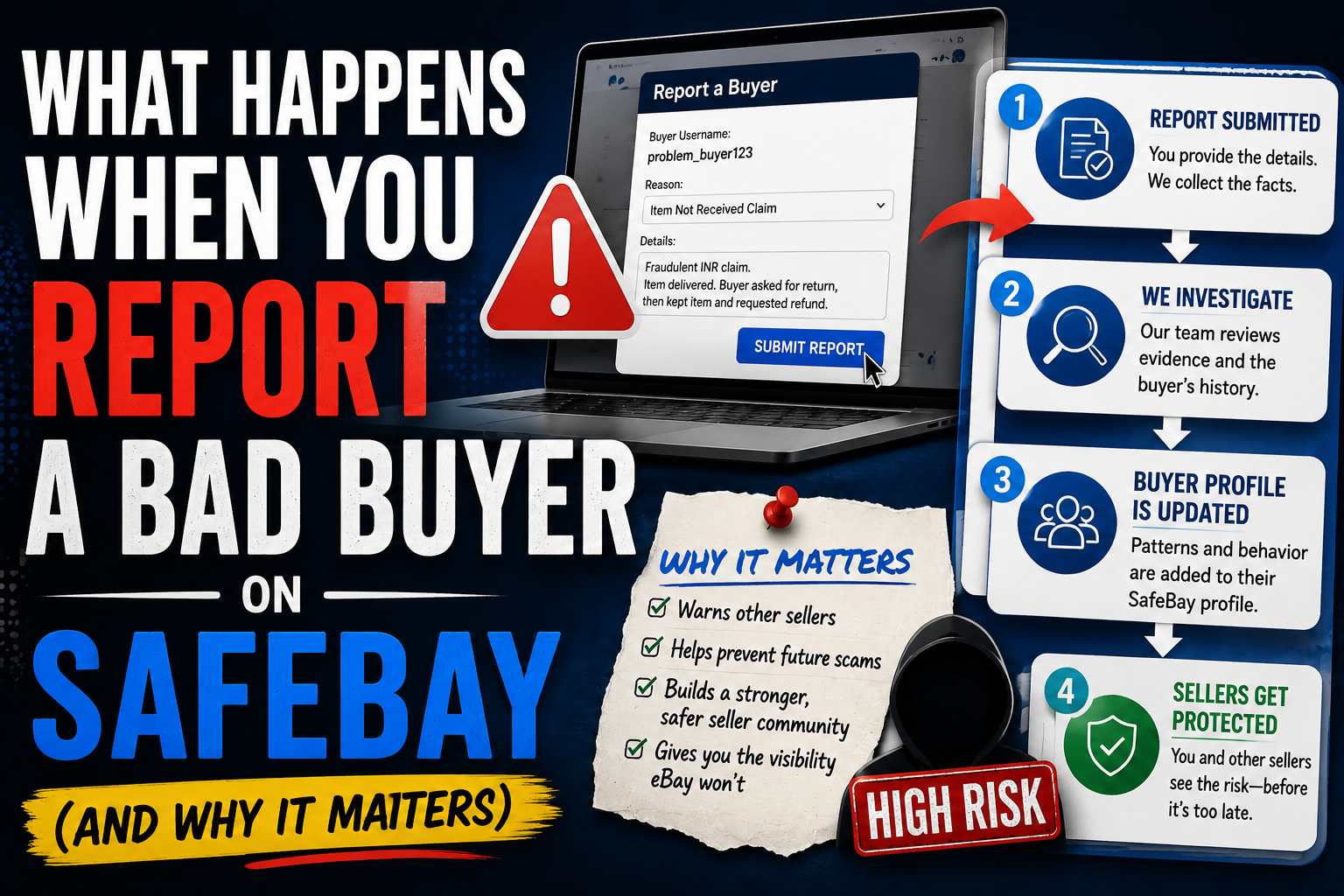
The reporting process is straightforward but thorough. SafeBay balances ease of use with the need for verification to maintain database integrity. Here's exactly what happens when you report a problematic buyer:
Step 1: Initiate the Report
Log into your SafeBay account and navigate to the Buyer Blacklist Manager. Click "Report New Buyer" and enter the buyer's eBay username. The system immediately checks if this buyer has been reported before, showing you any existing flags from other sellers. This preview helps you understand if you're dealing with a first-time issue or a pattern offender.
Step 2: Document the Issue
Select the type of problematic behavior from categories including:
- Return Fraud: Buyer returned wrong/damaged item, returned empty box, or kept item but filed return
- Item Not Received (INR) Fraud: Falsely claimed non-delivery despite tracking confirmation
- Chargeback Fraud: Disputed payment after receiving and keeping item
- Feedback Extortion: Threatened negative feedback to demand discount or free items
- INAD Abuse: Filed false "item not as described" to force return with eBay-paid shipping
- Communication Issues: Harassment, threats, or unreasonable demands
You can select multiple categories if the buyer exhibited several problematic behaviors. Each category helps other sellers understand the specific risk profile.
Step 3: Upload Evidence
This is the most critical step for eBay return fraud prevention. SafeBay requires supporting documentation to verify your report. Upload screenshots of:
- eBay messages showing buyer communication
- Return case details from eBay's Resolution Center
- Photos of returned items (showing wrong items, damage, or empty packages)
- Tracking information and delivery confirmations
- PayPal or credit card chargeback notifications
The platform uses AI to analyze uploaded evidence and flag inconsistencies. Reports without adequate evidence receive lower visibility scores until additional documentation is provided. This verification system protects against false accusations while maintaining the integrity of the eBay buyer blacklist.
Step 4: Add Detailed Notes
Write a concise description of what happened. Focus on facts rather than emotions. For example: "Buyer purchased $200 camera, received it according to tracking, then filed INR claim 3 weeks later. eBay sided with buyer despite delivery confirmation. Buyer has 47 feedback with pattern of similar claims every 2-3 months."
Include dollar amounts, timelines, and eBay case numbers where applicable. These details help other sellers assess risk and help SafeBay's AI identify fraud patterns across the platform.
Step 5: Submit and Monitor
After submitting your report, SafeBay's system processes the information within 24-48 hours. The buyer's profile updates with your report, and their risk score adjusts based on the severity and verification level of your documentation. You'll receive a confirmation email with your report ID for future reference.
What Happens After You Report: The Backend Process
Once you submit a report, several automated and community-driven processes kick in to maximize protection for sellers while maintaining fairness.
Risk Score Calculation
SafeBay's algorithm assigns each buyer a risk score from 1-100 based on multiple factors: number of verified reports, severity of incidents, recency of problems, account age, and feedback patterns. A buyer with one minor issue might score 20 (low risk), while a serial fraudster with multiple verified cases could score 85+ (high risk).
The SafeBay Companion Chrome extension displays these scores with color coding: green for low risk (0-30), yellow for moderate risk (31-60), and red for high risk (61+). This instant visual feedback helps sellers make quick decisions when reviewing offers or suspicious messages.
Pattern Recognition and Cross-Referencing
SafeBay's AI analyzes reports to identify fraud patterns. For example, if multiple sellers report that a buyer always files INR claims exactly 28 days after purchase (right before PayPal's deadline), the system flags this pattern and increases the risk score accordingly.
The platform also cross-references eBay usernames, shipping addresses, and PayPal accounts to identify buyers who create multiple accounts after being flagged. This sophisticated eBay return fraud prevention catches sophisticated fraudsters who think they can game the system by starting fresh with new usernames.
Community Visibility and Alerts
Your report becomes visible to other SafeBay users through several channels. When sellers search the buyer's username in the Blacklist Manager, your report appears with details and evidence. The SafeBay Companion extension shows an alert badge on eBay listings and messages when high-risk buyers interact with sellers.
For sellers who've enabled notifications, SafeBay sends real-time alerts when blacklisted buyers place orders or send messages. This proactive warning system has saved countless sellers from repeat victimization.
Real-World Impact: How Reporting Protects Your Business
The true value of reporting bad buyers on eBay becomes clear when you see the cumulative effect. Consider these scenarios experienced by SafeBay users:
Case Study: A Florida-based electronics seller reported a buyer who filed a false INAD claim, returning a broken substitute item instead of the $450 drone purchased. Within two weeks, three other SafeBay users searched that buyer's username before accepting offers—all three declined transactions after seeing the verified fraud report. The collective loss prevention: approximately $1,800 across four sellers.
This multiplication effect explains why SafeBay has been made by Sellers for Sellers. The platform understands that when you protect fellow sellers through accurate reporting, they protect you in return. It's a mutual defense network that strengthens with every verified report.
Preventing Repeat Victimization
Many problem buyers operate cyclically, targeting the same categories or seller types. A buyer who commits return fraud on designer handbags may systematically work through fashion sellers. By reporting these patterns, you help sellers in your category avoid becoming the next target.
SafeBay's sales heatmaps by state feature also reveals geographic patterns. If multiple sellers report fraud from buyers in specific regions with certain behaviors, the platform highlights these trends, helping you make informed decisions about blocking buyers from high-risk areas.
How SafeBay Works Alongside eBay (Not Against It)
A common question from new users: Does using an eBay seller protection platform like SafeBay violate eBay's policies? The answer is definitively no. SafeBay operates as an independent information-sharing platform, similar to public seller communities on Facebook, Reddit, or other forums.
eBay's terms prohibit discriminatory blocking based on protected characteristics. SafeBay focuses exclusively on documented problematic behaviors—return fraud, false claims, and policy abuse. The platform requires evidence for all reports, ensuring that buyers are flagged for actions, not identities.
Think of SafeBay as a Better Business Bureau for eBay transactions. Just as businesses share information about check fraud or credit card abuse, eBay sellers deserve a mechanism to share verified information about buyer fraud patterns. The platform complements eBay's existing buyer and seller protections rather than conflicting with them.
Maximizing the Value of Your Reports
To make your reports most effective for community protection, follow these best practices:
- Report Quickly: Submit reports within 7 days of the incident while details are fresh and documentation is readily available
- Be Thorough: Upload all relevant evidence—comprehensive reports receive higher visibility and verification scores
- Use Specific Details: Include case numbers, dollar amounts, and timelines to help other sellers assess risk accurately
- Update Reports: If eBay later reverses a decision or the buyer escalates behavior, update your report with new information
- Focus on Facts: Emotional language reduces report credibility—stick to documented events and verified information
Remember that your report contributes to a database used by thousands of sellers. The more precise and verifiable your documentation, the more protection you provide to the community.
Conclusion: Your Report Protects the Entire Seller Community
Understanding what happens when you report bad buyers on eBay through SafeBay reveals why this tool has become essential for experienced sellers. Your report doesn't just document a single bad transaction—it builds a protective shield around the entire seller community, identifying patterns, preventing repeat fraud, and giving sellers the information they need to make informed decisions.
The eBay buyer blacklist works because sellers like you take five minutes to document and report problematic experiences. Those five minutes multiply across thousands of users, creating a comprehensive fraud prevention system that traditional eBay seller protection can't provide alone.
SafeBay's free tier includes generous reporting credits, making it accessible for sellers of all sizes. The platform's AI auto-replies, auto-relist features, and sales analytics complement the Buyer Blacklist Manager, creating a comprehensive toolkit for running your eBay store smarter.
Ready to protect your business and help fellow sellers? Visit SafeBay to create your free account and install the SafeBay Companion Chrome extension. Your next report could save a fellow seller from the same frustrating experience you endured. Together, we stop bad buyers and build a safer marketplace for legitimate eBay businesses.