Why eBay's Block List Is Not Enough
Every eBay seller knows the frustration: a buyer files a bogus "Item Not Received" claim, gets a full refund, and walks away with your product. You add them to your eBay block list, breathe a sigh of relief — and then that same buyer moves on to the next seller and pulls the exact same scam.
That is the fundamental problem with eBay's built-in block list. It only protects you. Your hard-earned knowledge about a fraudulent buyer dies with your account. The seller down the street, the competitor across the country, the new seller who just listed their first item — none of them have any idea that this buyer is a known scammer.
eBay's system has three critical blind spots:
- Block lists are completely isolated. When you block a buyer, that information stays locked inside your account. No other seller benefits from your experience.
- Sellers cannot leave negative feedback for buyers. Since 2008, eBay removed the ability for sellers to leave negative feedback. This means repeat offenders have spotless profiles despite scamming dozens of sellers.
- There is no shared intelligence. Every seller has to learn the hard way — by losing money — that a particular buyer is problematic. There is no way to warn other sellers or check a buyer's history across the platform.
This is exactly the gap SafeBay's Community Blacklist was built to fill.
What Is the SafeBay Community Blacklist?
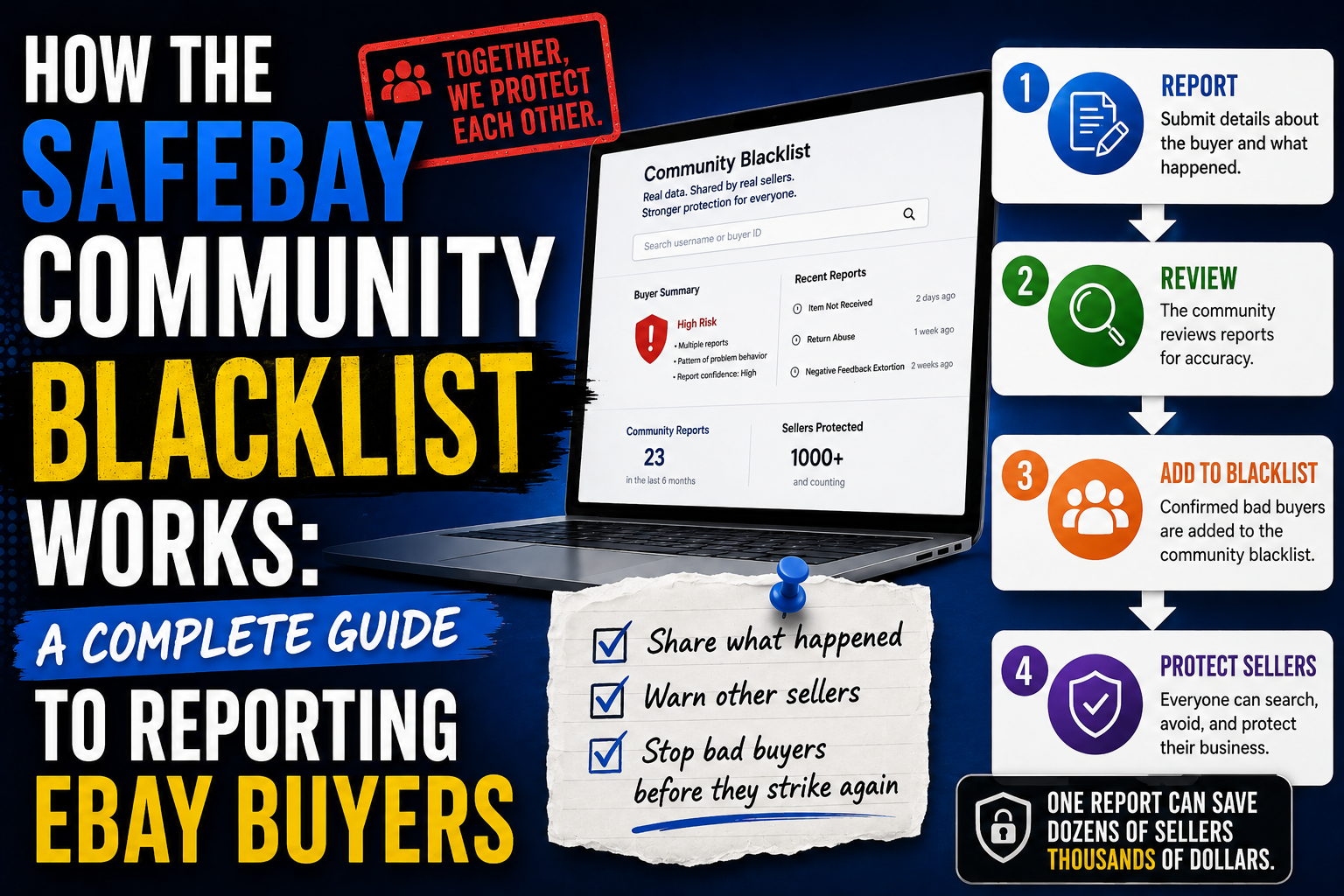
The SafeBay Community Blacklist is a shared, seller-driven database of problematic eBay buyers. When one seller reports a buyer, every connected seller gets protected — instantly.
Think of it as a neighborhood watch for eBay sellers. Instead of each seller operating in isolation, the community pools its knowledge so that a scammer reported by one seller is flagged for all sellers.
Here is how it works at a high level:
- A seller files a report against a problematic buyer on SafeBay, describing what happened and selecting the relevant issue tags.
- SafeBay's AI analyzes the report and assigns a danger level (Low, Medium, or High) based on the description, selected tags, and historical patterns.
- SafeBay moderators review the report to ensure accuracy and fairness before it goes public.
- Once approved, the report goes live. The buyer appears in the community blacklist, and all connected sellers are notified through the Chrome extension and email alerts.
The result? A buyer who scams one seller gets flagged across the entire SafeBay network. No more isolated block lists. No more learning the hard way.
How Sellers Get Notified
Reporting a buyer is only half the equation. The real power of the community blacklist is in how it delivers warnings to sellers before they ship an order.
The SafeBay Chrome Extension
The SafeBay Chrome Extension is the front line of defense. Once installed, it works silently in the background while you manage your eBay orders. Here is what it does:
- Real-time alerts on order pages. When you open an eBay order and the buyer is in the community blacklist, the extension displays a warning badge directly on the page — before you pack or ship anything.
- Risk level indicators. Each flagged buyer shows their danger level (Low, Medium, or High), so you can gauge the severity at a glance.
- One-click access to the full report. Click the warning to see the complete case history: what happened, when it was reported, what type of scam was involved, and any evidence the reporting seller attached.
Email Notifications
Not always at your computer? SafeBay also sends email alerts when a buyer in your recent orders gets added to the blacklist. This way, even if you haven't opened eBay in a few days, you'll know about a flagged buyer before it's too late.
Automatic Block List Sync
The Chrome extension can also sync the community blacklist directly to your eBay block list. Buyers flagged as High risk can be automatically added to your eBay block list, preventing them from purchasing your items entirely — no manual work required.
How to Report an eBay Buyer on SafeBay
Filing a report is straightforward and takes just a few minutes. Here is a step-by-step guide to walk you through the process.
Step 1: Go to the Report Page
Navigate to safebay.store/buyers/report. You can also get there from the main navigation or by clicking "Report a Buyer" on the eBay Buyer Blacklist page.
Step 2: Enter the Buyer's eBay Username
In the Buyer Username field, type the exact eBay username of the buyer you want to report. Double-check the spelling — this is how the buyer will be identified across the entire SafeBay network. You can find the username in your eBay order details or message history.
Step 3: Select Issue Tags
Choose all tags that apply to the buyer's behavior. The available tags include:
- Return Abuse — buyer exploits the return system (e.g., swapping items, returning used goods as "defective")
- Item Not Received Claims — buyer falsely claims a delivered package never arrived
- Chargeback Fraud — buyer files a chargeback after receiving the item
- Non-Payment — buyer wins an auction or commits to buy but never pays
- Abusive Behavior — buyer sends threatening or harassing messages
- Bid Manipulation — buyer uses shilling or shill bidding tactics
- Multiple Accounts — buyer operates several accounts to circumvent blocks
- Suspicious Activity — unusual patterns like bulk purchases with immediate return requests
- Communication Issues — buyer is unresponsive, makes unreasonable demands
- Policy Violations — any other violations of eBay policies
- Frequent Returns — buyer has a pattern of excessive returns across sellers
- Other — anything else that doesn't fit the categories above
You can select multiple tags. The more accurate your tagging, the better SafeBay's AI can assess the severity of the case.
Step 4: Write a Detailed Comment
This is the most important part of your report. In the Detailed Comment field (up to 2,000 characters), describe exactly what happened. A strong report includes:
- What the buyer purchased — item name, listing number if you have it
- What went wrong — the specific scam or problematic behavior
- Timeline — when the purchase happened, when the issue started
- eBay's response — did you open a case? What was the outcome?
- Financial impact — how much money did you lose?
Example of a good comment:
"Buyer purchased a brand-new iPhone 17 Pro Max ($1,199) on April 5. Delivered on April 8. On April 11, buyer opened a return request selecting 'Doesn't work or defective.' I accepted the return. When the package arrived back on April 18, it contained a cracked iPhone 11 with a shattered screen — not the item I shipped. I weighed the return package on camera (180g vs the original 240g). Filed a report with eBay but they closed it in the buyer's favor because a return was 'completed.' Total loss: $1,199 plus return shipping. This buyer has done this before based on other SafeBay reports."
Step 5: Add Buyer's Contact Information (Optional)
If you have any of the buyer's personal details — full name, email address, phone number, or shipping address — you can add them here. This information helps SafeBay identify buyers who operate multiple eBay accounts to evade blocks. It is stored securely and helps the algorithm detect fraudulent buyers by their physical addresses and other signals, even if they create a new account.
Step 6: Upload Evidence (Optional but Recommended)
Strong evidence makes your report more credible and helps moderators approve it faster. You can upload up to 20 images (JPEG, PNG, WebP, or HEIC format, 5MB each). Good evidence includes:
- Screenshots of eBay messages with the buyer
- Tracking information showing delivery confirmation
- Photos of the item before shipping (proving condition)
- Screenshots of the eBay case or resolution
- PayPal or payment dispute screenshots
Step 7: Submit Your Report
Click "Submit Report" to send your report for review. If you only want to block the buyer for your own account without filing a public report, you can check the "Block only for me" option instead.
What Happens After You Submit
Once you hit submit, your report goes through a multi-step review process designed to be both fast and fair.
AI Assessment
SafeBay's AI immediately analyzes your report and assigns a preliminary danger level:
- Low — minor issues such as late payment, poor communication, or a one-time misunderstanding. These buyers may not be intentionally malicious.
- Medium — patterns of problematic behavior such as multiple return abuse incidents, repeated complaints from different sellers, or borderline fraudulent activity.
- High — serious fraud including chargeback abuse, "Item Not Received" scams with confirmed delivery, threats, or identity-related violations. These buyers pose a significant financial risk.
The AI considers your written description, the issue tags you selected, and any patterns it detects from existing reports against the same buyer. If multiple sellers have reported the same username, the danger level may be elevated automatically.
Moderator Review
Every report is reviewed by a SafeBay moderator before it becomes public. Moderators check for:
- Accuracy — does the report contain enough detail to be actionable?
- Fairness — is the report about genuine problematic behavior, not a personal dispute?
- Evidence quality — does the attached evidence support the claims?
- Reporter credibility — the reporting seller's store reputation, including sales count, account age, and feedback history, is factored into the review.
- Duplicate detection — has this buyer already been reported? If so, the new report strengthens the existing case.
Moderators may adjust the AI-assigned danger level based on their assessment. This human-in-the-loop approach ensures that no buyer is unfairly blacklisted.
Report Goes Live
Once approved, the report becomes part of the public community blacklist. Here is what happens automatically:
- The buyer's profile appears in the Reported Buyers directory with their danger level, report count, and case details.
- All SafeBay sellers with the Chrome extension installed receive an update — the buyer is now flagged in their system.
- Sellers who have pending orders from this buyer get an immediate notification.
- The buyer is added to the auto-block queue for sellers who have enabled automatic blocking for that danger level.
What Other Sellers Can See
Transparency is key to the community blacklist's effectiveness. When a seller encounters a flagged buyer, they can view:
- Danger level — the current risk assessment (Low, Medium, or High)
- Report history — how many sellers have reported this buyer and when
- Case details — a summary of each incident, including scam type and description
- Issue tags — the categories of problematic behavior associated with the buyer
- Evidence — any screenshots or documentation attached by reporting sellers
This gives sellers the full picture, not just a red flag, but the story behind it. You can make an informed decision about whether to ship an order, require additional verification, or cancel the transaction entirely.
Privacy and Fairness
The community blacklist is built on trust, and SafeBay takes both seller privacy and buyer fairness seriously.
- Reporter identity is protected. Your personal information is never shared with the reported buyer or publicly displayed.
- Every report is moderated. No report goes live without human review. This prevents abuse of the system — you cannot blacklist a buyer over a simple disagreement.
- Buyers can dispute reports. If a buyer believes they were reported unfairly, they can contact SafeBay to request a review.
- Data is stored securely. All submitted information is encrypted and used solely for buyer risk assessment within the SafeBay community.
Getting Started
Joining the SafeBay community blacklist takes less than five minutes:
- Create a free SafeBay account at safebay.store.
- Install the Chrome extension to get real-time buyer alerts on your eBay order pages.
- Report your first buyer at safebay.store/buyers/report — it takes just a few minutes.
Every report you file makes the entire network stronger. One seller's warning becomes every seller's shield. Stop letting scam buyers operate in the shadows — join SafeBay and start protecting yourself and the seller community today.