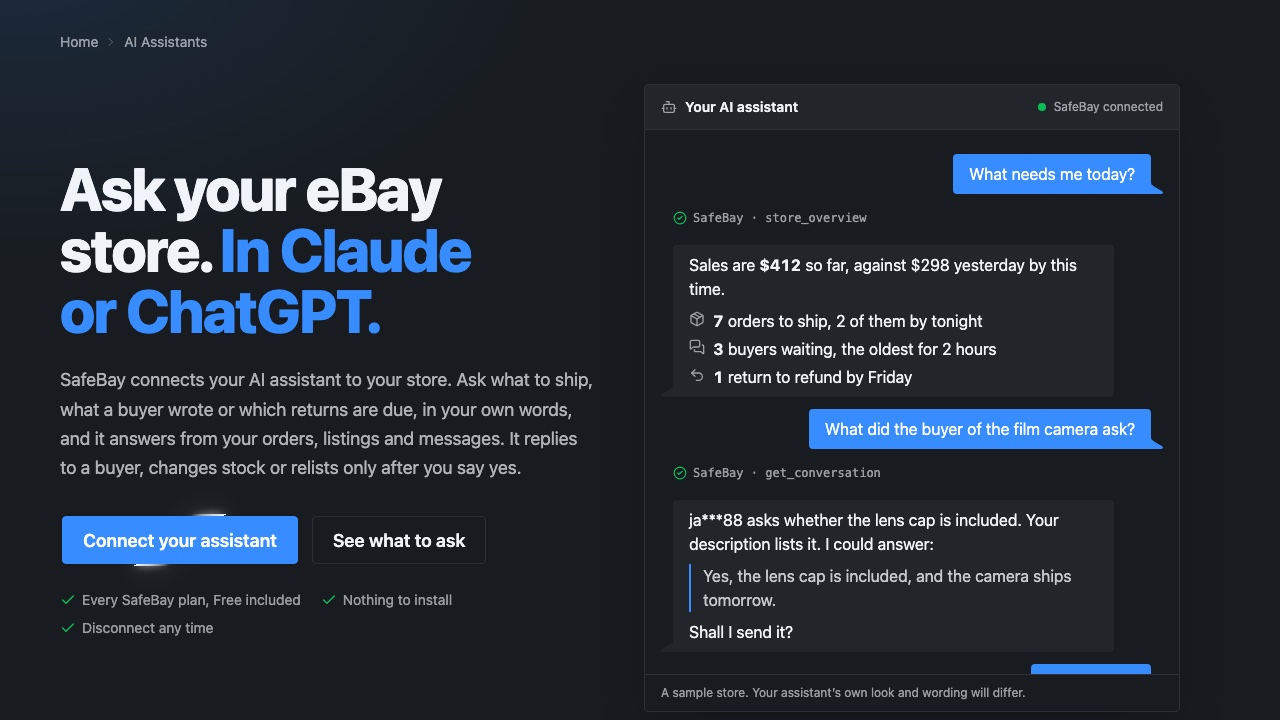
Most sellers already use an AI assistant for something: a listing description, a hard reply, a question about eBay's rules. Until now it knew nothing about your own store, so every answer started with you copying in an order or a message. SafeBay now connects Claude, ChatGPT and other assistants to your eBay store. You ask in your own words, and the assistant answers from your orders, listings, buyer messages and returns.
Key Takeaways
- SafeBay has an MCP server at
https://safebay.store/mcp. MCP is the open standard assistants use to connect to outside tools. - Once connected, the assistant can read your sales today, orders, listings, buyer conversations, a buyer's record, returns, cases and your seller level.
- Three things change your store: a reply to a buyer, a stock change and a relist. The assistant shows you each one and waits for your yes.
- You sign in and approve the assistant on SafeBay's own screen. It never sees your password, your eBay sign-in or a card, and Disconnect in your profile ends its access at once.
- It works on every SafeBay plan, Free included. You need a SafeBay account with your eBay store connected.
What it does
An assistant connected to SafeBay works like a colleague who can look things up in your store. It doesn't need commands or a particular wording. A few things sellers ask:
- "What needs me today?" Sales against yesterday at the same time, orders to ship and the oldest one, buyers waiting for an answer, feedback to answer, returns and cases due.
- "What do I still have to ship, oldest first?" The packing list, with SKUs and ship-by dates.
- "Which buyers are waiting for an answer?" Each conversation with the item it is about and, if the buyer bought it, their order. Reading marks nothing as read.
- "Has this buyer been reported?" Reports from other sellers on SafeBay's community blacklist, with the reasons, plus your own block or note and their orders with you.
- "Which returns do I have to refund this week?" Returns and cases from eBay's resolution center with their deadlines and the buyer's reason.
- "Am I still Top Rated?" Your eBay seller level and the metrics behind it.
Because the assistant reads the data itself, you can follow up the way you would with a person: "Draft an answer to that buyer", "Which of those orders came from a repeat buyer?", "Write me a summary of the week".
What waits for your yes
Three tools change something in your store, and each one waits for you:
- Reply to a buyer. The assistant shows you the exact message first. It goes out on eBay as you and can't be taken back.
- Change the stock of a live listing, on eBay at once. Zero keeps the listing as out of stock, and SafeBay refuses it when your eBay settings would end the listing instead.
- Relist a listing the way your Auto-Relist does: a new item number, back at the top of eBay's newest listings. eBay may charge its insertion fee.
SafeBay marks these three as tools that change things, so assistants that ask before using such tools ask you, and it tells the assistant to show you the exact message or change before it runs one. Everything else is read-only.
How to connect Claude
- In Claude, open Settings, then Connectors, and press Add custom connector.
- Name it SafeBay and enter
https://safebay.store/mcp. - Press Connect. Claude opens SafeBay's sign-in. Sign in and approve the connection.
- In a chat, ask "What needs me today?"
The connector then works in Claude on the web, the desktop app and the phone apps. Anthropic's help center explains custom connectors in more detail. In Claude Code, run claude mcp add --transport http safebay https://safebay.store/mcp, then /mcp to sign in.
How to connect ChatGPT
- In ChatGPT, open Settings, then Apps & Connectors, then Advanced, and turn on Developer mode.
- Create a connector: name it SafeBay, enter
https://safebay.store/mcpand choose OAuth. - Sign in to SafeBay and approve.
- In a new chat, switch SafeBay on in the tools menu and ask about your store.
Developer mode needs a paid ChatGPT plan. On Business and Enterprise workspaces, an admin may have to allow custom connectors first.
Other assistants
Perplexity, Gemini, Le Chat and Microsoft Copilot Studio can add remote MCP servers too, each under its own name: a custom connector, a custom app or an MCP tool. Enter the same address and choose OAuth where it asks. If your assistant is refused at the sign-in step, write to support@safebay.store with its name and we'll add it.
What the assistant can see, and who else does
- Your store only. It sees what you see in SafeBay's phone app: your orders, listings and messages, never another seller's.
- No password shared. You sign in to SafeBay, not to eBay. The approval screen names the assistant and the site you go back to, so approve only an assistant you just added.
- Keys that expire. The assistant's key lasts an hour and renews while you use it. Left unused for 60 days, it stops working.
- One press to stop. Profile, Integrations, AI assistants: Disconnect ends its access at once.
What the assistant reads goes to the company that runs it, such as Anthropic for Claude or OpenAI for ChatGPT, under their terms. SafeBay sends them nothing by itself, only the answers to what the assistant asks for. Our privacy policy lists every service that receives data.
Get started
The AI Assistants page has the address, the steps for each assistant and a list of questions to copy. If you don't have a SafeBay account yet, create one for free and connect your eBay store first. If you'd rather have the AI write your listings, that's AI Listings.