Handling time on eBay is the number of business days you commit to between the moment an order is ready to ship and the moment the carrier scans the package. It is counted in business days, it is satisfied by a carrier scan rather than a printed label, and it feeds directly into the delivery estimate your buyer sees. This guide explains how the deadline is calculated, how to choose a realistic setting, how to change it in bulk, and what happens when you miss it.
What handling time means, and what it does not
Three terms are often mixed up, and the confusion causes most late-shipment disputes.
- Handling time is the seller's window to prepare the item and hand it to the carrier.
- Shipping time (transit time) is how long the carrier takes to move the package to the buyer, and it depends on the service the buyer selected.
- Delivery time is the sum of the two, which eBay presents to the buyer as an estimated delivery date.
According to eBay's shipping guidance, the handling clock begins when the order status appears as Awaiting Shipment in Seller Hub or Ready to Ship in My eBay. The same page states that the clock is satisfied only by an acceptance scan from the carrier, not simply by buying or printing a shipping label. A label sitting on a box on your packing table therefore does nothing for you. A box that has been dropped at the post office counter and scanned, or picked up and scanned, does.
The practical consequence is that your real deadline is not the end of your workday but the last carrier scan opportunity on the ship-by day. If your local carrier pickup happens at 3 p.m., or the counter closes at 5 p.m., those hours define the true handling window.
How eBay calculates the ship-by date
Handling time is counted in business days, so weekends and holidays are excluded. eBay's handling guidance for sellers gives a concrete example for one-day handling: a payment received on Friday, Saturday or Sunday is due to ship by midnight Pacific time on Monday, and if Monday is a holiday, the deadline moves to before midnight Pacific on Tuesday.
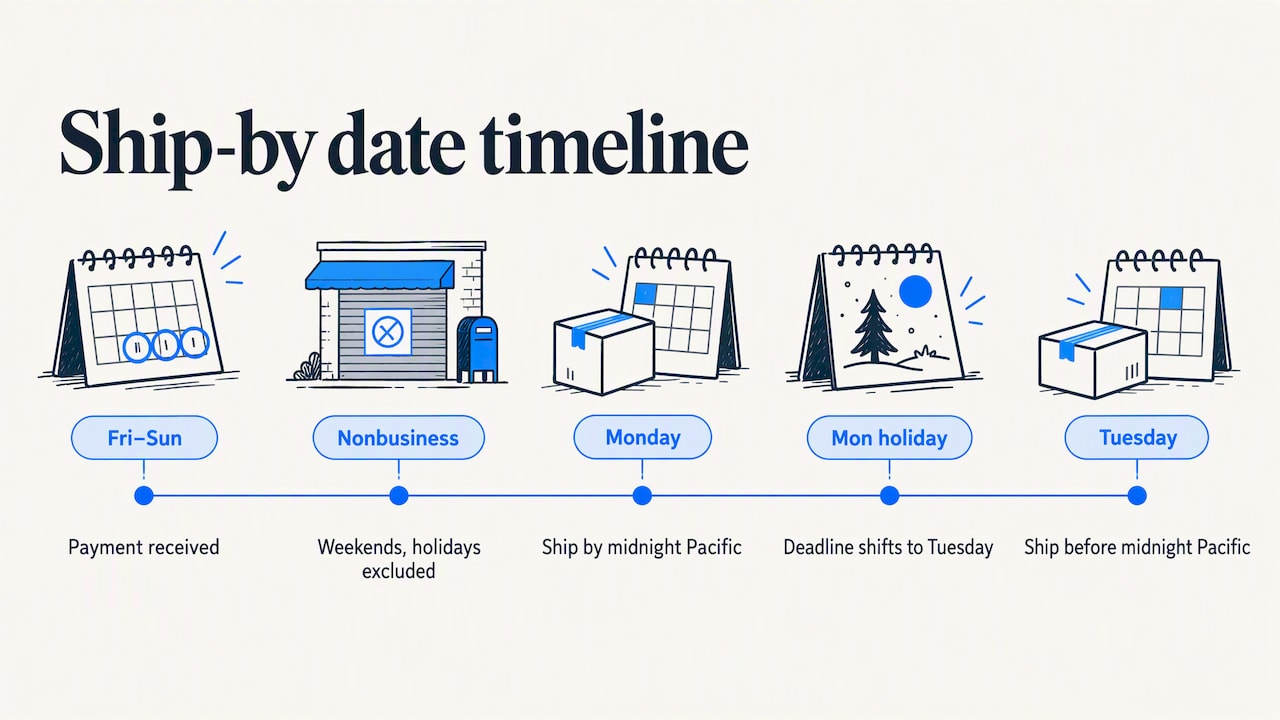
This explains a frequent complaint in seller forums: an item sells on a Saturday with one-day handling and the ship-by note shows a date later than the seller expected. The count does not start on Saturday, because Saturday is not a business day. It starts on the next business day, and one day of handling then ends at the close of that day.
A worked example
Assume you set two-day handling and an order is paid on a Thursday, with no holidays that week.
| Payment received | Handling time | Counted business days | Ship-by (carrier scan) |
|---|---|---|---|
| Monday | 1 day | Tuesday | End of Tuesday |
| Thursday | 1 day | Friday | End of Friday |
| Thursday | 2 days | Friday, Monday | End of Monday |
| Saturday | 1 day | Monday | End of Monday |
| Saturday before a Monday holiday | 1 day | Tuesday | End of Tuesday |
The table follows the logic of the example above and is meant for planning. The ship-by date shown in your order is always the authoritative figure, so confirm it there. If the date on your screen differs from your own calculation, check whether a holiday or an order cut-off time is involved before assuming an error.
Cut-off times
The same eBay page notes that sellers can specify an order cut-off time in their shipping preferences, and that doing so helps provide more accurate delivery estimates. A cut-off time says, in effect, that orders paid after a certain hour are treated as received the next business day. For a seller who packs in the morning and ships at midday, this is a more honest way to run a one-day promise than quietly hoping evening orders will be handled in time.
How long should your handling time be?
There is no universal correct number, but there is a correct method: set the shortest time you can meet on your worst normal day, not your best one. eBay's own advice is that buyers prefer shorter handling times, with a day or less being best, and that sellers should select a time they can meet consistently.
The trade-offs look like this.
| Setting | Advantage | Risk |
|---|---|---|
| Same day | Strongest signal to buyers; suits items that can be packed and shipped the day they are received | Requires a firm cut-off time and a reliable daily carrier scan |
| 1 business day | Competitive and manageable for most small operations | Little room for a sick day, a stock miss or a missed pickup |
| 2 business days | Realistic for sellers who also work a day job or source items to order | Weaker in search comparisons against faster listings |
| 3 or more days | Suits made-to-order, heavy or consolidated goods | Buyers may skip the listing; the delay needs to be justified in the description |
One measurable benefit of speed is documented by eBay. According to its handling page, offering one-day or same-day handling can help a seller earn a 5-star rating for shipping time, provided tracking shows the shipment arrives within four business days. Handling time is therefore not just a promise, it also feeds how buyers rate you afterward.
Matching the setting to your actual workflow
Before shortening your handling time, audit the steps between payment and scan.
- How soon do you see the order? Notifications on a phone help, but only if someone acts on them.
- Is the item in stock and findable? Misplaced stock is the quiet cause of many late shipments, particularly for sellers with parts, accessories or mixed lots.
- How long do packing and labeling take at your busiest volume?
- When is the last carrier pickup or counter drop-off, and does it include a scan?
- What happens when you are away for a day or two?
eBay recommends that sellers check carrier pickup and business hours so the package is scanned within the stated time. If the audit shows that you regularly ship on day two, set two days. A realistic two-day listing outperforms an optimistic one-day listing that produces late marks.
How to change handling time on one or many listings
Changing the setting on a single listing is done from the listing's edit page, in the shipping section. For more than a handful, Bulk edit is the efficient route.
- In Seller Hub or My eBay, open your active listings.
- Select the listings you want to change.
- Choose Edit, then Bulk edit.
- Change the handling time field in the spreadsheet-style editor.
- Submit all revisions.
This follows eBay's editing guidance, which describes selecting listings, changing available fields in the bulk editor and submitting the revisions, and which mentions revising up to 500 listings at a time. The same handling guidance says same-day handling can be added when listing, relisting or revising, including through the bulk edit and relist tool.
A few precautions apply when you edit many listings at once.
- Change a small test group first and confirm the new handling time shows correctly on the live listing.
- Group listings by what actually ships fast. Items stored in your garage and items drop-shipped from a supplier rarely share a realistic handling time.
- Keep a record of the previous values so that you can revert quickly.
- If you use a separate tool for listing creation or relisting, check that it does not overwrite your handling time. Our article on choosing a bulk listing tool without losing control covers this risk in more detail.
What happens when you ship late
Ebay judges lateness from data, not from your recollection. Under eBay's seller standards policy, a shipment is considered late if there is no carrier scan within the stated handling time and the final delivery is made after the estimated delivery date. Performance is measured through tracking data, and when tracking is unavailable, eBay relies on buyer feedback to decide whether the item arrived on time.
The two conditions matter. A package scanned a day after the deadline but delivered before the estimated date is not automatically a late shipment under that wording. Conversely, a package scanned on time but delivered after the estimate because of a carrier delay is a different case, and it is one reason the removal rules exist.
The consequence also needs to be put in proportion. On the US seller standards page, eBay states that a high late shipment rate on its own will not cause an account to be evaluated as Below Standard, but a low rate is required for Top Rated status. The seller level is calculated on the 20th of each month from recent transactions, so a bad week is diluted over the evaluation period rather than being judged in isolation. For the thresholds and arithmetic, see our guide to the late shipment rate on eBay.
Automatic removals and appeals
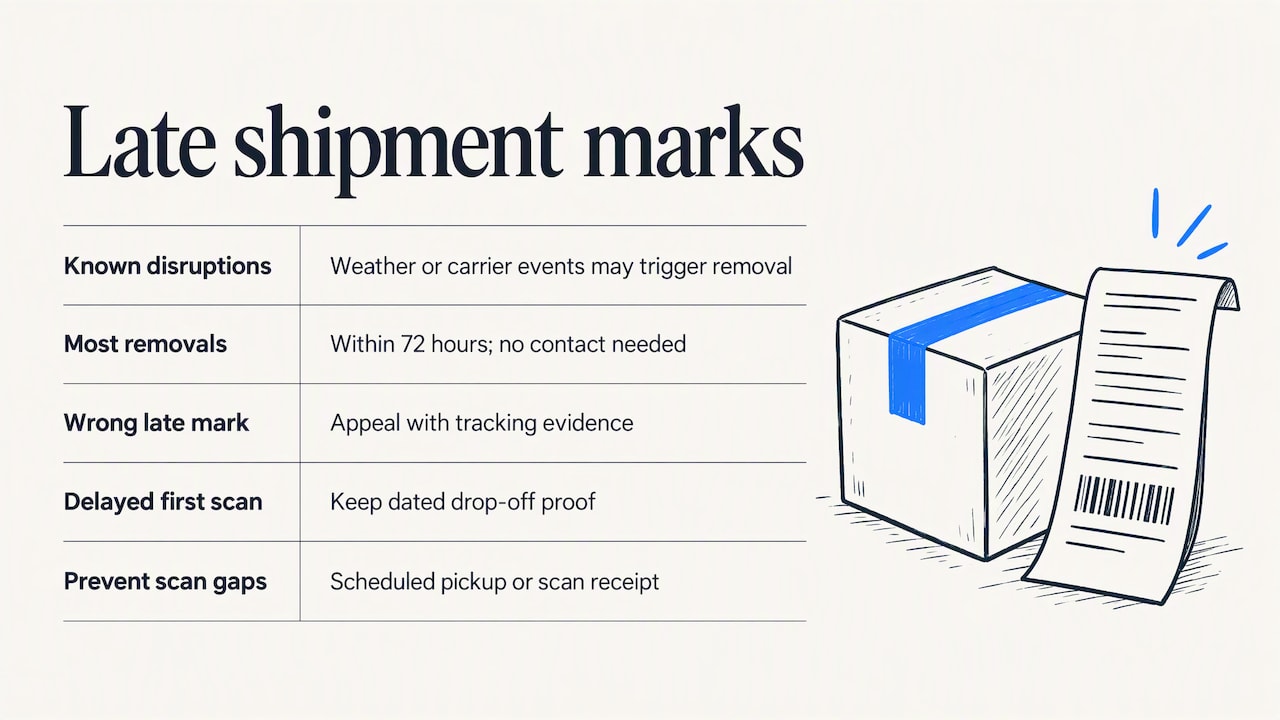
Sellers are not always penalized for delays outside their control. eBay states that it automatically removes late shipment marks in specific scenarios, such as widespread weather events or carrier disruptions that are known to have occurred, and that most automatic removals are completed within 72 hours without the seller contacting anyone. EcommerceBytes reported in 2025 that eBay monitors external disruptions such as weather and may adjust delivery windows proactively to protect sellers.
If a late mark remains that you believe is wrong, for example because your tracking shows an on-time acceptance scan, use the appeal route described on eBay's defect removal page, and attach the tracking evidence. When you are deciding how much of your volume to ship rather than hand over locally, the trade-offs in this comparison of shipping and local pickup are worth reading, since local pickup sales sit outside the carrier-scan problem entirely.
A frequently reported dispute concerns first-mile scans: a seller with one-day handling hands the package to USPS in time, but the first scan is recorded later, and the system treats the shipment as late. The defensible response is to keep dated proof of drop-off, such as a receipt, a pickup confirmation or a photo, and to appeal with it. Sellers also reduce this risk by using the carrier's scheduled pickup, or a counter drop-off with a scan receipt, instead of leaving packages in a mailbox.
When the ship-by date looks wrong
Sometimes the date on a sold order does not match what you set. Work through these checks before contacting anyone.
- Count business days from the right starting point. Weekends and holidays are skipped, and the start is the payment, not necessarily the order's creation.
- Check for a cut-off time. An order placed after your cut-off is treated as received the next business day, as described above.
- Look at the listing's revision history. If you edited handling time after the sale, the sold order keeps the value that applied when the buyer purchased.
- Check for multi-item orders. Items from different listings with different handling times can combine into one order, and the longest or earliest applicable date matters for how you ship.
Do not change the handling time on a sold item to give yourself more room. One industry summary notes that this is strongly discouraged because it violates the buyer agreement, and that where it cannot be avoided, the seller should contact the buyer immediately and obtain consent. The cleaner approach is to message the buyer early, explain the delay and offer a choice between waiting and cancelling. This is especially relevant for orders that look suspicious: before you rush a shipment, our list of buyer red flags to check before you ship can save you from sending goods to a buyer likely to file a false claim.
Our perspective on handling time
We build tools for eBay sellers, and the pattern we see in seller discussions is consistent: handling time is treated as a marketing number when it is really an operational commitment. A seller who shortens it to win search placement and then ships late gains a worse outcome than one who set an honest two days and met it every time.
We would add one point that is less often discussed. Speed matters most on the orders that deserve it. Rushing every shipment to protect a metric increases the chance that a problematic buyer receives goods before anyone has looked at their history. A buyer with a pattern of claims or returns is not owed the fastest dispatch, and a short pause to check the account is compatible with your handling time if you have planned for it. Handling time and risk review belong in the same workflow, ideally one that takes minutes, not hours.
Finally, we recommend that sellers separate the question of what is fast from what is reliable. Use the shortest handling time that your slowest ordinary day can support, keep a cut-off time that reflects how you actually work, and keep tracking proof for every shipment. Those three habits protect the metric far more than any single setting does.
— Mykola
Checking buyers before the clock runs out
The handling window is short, so any risk check has to fit inside it. SafeBay is a toolkit for eBay sellers that includes a community-reviewed buyer blacklist, real-time buyer risk alerts and syncing to eBay's Blocked Buyers list through a free Chrome extension, together with AI listing tools and auto-relisting. The Free plan costs $0 per month, Basic costs $9.95 per month and Pro costs $59.95 per month, and you can see the current plan details on the SafeBay plans page.
If you want a quick look at a specific account before you ship, you can check an eBay buyer's status, or read how the SafeBay buyer blacklist separates private and public blocks and keeps the reasons and dates for each report.
Practical habits that keep you on time
- Schedule carrier pickup for a fixed time each day, and plan packing to finish before it.
- Set a cut-off time in shipping preferences that matches your real packing schedule.
- Use handling time that varies by item type, rather than one number for the whole store.
- Keep proof of acceptance: scan receipts, pickup confirmations or dated photos.
- Plan for absences by raising handling time on affected listings before you travel, not after orders arrive.
- Review the late shipment rate monthly, since seller level is evaluated on the 20th.
- Watch for fraud pressure: buyers who demand unusually fast shipping or a changed address deserve a second look. Our guides to return fraud on eBay and what seller protection covers explain where a fast shipment does and does not protect you.
Sellers can also reduce exposure upstream by limiting who can buy. The article on eBay buyer requirements describes how to set them and where they stop being effective.
FAQ
Does eBay handling time include weekends?
No. Handling time is counted in business days, so weekends and holidays are excluded. A one-day handling order paid on a Saturday is due by the end of the following business day, which is normally Monday, or Tuesday if Monday is a holiday.
Does printing a shipping label meet the handling time?
No. According to eBay, the commitment is satisfied by the carrier's acceptance scan, not by buying or printing a label. Hand the package over for a scan, and keep a receipt or pickup confirmation in case a dispute arises.
What is the best handling time to set?
The best setting is the shortest one you can meet every time. eBay says buyers prefer a day or less, and one-day or same-day handling can help earn a 5-star shipping time rating when delivery arrives within four business days, but a missed promise costs more than a longer honest one.
Can I change handling time on an item that has already sold?
It is strongly discouraged, because it conflicts with the agreement the buyer accepted at purchase. If you cannot ship in time, contact the buyer straight away, explain the delay and obtain their consent to the new date or offer to cancel.
Will one late shipment ruin my seller level?
Unlikely. eBay measures late shipments from tracking data, removes some automatically after events such as severe weather or carrier disruption, and states that a high late shipment rate alone does not produce a Below Standard evaluation. It can, however, affect Top Rated status.
Sources
- Shipping | Seller Centre (eBay)
- Top rated handling | eBay Seller Center
- Editing tips and tools | eBay Seller Center
- Seller standards policy | eBay Australia
- Seller standards policy | eBay US
- Appeal a defect or late shipment | eBay
- eBay Vows to Protect Sellers from Shipping Delays | EcommerceBytes
- Mastering eBay Shipping: A Deep Dive into Handling Time
- Shipping vs. Local Pickup for Marketplace Sellers