A workable eBay pricing strategy has four parts: price from what comparable items actually sold for, choose the listing format that fits the item, calculate your margin after fees and shipping before you publish, and review the listing on a schedule instead of reacting to every slow week. This guide walks through each part in that order, adds a section on appliance parts, where compatibility changes how you should price, and closes with the questions sellers ask most often.
Why pricing on eBay is harder than it looks
On a fixed retail site you set a price and the market either accepts it or it does not. On eBay the same item is listed by many sellers, in different conditions, with different shipping terms, and buyers compare all of it at once. Price is therefore read together with condition, photos, delivery cost and seller reputation. eBay's own seller guide notes that buyers look for a great price and also consider shipping cost as they shop, which means a low item price with high postage can look worse than a slightly higher price with free delivery.
The practical consequence is that no single number is "the" market price. What you can establish is a range, a floor below which you lose money, and a target within the range that matches how quickly you want to sell. The rest of this article is about finding each of those.
Step 1: Research sold comparables
eBay's pricing guidance for sellers starts with the same instruction: search for similar items and check completed listings, using the Sold listings filter, to see what comparable items actually sold for. The reasoning is straightforward. An active listing at $80 tells you nothing about whether anyone will pay $80. A sold listing at $62 tells you someone did.
When you review comparables, apply some discipline:
- Match the item precisely. Model number, size, color, set completeness and included accessories all move the price. Compare like with like or discard the result.
- Match condition. A new-in-box listing and a used, untested one are different products to a buyer.
- Look at the spread. Take the middle of the recent sales, not the single highest one. One outlier often reflects a bidding war or a mislabeled listing.
- Note the format and shipping terms. An auction that closed at a low price with high postage is a different data point than a fixed-price sale with free shipping.
- Check recency. Prices for seasonal or trending items can shift within weeks, so favor the most recent sales.
If you sell in volume, eBay's Seller Hub also offers a built-in research tool with a longer sales history than the standard completed-listings view, which helps separate a temporary spike from steady demand. For a single item the sold filter is usually enough.
Before you source new stock, it is also worth measuring how often a product sells at all. Our guide to sell-through rate for eBay sellers explains how to check that before you buy, because a good sold price on an item that sells twice a year is a poor basis for a purchase.
Step 2: Build your floor price before you look at competitors
Market research tells you what buyers will pay. It does not tell you whether you can afford to sell at that price. Calculate a floor first, then see whether the market clears above it.
Your floor should include:
- Item cost, including what you paid for sourcing, repair or cleaning.
- eBay fees, which are charged on the total amount of the sale and vary by category, so read the fee page for your category rather than relying on a general figure.
- Shipping cost, either what you charge or what you absorb if you offer free shipping, plus packaging.
- Promotion and advertising costs, if you use promoted listings.
- A returns allowance, a small percentage of revenue set aside for refunds, return shipping and items that come back damaged.
A short worked example shows why this matters. Suppose you buy a used item for $20, pack and ship it for $7, and expect fees and a returns allowance to total roughly a fifth of the sale price. At a sale price of $45 you keep about $45 minus $9 for fees and allowance, minus $27 for cost and shipping, which is $9. If you then offer a 10% discount to move it faster, that $9 falls to roughly $4 and a single return wipes out the profit on several sales. The numbers are illustrative, but the structure holds: because fees scale with price and shipping does not, small discounts remove a disproportionate share of profit.
If the market price sits below your floor, the correct decision is usually not to list, or to find cheaper stock, rather than to list at a loss and hope.
Step 3: Choose between auction and fixed price
eBay's guidance treats auction-style and fixed-price listings as separate pricing choices: in a fixed-price listing you choose the price, while in an auction a low starting price may increase interest and a reserve can protect a minimum. Academic work on the subject points the same way. A study in the Journal of Political Economy by Einav, Farronato, Levin and Sundaresan describes the choice as a trade-off between competitive price discovery and convenience, and finds that eBay data supports that model.
In practice that gives a simple decision rule:
| Situation | Better fit | Why |
|---|---|---|
| Common item with plenty of recent comps | Fixed price | You know the range and buyers who want it now will pay it |
| Rare, collectible or hard-to-value item | Auction | Competing bidders reveal the price you could not estimate |
| Item you need to move by a deadline | Auction or aggressive fixed price | Auctions end on a known date |
| Item with a firm minimum you cannot go below | Auction with a reserve, or fixed price at the floor | Both protect a minimum |
| Ongoing inventory sold over months | Fixed price, Good 'Til Canceled | One listing keeps its history and can be repriced |
Two cautions apply to auctions. A starting price far below value works only if enough buyers see the listing, so the title, photos and category have to carry real visibility. And a reserve can discourage bidders, so use it only when a loss below that figure is genuinely unacceptable.
Using Best Offer without giving away margin
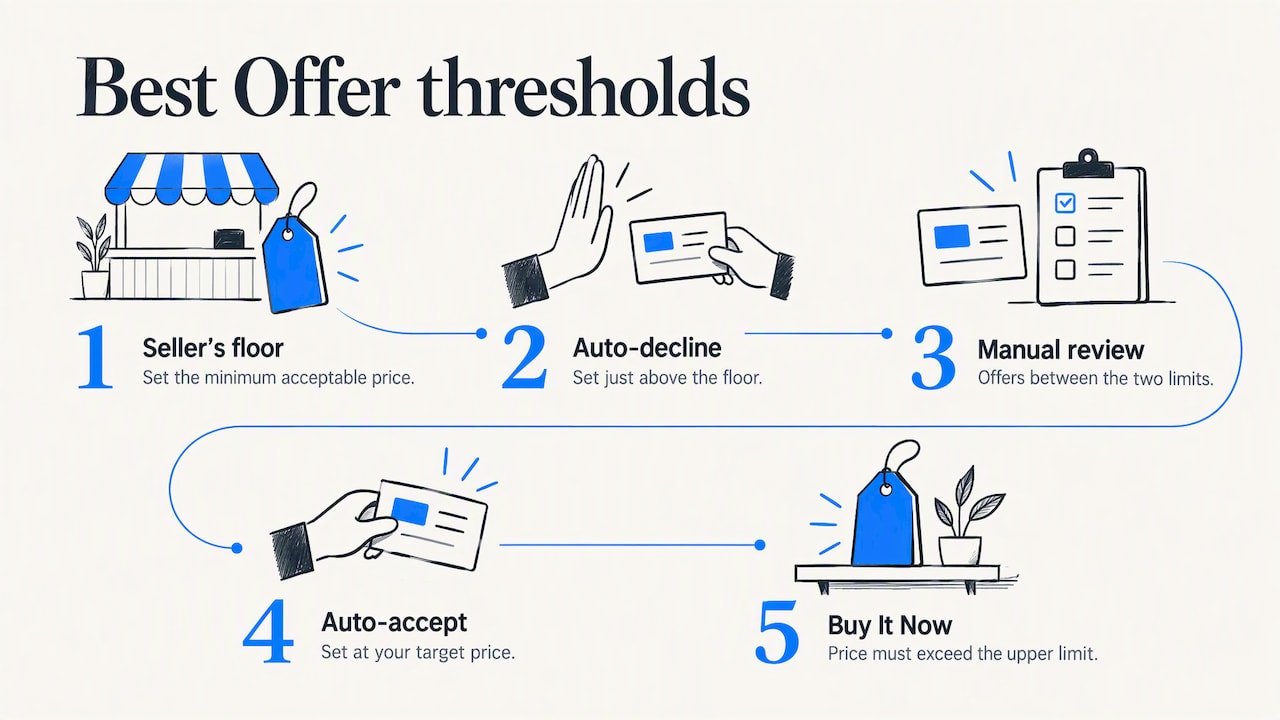
On fixed-price listings, Best Offer lets buyers negotiate, and it is useful when you price slightly above your target. eBay lets you set a minimum offer and an auto-accept amount, and automatic responses can accept or decline offers within the limits you choose; buyers do not see those limits, and the upper limit must sit below your Buy It Now price.
A sensible configuration is to set the auto-decline just above your floor and the auto-accept at the price you would be happy to receive immediately. Anything between the two reaches you as a decision to make by hand. This keeps the time cost low without letting a low offer slip through at a loss.
Step 4: Decide how aggressive to be
Sellers often describe two opposite philosophies. One is to price for speed: undercut the lowest comparable and turn inventory quickly. The other is to price for the buyer who wants this particular item and wait for that buyer. Both work, but for different businesses.
- Speed pricing suits sellers with cash tied up in inventory, perishable or trend-driven goods, and high-volume categories where many identical items compete. Its risk is a race to the bottom that erodes margin for everyone.
- Value pricing suits unique, scarce or high-quality items and sellers with low holding costs. Its risk is dead stock and listing fees or storage costs that accumulate while you wait.
Undercutting for its own sake is rarely the better route. Price influences how buyers judge quality, and a price far below comparable listings can raise suspicion rather than interest. A modest discount, combined with strong photos, an accurate title and free or clearly priced shipping, usually outperforms a deep one.
If you are deciding how much to pay for visibility rather than cutting price, compare the options in our article on auto-relist versus promoted listings, since a promotion fee is effectively another discount on your margin.
Step 5: Know when to adjust a price
Repricing too often makes it impossible to tell what worked. Repricing never leaves stale prices on the shelf. A review cycle sits between the two.
A practical schedule for fixed-price inventory:
- Give a new listing a fair window. Let it run long enough to collect meaningful data before changing anything. For fast-moving categories that may be a couple of weeks; for slow ones, a month or more.
- Read the signals together. Impressions without clicks suggest a title, photo or category problem. Clicks and watchers without sales suggest the price or shipping cost is the obstacle. Offers clustered below your price show where buyers see value.
- Compare against fresh sold data. If the recent sold range has moved, move with it. If comparable items are not selling either, the issue may be demand rather than your price.
- Change one thing at a time. Adjust the price or the title, not both, so you can attribute the result.
- Step down in modest increments. Small reductions let you find the clearing price without overshooting it.
Sellers in community discussions commonly describe a cycle of checking prices every few months and reducing only where nothing has changed and there are no comparable sales to defend the price. That is a reasonable default for slow inventory, though it is a community habit rather than an eBay rule.
Also check the listing itself before you cut the price. A weak title or incomplete item specifics can suppress views, and a price cut does not fix that. Our seven-step listing optimization guide covers the visibility gaps worth ruling out first, and the free listing analyzer gives a quick score of an existing listing.
Pricing appliance parts and other compatibility-driven items
Parts differ from general merchandise in one important way: the buyer is not shopping for "a part" but for the exact part that fits one appliance model. That changes pricing in several ways.
- Compatibility is part of the product. A part that lists its confirmed model compatibility clearly can justify a higher price than one with a vague title, because it removes the buyer's main fear, buying something that does not fit. A wrong fit also means a return, so accuracy protects your margin.
- Condition has to be explicit. For used parts, state whether the part is tested, pulled from a working unit, or sold as-is. Compare only against sold listings with the same condition and the same part number.
- Part numbers beat descriptions in research. Search sold listings by the OEM or manufacturer part number, then by the cross-referenced numbers, to see how the market prices the same component under different labels.
- Demand follows appliance failures, not seasons. Parts for popular models of washers, dryers, refrigerators and ovens sell steadily, so a fixed price with Best Offer often works better than an auction. Rare or discontinued parts are closer to collectibles and may justify a higher price or an auction.
- Shipping weight can decide the sale. Heavy or bulky parts make delivery cost a large share of what the buyer pays, so calculate postage precisely before settling on the item price.
This is a general framework drawn from how parts listings work, and prices vary by part, brand and condition, so test it against your own sold data. Our compatibility lookup in SafeBay Companion is built for this category, helping sellers confirm which models a part fits before listing.
Our perspective: price and buyer risk belong in the same calculation
Most pricing advice stops at the listing. We think that leaves out a line in the margin calculation that sellers feel every month: the cost of buyers who file false claims or abuse returns. Since 2008, eBay sellers have not been able to leave negative feedback for buyers, so a problem buyer on one seller's account is invisible to the next seller unless the sellers share what they know. That gap is the reason SafeBay exists.
When we look at pricing, we therefore ask two questions instead of one. First, what price does the market support? Second, how much of that revenue is exposed to claims that cannot be defended? A seller who prices carefully but absorbs a few fraudulent returns on higher-value items can lose the profit on many honest sales. Reducing that exposure is as valid a margin strategy as shaving a cost, and it does not require raising prices on honest buyers.
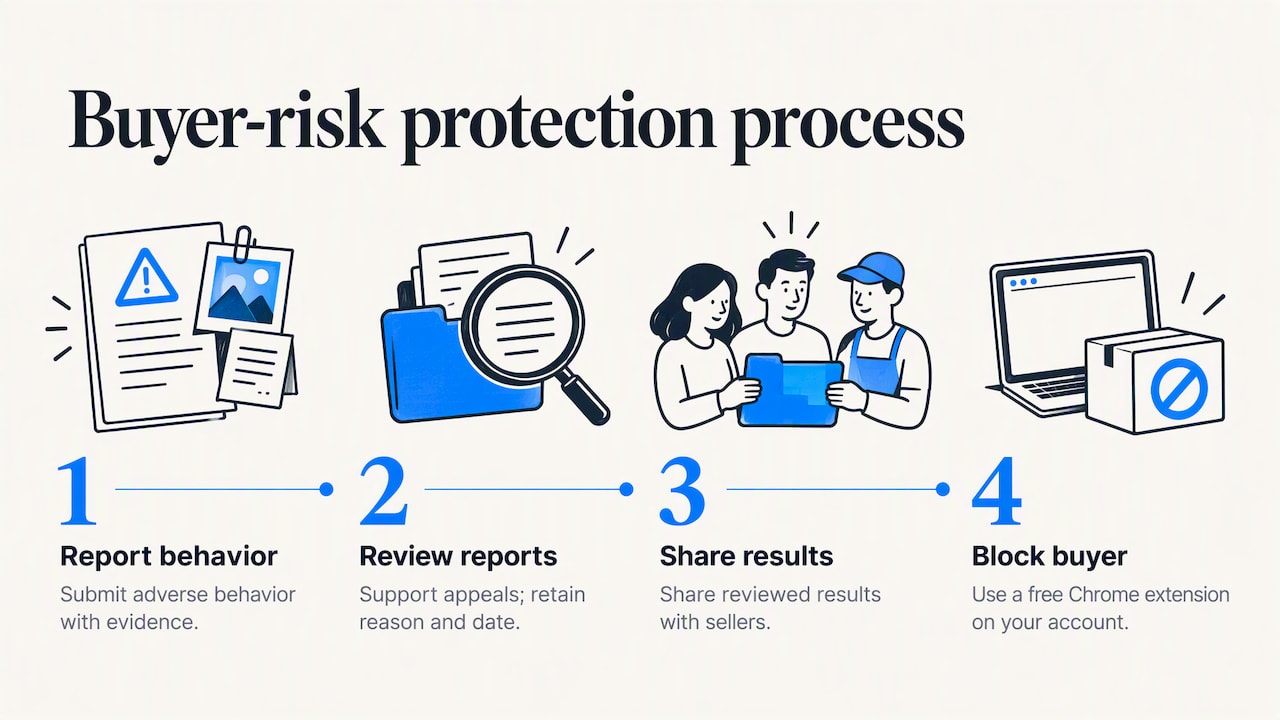
Our approach is deliberately procedural. Sellers report adverse behavior with evidence, the reports are reviewed, and the results are shared so that problem buyers can be blocked on a seller's own account through a free Chrome extension. Private and public blocks are separate, appeals are supported, and the reason and date for each listing are kept, because a blacklist without accountability would be a liability rather than a protection. A seller should be able to check a buyer, understand the basis of a flag and make their own decision.
We would add a note of restraint. No tool replaces the fundamentals above: sound comparables, a realistic floor and a review cycle. Fraud protection and listing tools protect margin that good pricing creates, they do not substitute for it.
— Mykola
Tools that support a pricing routine
A pricing routine involves repeated, small tasks: checking comparables, rewriting titles, relisting ended items and handling buyer messages. SafeBay offers a free plan with basic features and limited AI usage, plus paid monthly plans for higher limits: Basic at $9.95 per month, Pro at $59.95 per month and Enterprise at $599.95 per month. The free SafeBay Companion extension adds AI listing generation and proofreading on eBay's own pages, and the plans on our main page show which limits apply at each level. If an ended listing needs to return with its price reviewed, the auto-relist tool handles the repeat work, and you can look up a buyer before a high-value sale with the buyer status check.
Common pricing mistakes to avoid
- Pricing from active listings only. Asking prices overstate value, because the listings that never sell stay visible.
- Ignoring shipping in the comparison. The buyer sees item price plus delivery, so compare total cost.
- Matching the lowest price automatically. The lowest seller may have different costs, stock or goals, or may be pricing in error.
- Forgetting that fees apply to the whole sale. Because fees are calculated on the total amount including shipping and tax collected, your margin is smaller than the item price suggests.
- Setting auto-accept too low on Best Offer. Confirm that the lowest automatic acceptance still clears your floor.
- Changing everything at once. Without a single changed variable, the data cannot teach you anything.
- Treating all sales as equal. A sale that ends in a fraudulent return is worse than no sale, so pay attention to buyer history on higher-value orders.
FAQ
How do I find the right starting price for an eBay item?
Search for the same item, filter to Sold listings and take the middle of the recent results that match your condition and completeness. Then set your price at or slightly above that range if you accept offers, or at the range itself if you want a quicker sale. Always confirm it clears your cost, fees and shipping first.
Is it better to start high and lower the price, or start low?
For fixed-price items, starting near the top of the sold range with Best Offer enabled lets you capture buyers willing to pay more while still allowing negotiation. Lower the price in small steps if watchers and views do not turn into sales. Starting low suits auctions, where bidding competition can lift the final price.
Should I use auctions or Buy It Now?
Buy It Now suits items with plenty of recent comparables, since you know the range and can choose the price yourself. Auctions suit rare or collectible items where the value is uncertain, and a reserve can protect your minimum. Many sellers use fixed price for regular stock and auctions only for exceptions.
How much does eBay take from a sale?
EBay charges fees on the total amount of the sale, and the rate depends on the category and on whether you add extras such as promoted listings. Because the exact figures change, check the current fee page for your category before you calculate a floor price. Include shipping and returns in the same calculation.