If you're tired of paying for eBay Promoted Listings while watching your profit margins shrink, you're not alone. Thousands of sellers are looking for ways to boost their visibility without draining their advertising budget. The good news? There's a powerful, algorithm-friendly tactic that can help your listings climb eBay's search rankings naturally — and it won't cost you a penny in ad spend.
This article reveals how strategic auto-relisting works with eBay's Cassini algorithm to give your products a fresh visibility boost, plus how SafeBay automates the entire process so you can compete with promoted listings without the recurring fees.
Key Takeaways
- Auto-relisting gives your products a "newness" signal that Cassini rewards with improved search placement, creating a free alternative to paid promotion
- eBay's algorithm prioritizes recently listed items because they indicate fresh inventory and active sellers
- Strategic timing and proper execution of auto-relist tactics can increase impressions by 200-400% without spending on ads
- SafeBay's automated relist feature handles the heavy lifting while preserving your listing quality and avoiding eBay policy violations
- Combined with other optimization tactics, auto-relisting becomes part of a sustainable, cost-free ranking strategy
Understanding the eBay Cassini Algorithm (Without the Technical Jargon)
Before we dive into auto-relist tactics, let's quickly cover what eBay's search algorithm actually cares about. Cassini — eBay's search engine — doesn't just match keywords. It's designed to show buyers the listings most likely to result in a sale, which means it evaluates dozens of ranking factors simultaneously.
What Cassini Rewards
The algorithm gives preference to listings that demonstrate seller reliability and product desirability. Key factors include your recent sales velocity, conversion rate, detailed seller ratings, competitive pricing, and listing quality. But here's the critical insight most sellers miss: listing recency matters significantly.
When you create a new listing, Cassini gives it a temporary visibility boost to test market response. Fresh listings get priority placement in search results for the first 24-72 hours. This "new listing bump" exists because eBay wants to surface recently added inventory — it signals an active seller with in-demand products. This is exactly what auto-relist strategies exploit.
The Promoted Listings Problem
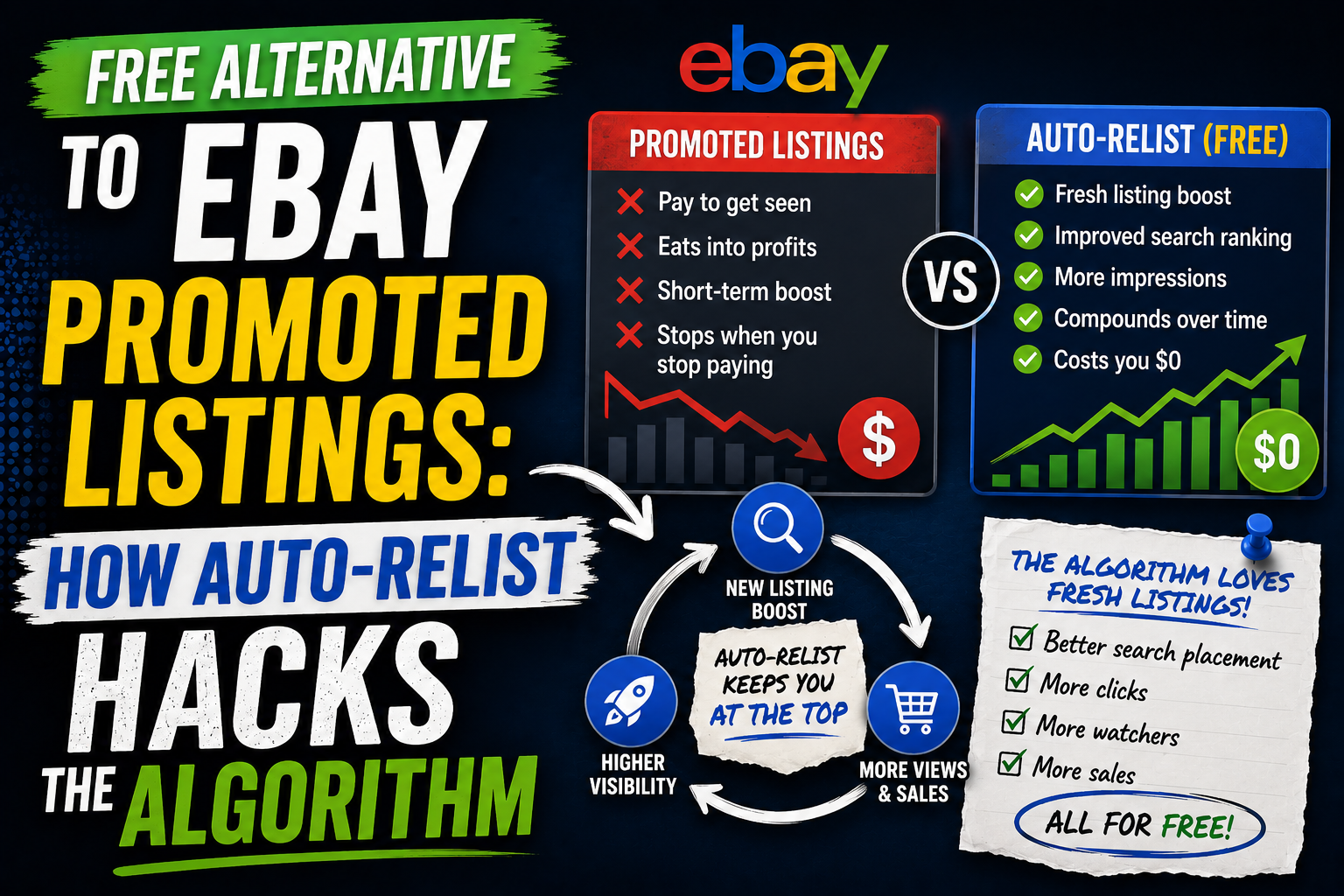
eBay Promoted Listings work on a cost-per-sale model, typically charging 2-15% of your final sale price. For a $50 item with 10% promotion, you're paying $5 every time it sells. If you're running hundreds of listings, these fees accumulate rapidly. A seller moving 100 items monthly at an average 8% promotion rate on $40 items is spending $320 per month just on advertising — $3,840 annually.
While Promoted Listings do increase visibility, they're essentially renting space in search results. The moment you stop paying, your visibility drops. Auto-relisting, by contrast, works with the algorithm's natural preferences rather than paying to override them.
How Auto-Relist Hacks eBay Search Ranking
Auto-relisting is the practice of strategically ending and relisting your items to trigger Cassini's "new listing" preference. When executed correctly, it gives your products repeated visibility boosts without spending a dollar on promotion.
The Mechanics Explained
Here's what happens when you relist: eBay treats the relisted item as fresh inventory entering the marketplace. Your listing gets a new item number and appears in "newly listed" sorts and feeds. More importantly, it receives priority consideration in Best Match search results for your target keywords. For the first 24-48 hours, your item appears higher than it would based on price, shipping, or feedback alone.
This visibility window is your opportunity to capture impressions and watchers. Even if the item doesn't sell immediately, the increased exposure builds social proof through watch counts and page views — signals that Cassini continues to reward even after the initial boost period.
Strategic Timing Makes the Difference
Random relisting won't maximize results. The most effective approach involves relisting during peak traffic periods when buyer activity is highest. For most categories, this means Sunday evenings through Tuesday afternoons, plus Thursday evenings. Avoid relisting at 3 AM when search volume is minimal — you'll waste your visibility window on empty hours.
Frequency matters too. Relisting the same item every 7-10 days creates a sustainable rhythm that maintains visibility without appearing manipulative to the algorithm. Daily relisting can trigger spam filters, while waiting too long means extended periods of low visibility between boosts.
Manual Relisting vs. Automated Solutions
You can absolutely execute this strategy manually through eBay's seller hub. The process involves ending your listing early, then using eBay's "Relist" button to create a new version with a fresh listing date. For 10-20 listings, this might be manageable. But for serious sellers with hundreds of active items, manual relisting becomes a time-consuming nightmare.
The Manual Approach: Why Most Sellers Give Up
Consider the logistics: tracking which items need relisting this week, scheduling the exact timing for optimal visibility, clicking through eBay's multi-step relist process for each item, and monitoring performance to decide which listings benefit most from the strategy. Most sellers attempt this for two weeks before abandoning it due to time constraints.
Manual relisting also introduces human error. Forget to update a price, accidentally modify a title, or miss your optimal timing window, and you've undermined the entire benefit. Consistency — the key to algorithmic success — becomes nearly impossible at scale.
How SafeBay's Auto-Relist Feature Does the Heavy Lifting
This is where SafeBay's automated relist functionality transforms a time-intensive tactic into a set-it-and-forget-it ranking strategy. SafeBay monitors your inventory and automatically relists designated products on your optimized schedule, preserving all listing details while triggering Cassini's fresh listing preference.
The system lets you set custom relist intervals by product or category. High-competition items might relist weekly, while slower-moving inventory relists every 10 days. SafeBay handles the execution during your specified peak traffic windows, ensuring every relist captures maximum visibility. You maintain complete control over which listings participate and can pause or adjust the strategy anytime through your dashboard.
Because SafeBay is built by sellers for sellers, the auto-relist feature includes safeguards that prevent common mistakes. It won't relist items that recently sold or received watchers who haven't been notified yet. It preserves your listing quality score by maintaining identical product details. And it tracks performance data so you can see exactly how relisting impacts your impressions and sales for each SKU.
Implementing Your Auto-Relist Strategy: Step-by-Step
Whether you choose manual execution or automation, follow this framework to maximize results from your eBay auto-relist approach.
Step 1: Identify Relist Candidates
Not every listing benefits equally from relisting. Start with items that meet these criteria: solid product with proven sales history, currently getting impressions but low conversions, not seasonal inventory nearing end-of-season, priced competitively within your category, and good quality photos with complete descriptions. These products already have market validation but need the visibility boost that relisting provides.
Step 2: Optimize Before Relisting
Don't waste your fresh listing boost on suboptimal content. Before relisting, review your title for target keywords (use all 80 characters), verify your price is competitive based on sold listings, confirm item specifics are completely filled out, and ensure photos are clear and professional. The visibility boost gets buyers to your listing — optimization converts them into sales.
Step 3: Schedule Strategically
For manual relisting, create a calendar noting when each item will be relisted and at what time. Stagger your items throughout the week so you're not relisting everything simultaneously. With SafeBay's automation, configure your relist schedule once and the system handles the calendar management for you, spreading listings across optimal time slots for continuous visibility.
Step 4: Monitor and Adjust
Track your results over 30 days. Monitor impressions (views), watcher counts, and conversion rates for relisted items compared to static listings. You should see impression increases of 150-300% during the 48-hour post-relist window. If specific items aren't responding, they may need pricing or optimization work rather than more frequency. SafeBay's sales heatmaps provide additional insight into geographic demand patterns that can inform your strategy.
Combining Auto-Relist with Other Free eBay Search Ranking Tactics
Auto-relisting works best as part of a comprehensive approach to eBay listing optimization. Here are complementary tactics that amplify your results without advertising spend.
Good 'Til Cancelled Listing Optimization
For items you're not actively relisting, optimize your GTC listings by editing them every 14-21 days. Add a new photo angle, update a description detail, or refine an item specific. Each meaningful edit signals activity to Cassini without triggering a full relist. This keeps your entire catalog "fresh" in the algorithm's eyes.
Competitive Shipping and Pricing
Price monitoring becomes crucial when relisting. Your fresh listing boost won't overcome being 20% more expensive than competitors. Use eBay's Terapeak or manual sold listing research to ensure you're priced in the top 30% of recently completed sales for identical items. Consider free shipping when feasible — Cassini gives preference to listings with shipping included in the price.
Buyer Risk Management
All the visibility in the world won't help if problematic buyers destroy your seller metrics with false defect claims or return fraud. This is where SafeBay's community buyer blacklist becomes essential. Before a risky buyer can damage your account health (which directly impacts Cassini ranking), SafeBay's database flags them based on reports from thousands of sellers. You can proactively block these accounts, protecting the metrics that keep you ranking well in search results.
Common Mistakes That Undermine Your Auto-Relist Strategy
Even experienced sellers make these errors when implementing auto-relist tactics. Avoid these pitfalls to protect your results.
Over-relisting the same items: Relisting identical products every 3-4 days appears manipulative and may trigger algorithmic penalties. Stick to 7-10 day minimum intervals unless you've made substantial listing improvements.
Ignoring item performance data: If a listing hasn't sold after three relist cycles despite good traffic, the problem isn't visibility — it's price, product-market fit, or listing quality. Relisting won't fix fundamental issues.
Relisting during low-traffic periods: A Tuesday 2 PM relist captures far more qualified buyers than a Saturday 2 AM relist, even though both receive the algorithmic boost. Timing amplifies the benefit.
Neglecting listing quality: Cassini's initial boost gets eyes on your listing, but poor photos, incomplete descriptions, or missing item specifics will result in zero conversions. The algorithm quickly learns that your listings don't convert and reduces future visibility accordingly.
Stop Renting Visibility — Build Sustainable eBay Search Rankings
eBay Promoted Listings have their place, but they shouldn't be your only visibility strategy — or even your primary one. Auto-relisting gives you a powerful, cost-free method to work with Cassini's algorithm rather than paying to bypass it. By strategically refreshing your listings during peak traffic windows, you capture the same "top of search" positioning that promoted listings offer, without the recurring percentage fees eating into your margins.
The challenge for most sellers isn't understanding the strategy — it's executing it consistently at scale across hundreds of listings while managing all the other demands of running an eBay business. Manual relisting becomes unsustainable. That's exactly why we built SafeBay's auto-relist feature.
SafeBay handles the technical execution while you focus on sourcing, customer service, and growth. Combined with our community buyer blacklist to protect your seller metrics and AI-powered feedback responses to maintain your reputation, SafeBay gives you the complete toolkit for ranking higher on eBay without burning cash on advertising. And with our generous free tier, you can start optimizing your eBay search ranking today — zero credit card required.
Stop Bad Buyers. Run Your eBay Store Smarter. That's not just our tagline — it's the approach that separates sustainable eBay businesses from sellers trapped in the promoted listings cycle. Ready to implement auto-relist and start competing with top-ranked sellers? Create your free SafeBay account and let automation do the heavy lifting.