An eBay listing title can be up to 80 characters long, and eBay's own guidance tells sellers to use as many of those characters as they can on accurate, searchable words. The limit itself is simple. The harder part is deciding which 80 characters earn the click, which is where a title builder that works from titles that already sold, such as SafeBay's free eBay Title Builder, saves time compared with guessing keyword by keyword.
This guide covers what the limit is, what counts toward it, how to order the words, which practices eBay's policies prohibit, and how appliance parts sellers handle part numbers and compatibility without breaking the rules.
What the eBay title limit is
The listing title is required on every listing and is capped at 80 characters, as the Trading API documentation for listing titles states. The same page describes the subtitle as an optional upgrade for an additional fee, shown on the item page and in search results, with a maximum length of 55 characters.
The 80-character figure is the one that matters for ranking. A subtitle is a paid display feature rather than a place to put the keywords your listing depends on, so treat the title as the field that carries the search weight.
A fair question is whether the limit has moved recently. The 80-character cap is the figure eBay's current seller and developer pages state, and guides written in 2026 repeat it, so you can plan around 80. Because eBay can change field rules, confirm the number on eBay's Seller Center listing guidance when you build templates for a large catalog.
What counts toward the 80 characters
Every character in the field counts: letters, digits, spaces, hyphens, slashes, ampersands and any other punctuation. A title with several separators and spaces around them spends characters on formatting that buyers never search for.
Two habits keep you inside the limit without cutting meaning:
- Use a single space between words and drop decorative separators. eBay's Seller Center advises avoiding special characters, so the character you save is also one the guidance discourages.
- Count the complete draft, not just the keywords. Part numbers with dashes and slashes are the usual cause of a title that looks fine and then gets truncated.
If you write titles in a spreadsheet, a simple length formula next to each title column catches overruns before upload. If you build titles inside eBay's listing form, SafeBay's free listing analyzer scores a listing, which gives you a second look at the title alongside the rest of the page.
Why you should use the full space
Ebay's Seller Center explains the core mechanic: when a buyer searches, the system looks for listing titles that closely match the search. The title is therefore the main place where your listing and the buyer's query meet. A title that stops at 40 characters leaves 40 characters of possible matches unused.
The Best Match help page asks for a clear, concise title with correct spelling and no more than 80 characters. It lists the factors in ranking: how closely the listing matches the buyer's search terms, item popularity, price, listing quality, completeness, compliance with the terms of service and the seller's track record. Title length is not on that list as a factor in itself. What the extra characters buy you is more opportunities to match real searches.
That distinction shapes the whole approach. The goal is not 80 characters; the goal is the most accurate, searchable description of the item that fits in 80 characters. A title padded with filler words fills the field and adds no matches.
A title structure that works
Seller Center guidance names the elements to include: brand, model or type, color, style and model number. Put them in the order a buyer would think of them, with the most identifying terms first, since mobile search results often show only the start of a long title.
A workable template for most categories:
- Brand, because many buyers search by brand name first.
- Product type or name, in the words buyers use.
- Model, style or part number, the exact identifier.
- Size, color or material, whichever buyers filter by.
- Key feature or condition, only if it is accurate and short.
After the template, check each word with one question: would a buyer type it? "Beautiful," "wow" and "L@@K" fail that test. Model numbers, sizes and materials pass.
Worked example: counting characters
Take a real title pattern from a U.S. appliance-part listing, GE Oven Control Board - Part # WB27T10816 | 191D3776P007. It leads with the brand, names the part type, then gives two part numbers. Counting the spaces, hyphen, hash and bar, it uses 56 of the 80 characters, so there is room for a few more accurate words, such as another buyer-facing term for the part, if they are true of the item.
A second example, Speed Queen Dryer Heating Element Kit 964P3, runs 43 characters. It carries the brand, the appliance, the part, the kit form and the part number. The listing places compatibility information in item specifics (Compatible Brand and Compatible Model fields) rather than in the title.
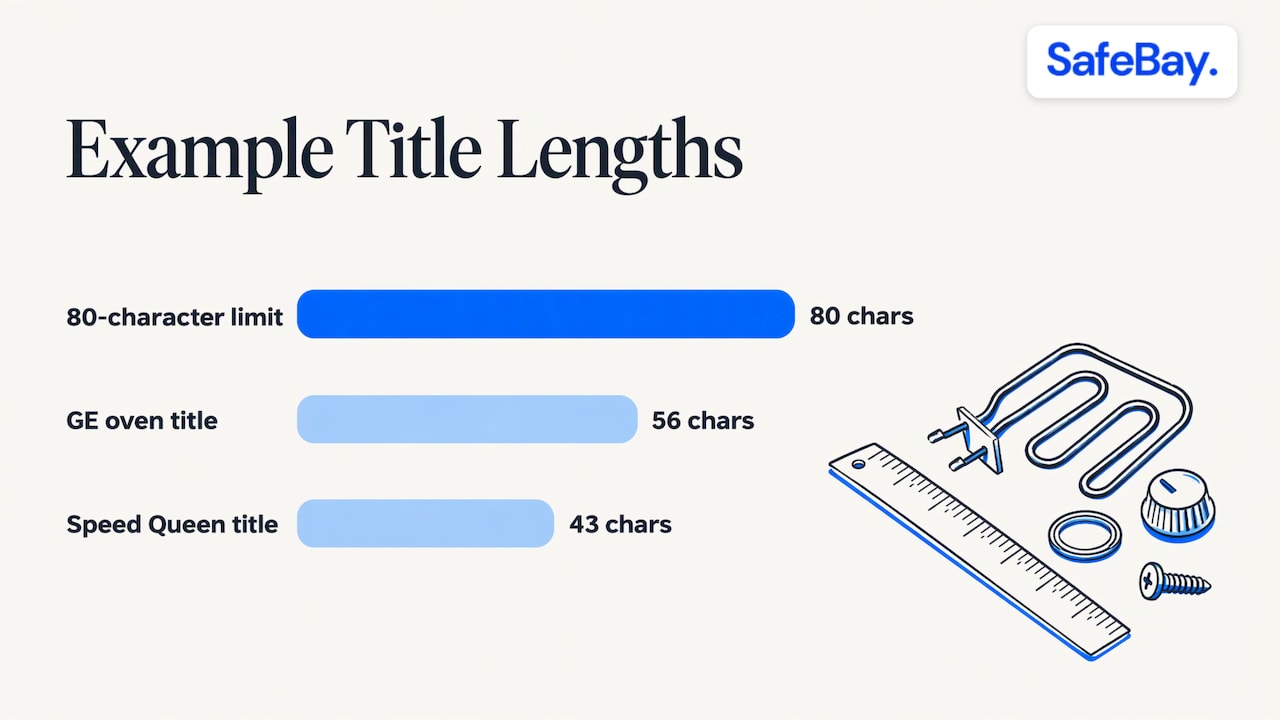
Both titles are compact and readable. They show that a good title is built from identifiers, and that the remaining characters should be spent only on words that add a real match.
What eBay does not allow in a title
The search manipulation policy requires that every word in a listing be accurate and refer only to the item for sale. It does not allow keywords unrelated to the item, product comparisons, question-mark keywords, or offering a choice of different products in a single listing.
In practice, that rules out these common shortcuts when you have spare characters:
- Adding a popular brand name that is not the brand of your item.
- Writing comparisons such as "better than" or "not" followed by another brand.
- Listing several different products in one title to catch more searches.
- Repeating the same keyword to gain weight.
A listing that breaks these rules risks being removed or restricted, which costs far more than the extra search matches ever bring. Accuracy is also the right commercial choice, since a buyer who receives an item that does not match the title can open a not-as-described case.
Titles for appliance parts: part numbers and fit
Parts buyers often search by exact part number or by the model of the appliance they are repairing. That makes the title's job slightly different: it has to carry the part number precisely and signal fit without turning into a list of dozens of models.
The search manipulation policy sets a specific rule for compatible items. If an item is an accessory for or compatible with another item, the words "fits," "for" or "compatible with" must appear before the name of the compatible item. Exceptions apply to brand names of jewelry, clothing and accessories, and to universally compatible items. For parts that fit multiple vehicles, eBay directs sellers to its parts compatibility guide instead of putting the vehicles in the title.
A practical routine for appliance parts:
- Lead with the brand and part name, using the term buyers use, such as control board, heating element or door latch.
- Add the primary part number and any supersession or alternate numbers that fit within the limit.
- Use "fits" or "for" only before a compatible model or brand you name, in line with the policy.
- Move the full compatibility list into item specifics, where the Compatible Brand and Compatible Model fields are designed for it.
The weak point in this routine is verifying fit before you state it. A wrong model in the title or specifics produces returns and not-as-described claims. SafeBay's guide on verifying appliance parts compatibility by model number walks through the check, and the Appliance Parts Locator looks up parts by model number alongside eBay sold prices. For the fields that hold the compatibility detail, see the guide to eBay item specifics.
Do you need to repeat the title in the description?
Sellers often ask whether the title text should be repeated at the top of the description. The title already appears on the item page and in search results, so repeating it adds nothing for the buyer. Use the description for what the title cannot hold: measurements, condition detail, what is included, and fit notes for a part. Item specifics then carry the structured attributes that buyers filter on, so the three fields each do separate work.
A repeatable process for a whole catalog
One well-written title is easy. Hundreds are a workflow problem, and the following process keeps them consistent:
- Collect the buyer's words. Use eBay's search suggestions and the titles of items that sold in your category, since sold listings show which words actually led to purchases.
- Set a template per category. Decide the word order once for each product type so every title follows it.
- Write to the limit, then trim. Draft with every relevant term, then cut the least useful words until the title fits within 80 characters.
- Check the policy. Read each title for words that are not strictly about the item.
- Review after a few weeks. Compare views and sales by title, and revise the listings that lag. The seven-step guide to optimizing eBay listings and the overview of eBay SEO and Cassini's ranking signals cover what to check beyond the title.
Title work is one part of the listing. Photos affect click-through once the title earns an impression, and eBay publishes size and format rules for them, summarized in SafeBay's photo requirements guide.
Where SafeBay fits
For sellers who write titles at volume, SafeBay offers the AI eBay Listing Generator, which produces title, item specifics and price on eBay's own platform, and the free Title Builder that draws keywords from titles that sold. The SafeBay Companion is the Chrome extension that brings the listing assistant into the eBay workflow.
SafeBay has a Free plan at $0 per month with basic features and limited AI usage. The paid plans are Basic at $9.95 per month, Pro at $59.95 per month and Enterprise at $599.95 per month, all listed on the SafeBay plans page.
The same toolkit covers the other side of selling: a community-driven buyer blacklist that syncs to eBay's Blocked Buyers list, so the time you save on listings is not lost to return fraud.
Our perspective
We look at titles as a data problem before a writing problem. The 80-character limit is fixed, so the useful question is which words in that space match what buyers type in your category, and the answer is visible in the titles that already sold.
That is why we built the title tools around sold listings and why the listing assistant works inside eBay's own listing screens. A seller who has to switch between a spreadsheet, a keyword tool and the listing form tends to write shorter, less consistent titles.
For parts sellers, we pay particular attention to the link between the title, the part number and the compatibility fields. A precise title that matches a verified fit reduces the mismatches that lead to returns, and a returns problem is exactly where sellers need protection from repeat bad actors.
Our advice is to write each title to a template, keep it accurate, and review it against results. Tools make that routine faster, but the discipline is the seller's.
Mike Brydko
FAQ
How many characters can an eBay title be?
An eBay listing title can be up to 80 characters, including spaces and punctuation. The optional paid subtitle allows 55 characters. The title is required on every listing.
Is it better to use all 80 characters?
EBay's Seller Center advises using as many of the 80 characters as possible, as long as the words are accurate and searchable. Length alone does not rank a listing. The benefit comes from the additional words buyers might type that match your item.
Can I put compatible models in the title of a part?
Yes, but eBay's policy requires "fits," "for" or "compatible with" before the name of the compatible item, and every word must be accurate. For long lists, use the compatibility fields in item specifics rather than the title.
Which words should I avoid in an eBay title?
Avoid keywords unrelated to your item, comparisons with other products, other brand names and phrases that offer a choice of different products. The search manipulation policy prohibits them, and they can lead to a listing being removed.