eBay SEO is the work of making each listing easy for eBay's search to match with a buyer's query. The default results order, Best Match, weighs how closely a listing fits the search terms, along with popularity, price, listing quality and completeness, return and handling terms, and your track record as a seller. Most of those inputs are fields you fill in, which means they can be fixed listing by listing. SafeBay's free eBay tools are built around that routine, so you can check a title or a listing before you publish it.
How eBay ranks your listings
When a buyer searches, eBay sorts results by Best Match unless the buyer changes the sort. According to eBay's own help page, the algorithm considers how closely the listing matches the search terms, how popular the item is, its price, listing quality and completeness, the listing terms such as return policy and handling time, and the seller's track record.
That list sorts into two groups.
| Group | Signals | What you control |
|---|---|---|
| Relevance | Title, item specifics, category, identifiers, description | Every word and field you enter |
| Quality and trust | Photos, completeness, price, return policy, handling time, seller record | Listing settings and daily operations |
Nothing here is a trick. The algorithm needs to know what the item is, and buyers need to believe it will arrive as described. Accurate data helps with both. Third-party guides often give precise numbers for how much a tweak will lift visibility, but eBay does not publish a weighting for these factors, so treat any such percentage as an estimate and measure your own results.
Titles: the highest-leverage field
The title is the first thing search reads and the first thing a buyer sees next to the photo. eBay's Seller Center advises using as many of the 80 title characters as you can, with the brand, model or type, color, style and model number, and no special characters or irrelevant words.
A repeatable title formula
Start with what a buyer would type, then add the details that separate your item from near-identical ones:
- Brand
- Product type or model name
- Model or part number
- Key attribute (size, capacity, voltage, color, material)
- Condition or compatibility detail the buyer filters on
A weak title: "Great washer part, fast shipping!!" A stronger title: "Whirlpool W10130913 Washer Door Latch Assembly OEM Genuine Replacement". The second one holds the brand, the part number, the appliance type and the part name, and nothing a buyer would not search.
Appliance parts and compatibility
If you sell appliance parts, the part number is usually the query. Buyers search by the OEM number printed on the old part, or by the appliance model it fits. Put the primary part number in the title and any cross-reference or replacement numbers in the item specifics and description, where space is not capped at 80 characters. Compatibility is also where returns come from: a buyer who orders the wrong latch opens a return, and that hurts the same seller record Best Match uses. SafeBay's tooling includes an appliance parts compatibility lookup, so you can confirm that a part fits the model you name before you write the fit into the listing.
What to leave out
eBay's search manipulation policy prohibits unrelated keywords, comparisons with other products, promotion of other listings, keywords with question marks, and offering different products in one listing. Phrases such as "not Samsung" or "compare to Brand X" fall in that category. The practical rule: every word in the title must describe the item you are actually shipping.
If you would rather not build titles by hand, the free eBay Title Builder pulls keywords from titles that sold, which gives you real buyer language to start from.
Item specifics and identifiers
Item specifics are the structured fields (brand, color, size, type, compatible model) that appear on the listing and feed eBay's filters. eBay states that item specifics together with product identifiers are the most important way to help buyers find items. A listing appears in filtered results only if the matching specific has been added, and eBay shows recommended specifics ranked by search volume over the past 30 days.
That has a direct consequence. A buyer who clicks the "Brand: Whirlpool" filter never sees your listing if the Brand field is empty, no matter how good the title is. Filling in the fields takes a minute and puts the listing back in front of filtered buyers.
Also choose the category eBay suggests and add identifiers where they exist. eBay's listing best practices say that UPC, SKU, ISBN or MPN values help listings appear in more relevant searches and auto-fill catalog details.
Three habits keep this part clean:
- Fill every recommended specific, not just the required ones.
- Use the same spelling and units in the specifics as in the title.
- Keep variations (size, color) inside one multi-variation fixed-price listing and list identical items in one multi-quantity listing, as the search manipulation policy recommends for Best Match.
The AI listing generator drafts the title, item specifics and price suggestion from within eBay's own listing flow, so the structured fields get filled in while you write the listing instead of afterward.
Photos and descriptions
The first photo appears in search results, so it works as part of your ranking and your click-through at once. eBay's photo guidance recommends up to 24 photos, a minimum of 500x500 pixels with 1600x1600 recommended, a white or neutral background, natural lighting, closeups of wear and tear, and no text, logos or watermarks, which can block third-party search results.

For product photography that holds up at small sizes, this walkthrough of photography tips for small items covers lighting and angles that translate to eBay thumbnails. For eBay's current size and format rules, see SafeBay's photo requirements guide.
The description does two jobs. It answers the buyer's last questions (condition, what is included, what it fits), and it adds detail the title has no room for. State defects plainly. An accurate description cuts "not as described" cases, which protects both your conversion and your seller record.
Price, terms and seller record
Best Match lists price, return policy, handling time and seller track record as inputs, and these are decisions about the business more than the listing text. eBay's Seller Center advises pricing competitively, and its Listing Quality Report gives example actions such as reducing handling time to one day and adding order-size discounts.
The seller record is where buyer behavior comes back into SEO. Return fraud, false "item not received" claims and unwarranted disputes can damage the metrics that influence how your listings rank, and since 2008 eBay has not let sellers leave negative feedback for buyers. SafeBay's community buyer blacklist lets sellers report problem buyers with evidence, and the free Chrome extension syncs the reviewed list to your eBay Blocked Buyers list. You can look up a specific account on the buyer status page before you ship a high-value order.
Audit your listings with eBay's data
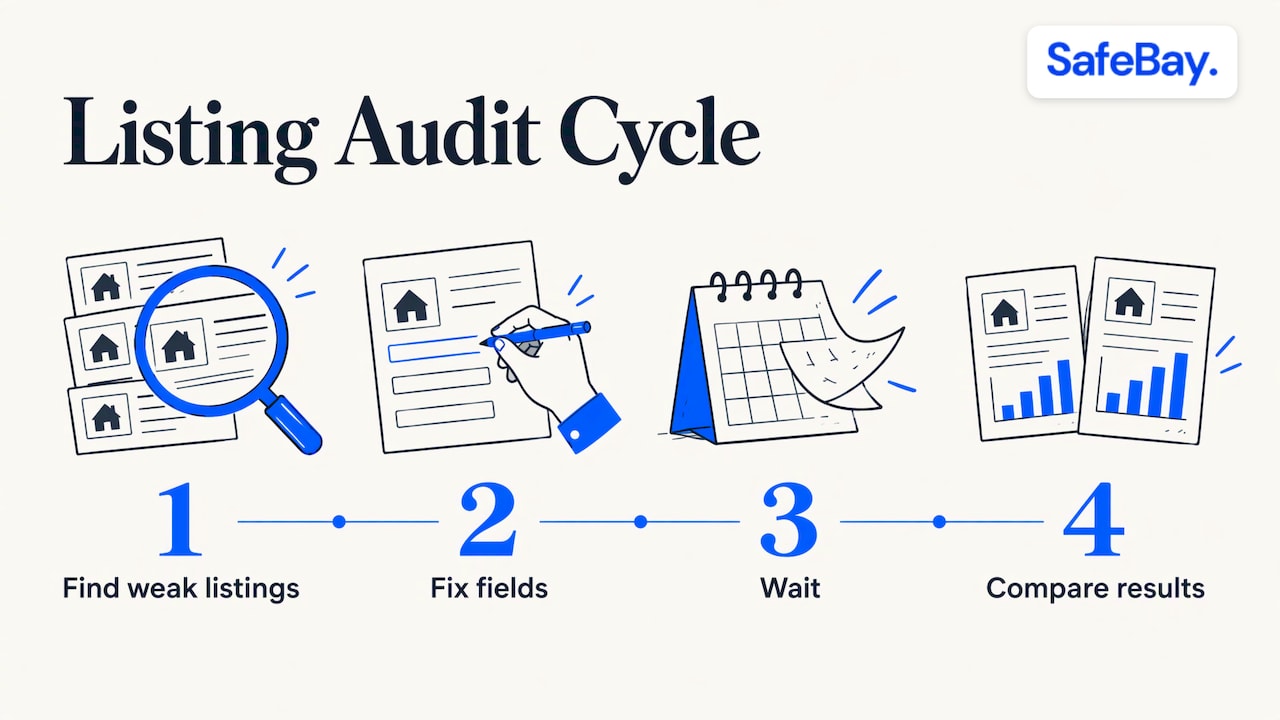
SEO is not a one-time edit. Run a cycle: find the weak listings, fix the fields, wait, and compare.
eBay's Listing Quality Report
eBay's Listing Quality Report is a downloadable Excel analysis covering the 10 categories where you have the most live listings. It lists specific actions to raise impressions, views and sales, for example filling in 7 recommended item specifics per listing, and shows why listings were rejected from Google Shopping ads. SafeBay's walkthrough explains where to find the report and how to use it.
Traffic and sales data
Impressions tell you whether search shows the listing. Views tell you whether the photo and title earn the click. Sales tell you whether the page converts. A listing with low impressions has a relevance problem (title, specifics, category). A listing with high impressions and few views has a title or photo problem. A listing with many views and no sales has a price, terms or description problem. SafeBay's guides to the eBay traffic report and sales analytics explain how to read those numbers in Seller Hub.
Scoring a listing before and after edits
The free eBay Listing Analyzer gives a listing a score, which makes it easy to rank your catalog and start at the bottom. For a stepwise routine, the seven-step listing optimization guide shows how to catch visibility gaps.
Choosing an eBay SEO tool
Tools differ in what they do, so compare them on the job you need done:
| Criterion | What to check |
|---|---|
| Keyword source | Does it draw on real buyer language, such as titles that sold, rather than generic keyword lists? |
| Where it works | Inside eBay's listing flow, or in a separate dashboard you copy from? |
| Specifics and identifiers | Does it fill item specifics and compatibility, not just the title? |
| Policy safety | Does it keep titles within the 80-character limit and away from prohibited keywords? |
| Scoring | Can it rate existing listings so you know where to start? |
| Cost and limits | Is there a free plan, and what changes at higher tiers? |
SafeBay's plans are priced in US dollars per month: Free at $0, Basic at $9.95 and Pro at $59.95, with Enterprise at $599.95. The free plan covers the basic features with limited AI usage, and the free tools include the title builder and listing analyzer. Whatever you use, review the output yourself: a tool drafts, and you are responsible for the accuracy of the listing.
Promoted Listings: after the basics
Promoted Listings are eBay's paid placement. Under the general strategy, you pay only when a buyer clicks the ad and buys the promoted item within 30 days, with an ad rate you choose from 2% to 100% of the total sale amount. The rate covers item price, shipping, taxes and applicable fees. Dynamic rates follow eBay's daily suggestion, based on item attributes, seasonality, past performance and competition. That page is eBay Canada's, so check the US program page in Seller Hub for current terms.
Promoted and non-promoted listings compete in one ranker. eBay's engineering team described it in 2020: promoted items are ranked by relevance to the search term, past performance of the item and seller, and the ad rate. Relevance is part of the formula, so a listing with a weak title or empty specifics gains less from an ad than a complete one. Fix the listing first, then decide whether the ad rate fits your margin. SafeBay's guide to fixing ranking signals before promoting walks through that order, and the auto-relist guide covers relisting as a free alternative to ads. SafeBay also automates auto-relisting of ended items.
A one-week plan
- Day 1: Download the Listing Quality Report and sort listings by traffic.
- Day 2: Rewrite the titles of your ten weakest listings to use all 80 characters with brand, type, part or model number and attributes.
- Day 3: Fill all recommended item specifics and identifiers on those listings.
- Day 4: Reshoot or replace the first photo where it breaks the photo guidance.
- Day 5: Review handling time, returns and pricing against comparable listings.
- Days 6 and 7: Leave the listings alone, then compare impressions, views and sales against the previous period.
Change one group of variables at a time so you can tell which edit moved the numbers.
Where SafeBay fits
The free plan gives you the basic features with limited AI usage, so you can run the title builder, listing analyzer and the Chrome extension before deciding on anything paid. The AI listing generator and proofreading work directly on eBay's platform, and the related tools include automated messaging and feedback replies, sales analytics and order management. If you want to start, see the plans on SafeBay.
Our perspective on eBay SEO
Most ranking advice for eBay sellers stops at the listing. We think that is half the picture. A listing earns its position through accurate data, but it keeps that position through the seller record, and the seller record can be damaged by a small number of buyers who file false claims or abuse returns.
That is why we built SafeBay as two connected toolsets. One helps you write complete, accurate listings on eBay's own pages: titles, item specifics, descriptions and proofreading. The other helps you keep known problem buyers out of your orders through a community blacklist that syncs to your Blocked Buyers list. We keep reasons and dates for each entry, separate private and public blocks, and support appeals, because a block list is only useful if sellers can trust it.
Our advice is to treat SEO as routine maintenance, not a project. Audit, fix the weakest listings, measure and repeat, and protect the account that all those listings sit on.
Mike Brydko
FAQ
Does eBay have an algorithm that ranks my listings?
Yes. Best Match is eBay's default search order, and eBay says it considers match to the search terms, popularity, price, listing quality and completeness, listing terms and the seller's track record. You influence most of those through the fields you complete and the terms you set.
How do I improve my eBay search ranking quickly?
Start with the title, using the full 80 characters with brand, type and model or part number. Then fill in every recommended item specific and identifier, and make sure the first photo meets eBay's guidance. These changes take minutes per listing and address the relevance signals directly.
Do Promoted Listings guarantee a top position?
No. eBay's engineering team has explained that promoted listings may appear at the top when competition and ad rates are high, and none may appear when there are too few relevant items or the ad rate is low. Relevance is still part of the ranking.
Can buyer behavior affect my visibility?
Your track record as a seller is one of Best Match's inputs, so returns and disputes matter to the account's performance. Reporting abusive buyers and blocking repeat offenders helps protect that record.
Sources
- Optimizing your listings for Best Match, eBay
- Create great listings, eBay Seller Center
- Listing best practices, eBay Seller Center
- Item specifics, eBay Seller Center
- Take great photos, eBay Seller Center
- Search manipulation policy, eBay
- The Listing Quality Report, eBay
- General campaign strategy, eBay Canada
- eBay Makes Promoted Listings in Search Results More Relevant and Dynamic, eBay Inc.
- LEGO Photography Tips: Better Photos of Your Builds