The Listing Quality Report is eBay's listing-by-listing diagnostic, and according to trade reporting from October 2025, an eBay employee confirmed it should now be available to all sellers, under Performance in Seller Hub. If you cannot see it, or the download fails, you can still assemble most of the same picture from Seller Hub's downloadable listing reports and its traffic data. This guide explains what the report contains, how to reach it, what to do when it is missing, and how to turn it into listing changes that you can measure.
What the Listing Quality Report is
The Listing Quality Report is a downloadable file that evaluates the content of your listings and suggests improvements. Sellers on the forums draw a clear line between it and the traffic summary: one seller describes the traffic report as showing only traffic numbers, while the quality report goes into the content of individual listings.
The most detailed public description of its layout comes from eBay's Australian seller centre, so treat it as an indication of the structure rather than a statement about U.S. availability. eBay's documentation for that market describes three kinds of content:
- A summary of recommendations by category.
- A Google Shopping section that lists rejected listings and the reasons for rejection.
- Category tabs with listing-level detail and benchmark data.
The same page says recommendations can relate to search impressions, listing views, or sales conversion. Examples include adding recommended item specifics, offering free shipping, and reducing handling time. These three levers map directly onto things you control, which is what makes the report practical.
How to access it in Seller Hub
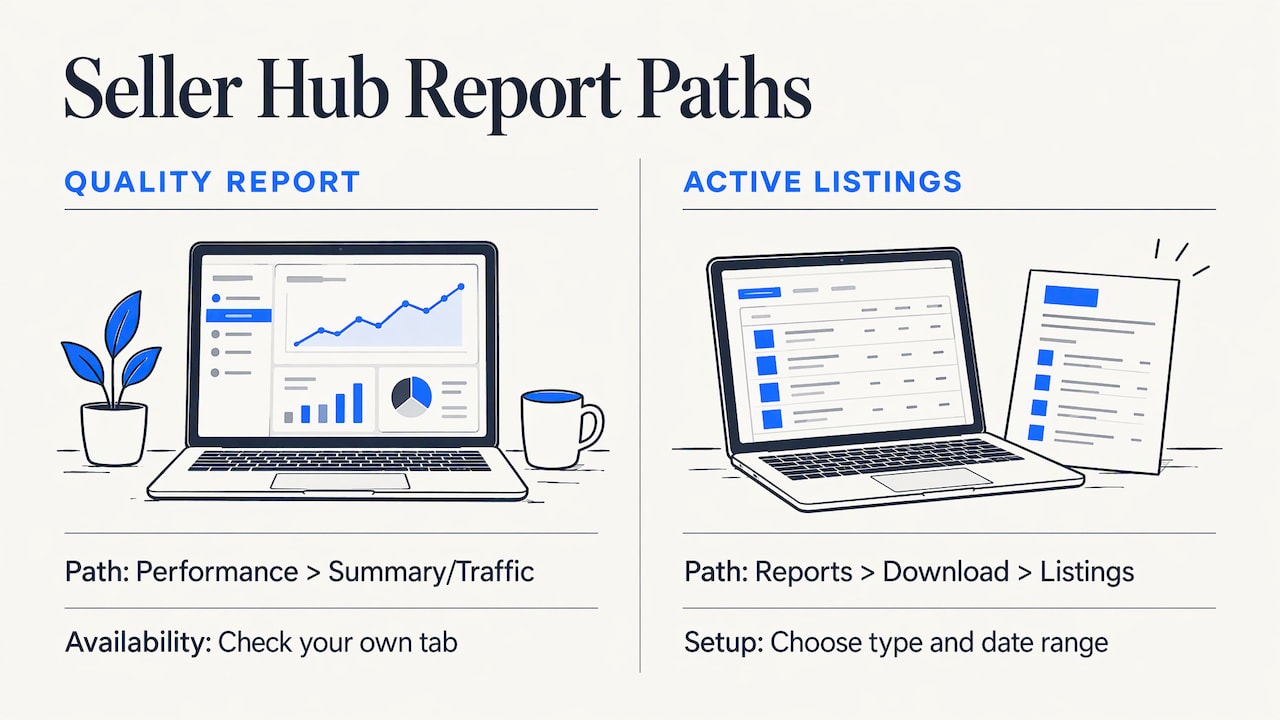
The location has changed more than once. The most recent account comes from an October 2025 report in an established eBay trade publication, which says an eBay employee confirmed the report should now be available to all sellers. It says sellers can look in Seller Hub under Performance, including the Summary or Traffic tabs, and that eBay was working on surfacing the insights in Seller Hub and the app. Because those rollout details are not in eBay's published U.S. guides, check your own Performance tab rather than assuming a menu path.
For listing data you can always reach, eBay's official Seller Hub Reports Guide describes the path: select Reports, then Download, then Listings, choose a report type such as All active listings, and set a date range. That guide is dated April 2021, so menu labels may have shifted slightly, but the structure of the download remains a reliable fallback.
If the report is missing or will not download
Missing links and download errors are common enough to have a history. In February 2024, sellers reported that the link was absent or the download threw an error, and trade coverage of that incident noted that eBay temporarily removed the download link while it investigated. The same report said affected sellers could contact eBay Customer Support to be added to the open technical-issue tickets.
A practical sequence when it fails:
- Check the Performance tab again after a day, since the link has been pulled and restored before.
- Contact eBay Customer Support, describe the exact error, and ask to be attached to the existing technical-issue ticket if one is open.
- Download the Active listings report from Reports in Seller Hub so you can keep working on listings while the ticket is open.
- Keep a dated copy of each file you do get. Comparing two exports is the only reliable way to see whether your changes moved anything.
Some older articles claim the report was discontinued. Those claims reflect a period when it was deprecated, and the 2025 reporting above indicates it has since returned, so do not rely on pages that describe it as gone.
What the Active listings report adds
The Reports Guide says an Active listings export can include, for each listing, available quantity, start price, Buy It Now price, reserve price, current price, sold quantity, views, watchers, bids, start date, end date, category, condition, ePID, and listing site. The guide defines sold quantity as the number of items sold at download time, views as the number of people who viewed the listing, watchers as the number of users watching it, and bids as the number of bids on an auction-style listing.
This is not a quality score, but it lets you build one. A simple triage in a spreadsheet:
| Pattern in the export | What it suggests | First fix to test |
|---|---|---|
| High views, zero sold | The listing attracts clicks but does not convince | Price, photos, shipping terms, description clarity |
| Low views, old start date | The listing is not surfacing in search | Title keywords, item specifics, category |
| Many watchers, no sales | Buyers are interested but hesitating | Price check, offers, handling time |
| Missing or blank condition or ePID | Incomplete catalog data | Complete the product identifiers |
Turning recommendations into changes
The recommendations in the quality report are most useful when you apply them in a consistent order and change one thing at a time on a sample of listings.
Item specifics first
Item specifics feed search filters and catalog matching, so missing ones are the most common reason a listing never appears where it should. Our guide to required item specifics and how to fill them covers the required and recommended fields in detail.
Shipping and handling time
The documented examples of free shipping and shorter handling time are changes that affect both ranking and buyer confidence. Set a handling time you can meet every time, because a promise you miss costs more than a slower promise you keep. See how handling time works and what to set.
Titles, photos, and descriptions
Once the structured data is complete, work on the content buyers read. The principles are the same across marketplaces, and a general walkthrough of product detail page optimization shows the kinds of changes retail sellers make, such as clearer images and better-organized copy. For eBay-specific ranking signals, see our piece on Cassini's four ranking signals, and for a step-by-step audit, seven steps to catch visibility gaps.
A note for appliance parts sellers
Appliance parts are a category where compatibility decides the sale. A buyer searching a model number wants proof that the part fits, so a listing that omits model numbers, part numbers, or brand details loses to one that states them. When you read a quality or active-listings export, filter for listings with high views and no sales, then check each for the following:
- The manufacturer part number and any replaced or superseded numbers in the title and item specifics.
- The compatible model numbers, stated in the description in a form buyers can scan.
- Condition stated plainly (new, used, refurbished) with photos of the part's connectors or mounting points.
SafeBay includes an appliance parts compatibility lookup among its seller tools, which is designed to help with this research. Use it as a cross-check, and always confirm fitment against the manufacturer's documentation before you publish a claim.
What to look for in eBay reporting tools and dashboards
Sellers searching for the best analytics tools or a performance dashboard are usually trying to answer one of four questions. Judge any tool, including eBay's own, against them:
- Which listings need attention? The tool should rank or flag listings, not only total them.
- What changed, and when? You need date comparisons, so you can attribute a lift to a specific edit.
- Where does money go? eBay's Seller Hub documentation says the Performance area covers sales, selling costs as a percentage of sales, traffic, buyer traffic source, and drill-down charts. It also says the All sales report can break out item sales, shipping and handling, and government taxes and fees, and that Selling costs can show amounts and percentages for eBay fees and shipping labels. That page is from eBay Canada, so confirm the exact options in your U.S. account.
- Does it fit your workflow? A dashboard you have to leave eBay to open is one you will check less often.
For reading the traffic side of Seller Hub, our guide to the eBay traffic report explains impressions, views, and conversion. For revenue by period, SafeBay's orders dashboard and sales statistics show revenue by day, week, month, and state.
Using reports to spot transaction problems
Listing performance and buyer behavior are linked. A listing that converts well but produces repeated returns, "item not as described" claims, or disputes may have a content problem, or it may be attracting a specific kind of buyer. Review your returns and cases alongside the listing's sales data, and note whether the same buyer accounts recur.
For the buyer side, SafeBay maintains a community-reviewed blacklist: sellers can report an eBay buyer with evidence, and you can check a buyer's status before a dispute escalates. Clear, consistent messaging also reduces cases. SafeBay's free feedback generator can draft replies, and you should review every reply before sending it.
Our perspective
Most sellers treat reporting as a monthly chore, and that is why it rarely changes anything. The report is only valuable when it sits inside the place where you work and points to a specific listing and a specific fix.
That is the idea behind SafeBay. We built an extension that works on eBay's own pages, because sellers lose time switching between tabs and spreadsheets. Listing generation and proofreading, risk alerts on buyers, and sales analytics are connected by the same workflow, so an observation about a weak listing can become an edit in a few clicks.
We also think quality and protection belong together. A well-optimized listing that sells to a repeat return abuser still loses money. Our community blacklist keeps reasons and dates, separates private and public blocks, and supports appeals, so decisions stay accountable. We recommend starting with the free plan, measuring a handful of listings, and upgrading only when the limits get in your way.
Mykola
Try it in your own account
If you want a quick read on a single listing before you dig into exports, the free eBay listing analyzer returns a score for it. For ongoing work, the SafeBay Companion extension adds AI listing generation, proofreading, and buyer risk alerts inside eBay.
Plans are published on the SafeBay site: Free at $0 per month, Basic at $9.95 per month, Pro at $59.95 per month, and Enterprise at $599.95 per month. The free plan includes basic features and limited AI usage.
A simple monthly routine
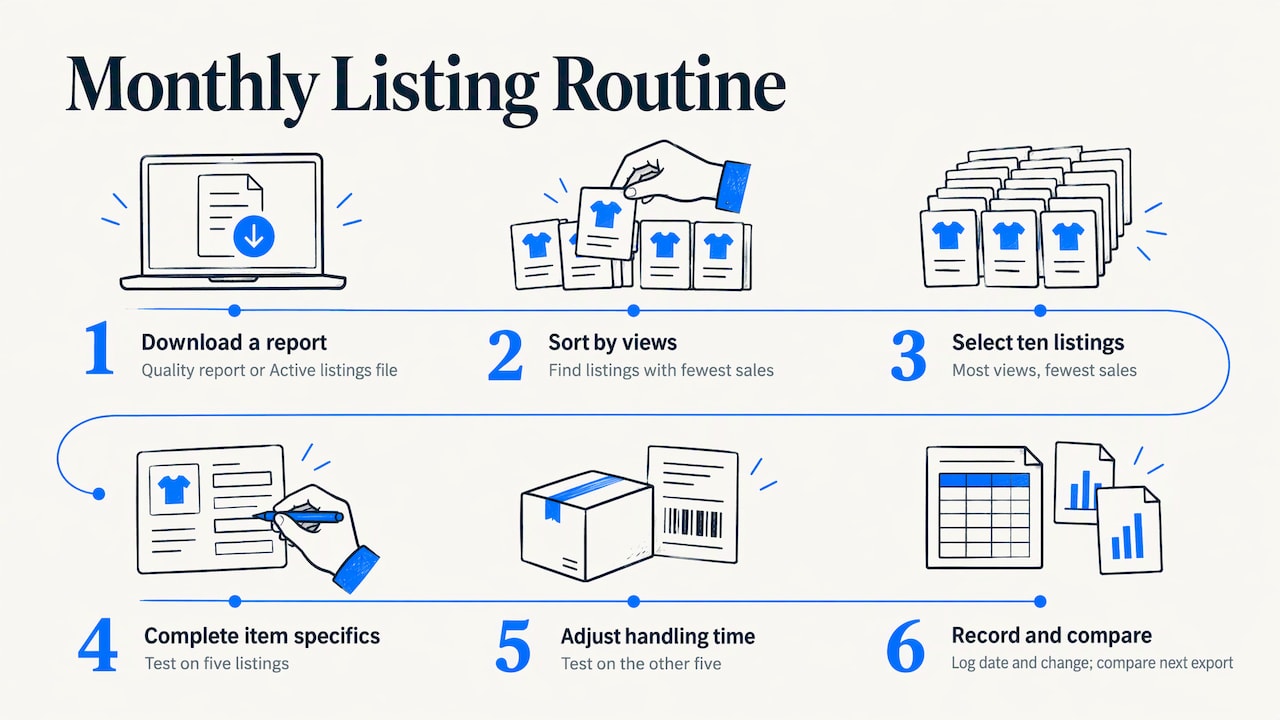
A routine you will actually keep beats an elaborate one. Once a month, download the quality report if you can see it, or the Active listings file if you cannot. Sort by views, pick the ten listings with the most views and the fewest sales, and apply one change type to each group, such as completing item specifics on five and adjusting handling time on the other five. Record the date and the change, then compare the next export. After two or three cycles you will know which fixes work for your category, and that knowledge is worth more than any single score. For deciding whether to hand this work to someone else, see our look at whether listing optimization services are worth paying for.
FAQ
Why can't I see the Listing Quality Report in Seller Hub?
It has been removed, restored, and moved several times, and sellers have reported missing links and download errors. Check under Performance in Seller Hub, then contact eBay Customer Support to be attached to any open technical ticket. Meanwhile, use the Active listings download from Reports.
Is the Listing Quality Report the same as the traffic report?
No. The traffic view summarizes impressions and views, while the quality report addresses the content of individual listings and offers recommendations. Use both: traffic shows where you lose attention, and the quality report suggests what to change.
What can I export from Seller Hub if the report fails?
The Reports Guide describes an Active listings download that includes price, quantity, sold quantity, views, watchers, bids, dates, category, condition, and ePID. That is enough to flag listings with views but no sales.
How often should I review listing reports?
Monthly works for most sellers, because it leaves enough time for changes to show up in views and sales. Always keep dated exports so you can compare before and after.
Sources
- Listing Quality Report, eBay Seller Centre (Australia)
- Seller Hub Reports Guide, eBay
- Seller Hub, eBay Canada help
- eBay Listing Quality Report Missing, Download Errors, Value Added Resource
- eBay Finally Rolls Out Listing Quality Report To All Sellers, Value Added Resource
- Product Detail Page Optimization: 2026 Seller Guide