

The eBay traffic report is the section of Seller Hub, under the Performance tab, that shows how often buyers saw your listings, how often they clicked, and how often a visit ended in a sale. Reading it correctly means comparing three numbers (impressions, click-through rate and sales conversion) against each other, because each one points to a different problem: visibility, presentation or offer.
This guide explains where the report lives, what each metric measures, the limits of the data, and how to turn a low number into a specific listing change. It also covers a related point that many sellers overlook: traffic quality matters as much as traffic volume, since a share of the buyers who arrive will return items, open false claims or never pay.
Where to find the traffic report in Seller Hub
Open Seller Hub and go to the Performance tab, then choose Traffic. eBay's own guidance describes the Traffic section as a way to review how popular your items are and which means of reaching buyers work best. You select the eBay site, set a time period, and then read the statistics for your listings.
A third-party walkthrough of the export process describes the same path: set the date range, choose to view by listing or by category, and use the Download button. Menu labels move around from time to time, so if you do not see exactly these words, look for Performance first and Traffic beneath it.
Traffic reporting has not always been available. EcommerceBytes reported in 2015 that Seller Hub's beta added Traffic reports, which sellers had lacked since eBay ended a previous analytics arrangement that summer. The report has been revised several times since, and sellers have complained about changes in how the data is displayed, so treat screenshots in older tutorials with caution.
Downloading the data
The on-screen view is useful for a quick check, but the download is what lets you compare periods. In the Reports tab of Seller Hub you can also schedule recurring downloads, which is the simplest way to build your own history. The reason to do this is practical: the programmatic version of the report, the Sell Analytics API, only returns data for listings that were active or sold in the last 90 days, or unsold in the last 30 days. Anything older has to come from files you saved yourself.
The metrics you will see and what each one measures
The report is built around a small set of metrics. The definitions below follow eBay's own description in its Seller Hub guidance, and the developer-facing documentation lists the same family of fields.
| Metric | What it counts | What it tells you |
|---|---|---|
| Impressions | Times your listing appeared in search results or on other eBay placements | Whether eBay is showing the listing at all |
| Click-through rate (CTR) | Page views from eBay divided by impressions, excluding external views | Whether the title, price snippet and main image attract a click |
| Page views | Visits to the listing page | Interest once the buyer has arrived |
| Sales conversion rate | Quantity sold divided by page views | Whether the listing page and offer persuade the buyer to buy |
eBay also separates organic from promoted impressions, and breaks impressions down by placement, for example the top of search results versus lower positions. That split matters when you run Promoted Listings, because paid exposure can flatter the totals. Industry coverage has noted that some sellers report visits increasing by as much as 60% with promotion compared with non-promoted listings, which is a seller-reported figure and not a guarantee. Look at organic and promoted traffic separately before deciding that a listing is performing well on its own merits.
How to diagnose a listing from three numbers
The most reliable way to use the report is to read the funnel from left to right and stop at the first weak step. Practitioners commonly recommend this approach: high impressions with a low click-through rate point to the title and main image, while high page views with low conversion point to price or offer details.
Low impressions
If few people see the listing, the problem is discoverability. Check that the title contains the words a buyer would actually type, that the category and item specifics are complete, and that the listing has not simply ended or sat unrenewed. Our guide to eBay SEO and the ranking signals behind Cassini walks through the fixes worth making before you spend money on promotion. If you want a quick baseline, the free listing analyzer scores a listing so you can see where the gaps are.
High impressions, low click-through rate
Here eBay is showing the listing, but buyers scroll past. Test the following, one change at a time so you can attribute the result:
- Move the most important keyword, such as brand, model or part number, to the start of the title.
- Replace the main image with a cleaner, brighter shot on a plain background.
- Check the total price including shipping against the nearest competing results.
- Confirm that the condition and any free-returns badge are visible in the search snippet.
Wait long enough between changes to collect a meaningful number of impressions. A listing with a few hundred impressions will swing widely on chance alone.
Good views, weak conversion
When buyers open the page and still leave, review what they see once they arrive: the price relative to sold comparables, shipping speed, return terms, the description, and whether the photos answer obvious questions. For parts and compatibility-sensitive items, an unclear fitment statement is a frequent reason a buyer hesitates. Our walkthrough on optimizing eBay listings and catching visibility gaps covers a seven-step review that fits this stage.
What the traffic report cannot tell you
The report has real limits, and knowing them prevents wrong conclusions.
- No search terms. Seller Hub gives aggregate figures such as impressions and click-through rate, but eBay does not show the specific search terms buyers used to find an individual listing, which often surprises new sellers. You infer keywords from titles and sold results, not from the report.
- Limited history. As noted above, programmatic access covers a short window, so a seasonal comparison needs your own archive.
- No buyer quality information. The report counts visits and sales. It says nothing about whether the resulting buyer will pay without dispute, keep the item or behave reasonably after delivery.
- Small samples. Niche items may have only dozens of views a week. Compare four-week periods rather than single days.
A forum thread among sellers shows how often the question arises: a new seller with about a month and a half of sales asks whether their traffic report looks decent. There is no universal benchmark, because click-through and conversion rates vary heavily by category, price and seasonality. The useful comparison is your own listing against its previous period, or against a similar listing in your own store.
A worked example
Suppose you sell replacement dishwasher parts and one listing shows the following over four weeks. These figures are illustrative, not eBay benchmarks.
| Listing | Impressions | Page views | CTR | Sold | Conversion |
|---|---|---|---|---|---|
| Door latch, Model A | 12,000 | 180 | 1.5% | 9 | 5.0% |
| Pump assembly, Model B | 2,500 | 125 | 5.0% | 1 | 0.8% |
The first listing has plenty of visibility but a weak click-through rate, so the title and main image deserve attention, perhaps adding the compatible model numbers up front. The second attracts clicks at a healthy rate yet rarely sells, which suggests checking price, shipping cost and whether the fitment information is clear. Two listings, two different fixes, and neither would be obvious from sales totals alone.
Our perspective: traffic is only useful if the buyers are
We build tools for eBay sellers, and the pattern we see most often is that sellers measure everything about the top of the funnel and almost nothing about the buyer at the end of it. The traffic report is a good instrument for visibility and presentation. It is silent on who buys.
That gap matters because of how feedback works. eBay moved to a one-way feedback system to protect the reliability of ratings, since buyers had felt pressured to leave positive feedback to avoid retaliation. The change addressed a real problem, but it also means sellers cannot leave negative feedback about a buyer who abuses returns or files false claims, so a repeat offender can move from one seller to another with no visible record. Raising impressions and conversion brings more of every kind of buyer to your store, including these.
Our approach has three parts. First, report problem buyers with evidence so the behavior is recorded with reasons and dates. Second, review those reports before they are shared, and separate private blocks from public ones, with an appeals route so that errors can be corrected. Third, sync the result to eBay's own Blocked Buyers list so the protection works inside the platform you already use. We would not claim this removes fraud, and we would not suggest a blacklist replaces eBay's own policies. It is one more layer, and the traffic report is a natural moment to add it: when you see a listing finally gaining views, check who is buying.
On feedback that already exists, eBay's policy has defined cases of removal, such as buyer-requested cancellations or feedback that breaks policy rules, and the seller help page explains that qualifying feedback is removed within 24 hours of notice. Check your eligibility before filing, using our feedback removal guide, and consider replying to the rest thoughtfully.
— Mykola
Pairing traffic data with buyer screening
A practical weekly routine takes about half an hour once it is set up.
- Export the traffic report for the last four weeks and note the three weakest listings at each funnel stage.
- Make one change per listing and record the date.
- Review the sales and orders for the same period, using something like the orders dashboard and sales statistics to see revenue by day, week, month and state.
- Check any unfamiliar buyer with a buyer status lookup before you ship a high-value item or accept a risky offer.
- Report any buyer who has opened a false claim or abused a return, attaching your evidence, through the community report form.
The point of step three and four is simple: a conversion rate that rises because of a new title is good news only when the extra orders are completed cleanly.
Do not buy traffic before you fix the listing
Promoted Listings can raise impressions, but they raise the cost of each sale if the underlying click-through and conversion are poor. We compared a no-cost option in our article on auto-relisting versus Promoted Listings, which explains how renewing ended items affects visibility. If you use AI to rewrite titles and descriptions, our overview of how to choose an eBay AI listing tool lists the criteria that matter, such as accuracy of item specifics and whether the tool works inside eBay.
How SafeBay fits into this workflow
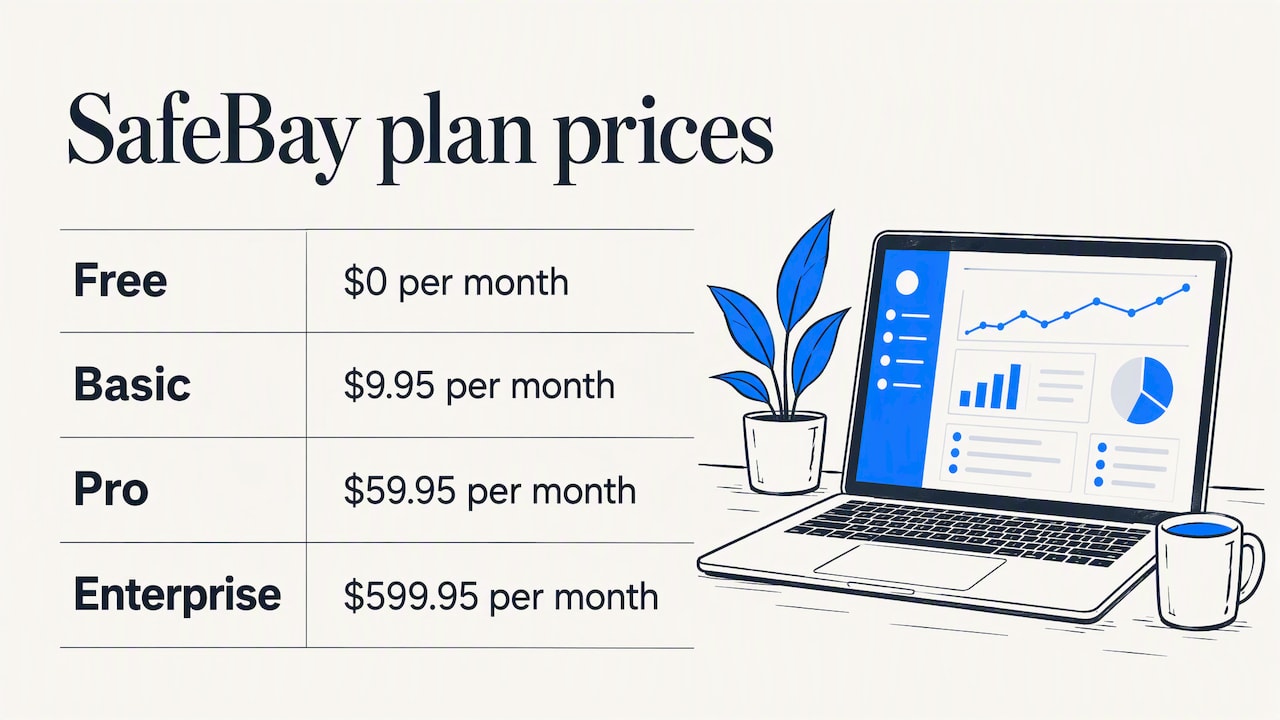
SafeBay is a toolkit for eBay sellers. The SafeBay Companion Chrome extension syncs the community blacklist to your eBay Blocked Buyers list, shows buyer risk alerts, and offers AI listing generation and proofreading directly on eBay. Pricing is published on the SafeBay plans page: Free at $0 per month with basic features and limited AI usage, Basic at $9.95 per month, Pro at $59.95 per month and Enterprise at $599.95 per month. You can start with the Companion extension and the free seller tools before deciding whether a paid plan is needed. For the buyer side specifically, see how the buyer blacklist separates private and public blocks.
FAQ
Where is the eBay traffic report?
It is in Seller Hub under the Performance tab, in the Traffic section. You choose the eBay site and a time period, and you can download the data to a file. Labels change occasionally, so look for Performance first if the menu looks different.
What is a good click-through rate on eBay?
There is no single figure that applies to every seller, because rates vary by category, price and season. Compare a listing with its own earlier period and with similar listings in your store. A listing with many impressions and a much lower rate than its siblings is the one to fix first.
Can I see which keywords buyers used to find my listing?
Not in Seller Hub. eBay reports aggregate figures such as impressions and click-through rate, but not the search terms behind an individual listing. You can approximate keyword demand by studying titles of similar sold items.
How long does eBay keep my traffic data?
The API version of the report covers listings active or sold in the last 90 days, and unsold listings from the last 30 days. For longer comparisons, download your reports on a schedule and keep the files.
Does more traffic mean more risk from problem buyers?
More views usually mean more orders, and a small share of any buyer pool will abuse returns or file false claims. Screening unfamiliar buyers and reporting abuse with evidence limits repeat exposure without slowing normal sales.
Sources
- How to monitor your business in Seller Hub (eBay)
- eBay Seller Hub Provides Long-Missing Traffic Reports (EcommerceBytes)
- Traffic Report API documentation (docs.rs)
- Traffic Report (merchantCENTRAL)
- How to export CSV data from eBay Seller Hub (clariBI)
- eBay briefs sellers on new features (EcommerceBytes)
- eBay Seller Protection FAQ
- eBay feedback policy