

Sell-through rate is the percentage of available listings that sold in a chosen time window: (units sold ÷ total listings or stock on hand) × 100. For eBay sellers, the one practical takeaway is that STR works as a sourcing diagnostic, not a standalone score. Check your sell-through rate on eBay alongside median sold price and sales velocity before you buy more stock.
TL;DR:
- Calculate market STR by dividing sold listings by sold plus active listings, using identical item, condition, and date filters for both counts.
- No universal eBay benchmark exists; compare candidates within the same category and season, then check median sold price and weekly sales velocity.
- A very high rate can reflect thin supply or underpricing, while a low one may signal oversupply, weak demand, or mismatched searches; verify filters first.
- Buy only when the STR fits its category and the median sold price covers fees and shipping; stop sourcing items with persistent oversupply.
- For stalled listings, compare same condition pricing with the median, assess active competitors against weekly sales, and change one listing feature at a time.
Table of Contents
- What sell-through rate tells you about an item
- How to calculate sell-through rate on eBay step by step
- What a good sell-through rate looks like
- Common mistakes when checking sell-through rate on eBay
- Practical ways to improve sell-through rate without hurting margins
- Tools and reports for tracking sell-through rate
- Why I treat sell-through rate as a gate, not a goal
- How SafeBay speeds up your sell-through rate checks
- FAQ
- Sources
What sell-through rate tells you about an item
The standard formula, as Shopify explains it, is total sales divided by stock on hand, times 100. Shopify also recommends measuring over a window that suits the product. Inside Supply Management describes the same metric as the share of inventory sold in a period and separates it from inventory turnover, which measures how often stock cycles through, not what share of a specific supply cleared.
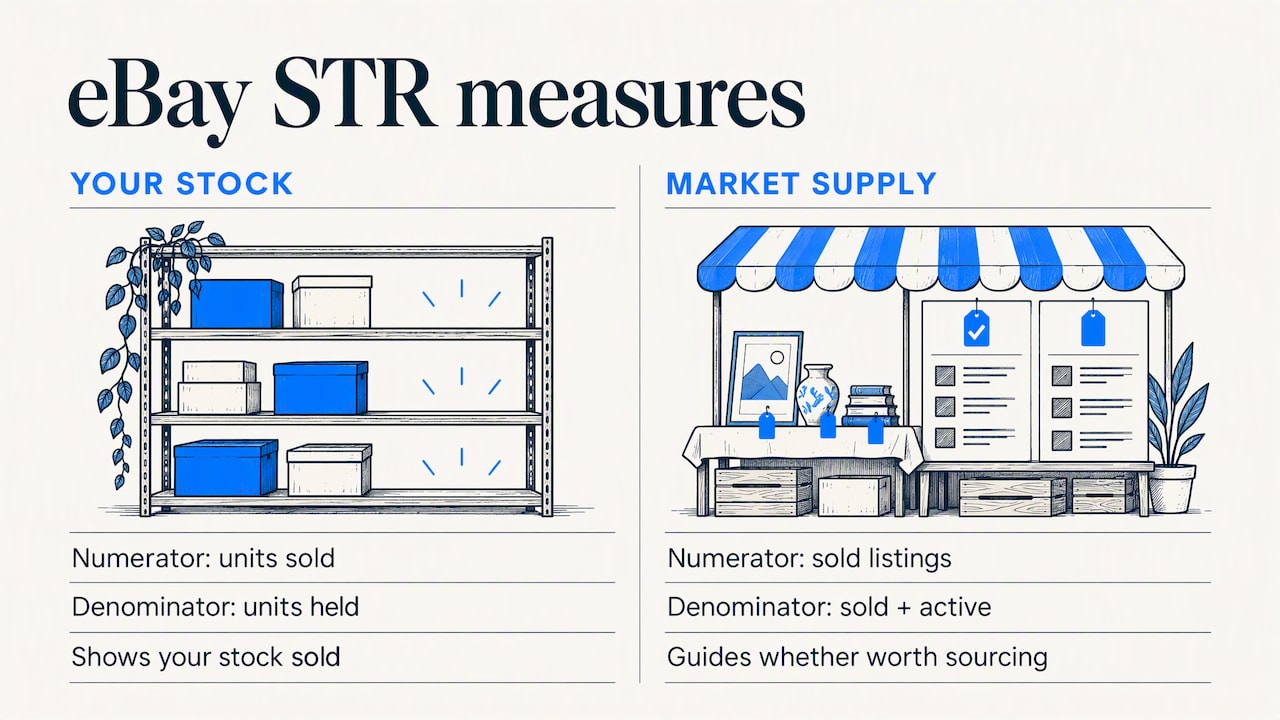
On eBay, two variants are common. The first uses your own stock: units sold divided by units you held. The second uses the market: sold listings divided by sold plus active listings for the same item. The second tells you whether an item is worth sourcing at all.
Window choice matters. Choose a window suited to the category. Fast-moving items may need a shorter window, while slower items such as collectibles or vintage goods may need a longer one.
A percentage alone misleads. A high STR on an item that sells for a few dollars may be worth less than a lower STR on an item with strong margins. Always read STR next to median sold price and how many units move per week.
How to calculate sell-through rate on eBay step by step
You can produce a reliable number in a few minutes with a consistent workflow. The goal is to compare like with like at every step.
- Search for the exact item using a precise title or model number, and set the category.
- Apply the condition filter you plan to sell (new, used, for parts) and keep it fixed for every later step.
- Tick "Sold items" and choose your date range. Write down the sold count.
- Clear the sold filter, keep every other filter unchanged, and note the number of active listings.
- Add sold and active listings to get total listings for the item.
- Divide the sold count by that total and multiply by 100.
- Record the result, the date range and the median sold price in a simple sheet so you can compare candidates later.
For example, divide the sold count by the combined number of sold and active listings, then multiply by 100 to get the STR. This is an illustration, not market data.
Pro Tip: Use Product Research (Terapeak) in Seller Hub for the sold side. It applies your filters and date range consistently, which removes most hand-counting errors.
What a good sell-through rate looks like
There is no single eBay-wide benchmark, and we do not quote one here. Retail guidance gives rules of thumb, and Shopify's article is a useful starting point for how merchants think about healthy ranges. Treat any such range as a starting reference, then calibrate against your own category.
Several factors shift what counts as healthy:
- Category speed: consumables, accessories and common electronics clear faster than furniture, antiques or niche collectibles.
- Seasonality: a holiday item can show a strong rate in November and a poor one in February without anything being wrong with the product.
- Product life cycle: a newly released item often sells quickly, while a discontinued or superseded model slows as buyers move on.
- Marketplace conditions: eBay's second quarter 2026 results show how buyer activity and GMV shift over time, which is a reminder that last year's benchmark may not describe today's demand.
Extreme readings need a second look. A very high STR can mean you or competitors are underpriced, so compare it with median sold price before celebrating. A very low STR can mean oversupply, weak demand or a mismatched search, so confirm your filters first.
Common mistakes when checking sell-through rate on eBay
Most bad STR numbers come from the search, not the product. Filter mismatches are the usual cause. If your sold search includes parts-only units and your active search does not, the ratio is meaningless. The same applies when a sold count mixes single units with multi-item bundles.
Window errors are the second source. Comparing a sold count with an active snapshot from a different time window, or checking different items over different date ranges, makes candidates look better or worse than they are. Pick one window per comparison and keep it.
Two metrics are also easy to confuse:
- Sell-through rate is the ratio of sold units to available supply.
- Sales velocity is how many units move over time.
A slow category can have a high STR because supply is thin, and a busy category can have a low STR because everyone lists the same item. Velocity tells you how fast money returns, and STR tells you how crowded the field is.
When a result disappoints, run a short diagnostic:
- Confirm the sold and active searches use identical filters and the same date range.
- Check whether your own listing is the problem: weak title, poor photos, unclear condition.
- Compare your price with the median sold price for the same condition.
- Look at the number of competing active listings against the weekly sold count.
- If your listing is sound and the market is oversupplied, stop sourcing that item rather than discounting it further.
Practical ways to improve sell-through rate without hurting margins
Improving STR is mostly about removing friction for the buyer, then testing price carefully. Shopify's guidance points to smarter buying, promotions, bundles and demand forecasting, and each of those translates directly to eBay.
- Tighten the listing. Put the exact model, brand and key attributes in the title, add clear photos of every angle and flaw, and state the condition plainly. For parts and accessories, a compatibility list answers the buyer's first question.
- Test price in small steps. Move the price a few percent toward the median sold price and watch results over a full window before changing it again.
- Bundle slow stock. Pair a slow item with a fast one, or sell multiples as a lot, to clear units without cutting the headline price.
- Use promotions sparingly. Reserve discounts or promoted listings for items with proven demand and healthy margins. Our post on auto-relist versus promoted listings covers the trade-offs.
- Delist what does not move. Remove SKUs that keep failing across your chosen review windows so your effort goes to faster categories.
- Audit on a schedule. Review STR monthly, keep a relist cadence, and size new purchases to what the data supports. A daily listing habit, like the one in our guide to listing something every day, makes these reviews easier.
Pro Tip: Change one variable at a time, either price or title or photos. If you change all three, you will not know which one moved the number.
Tools and reports for tracking sell-through rate
You have three realistic options, and the right one depends on how often you check.
A manual search costs nothing and works for a one-off sourcing decision. It is also where most filter and date mistakes happen.
Product Research (Terapeak) inside Seller Hub gives you historical sold data with consistent filters, which suits repeat checks and trend views over longer periods.
Third-party calculators and seller analytics tools speed up repeated checks, and some add auto-relist and sales analytics. Their output is only as good as the inputs, so verify what they count.
Whatever you use, verify these points before trusting a number:
- The time window matches the one you used for other candidates.
- The condition filter (new, used, parts) is the same for sold and active counts.
- The search matches your exact SKU or model, not a looser keyword.
- Bundles, lots and variations are handled consistently.
- The tool's active-listing snapshot is current, not cached from an earlier date.
Why I treat sell-through rate as a gate, not a goal
My rule is simple: before I buy stock, the item needs both a minimum STR for its category and a target median sold price that leaves room for fees and shipping. If either fails, I pass. The pass I regret least was a slow-moving accessory I kept restocking because it sold occasionally. Once I counted active supply against sold units, the rate was weak, and dropping the SKU freed cash for items that cleared. Pair this with a regular inventory audit, because a rate that was healthy last quarter can slip as competitors list the same item.
— Mykola
How SafeBay speeds up your sell-through rate checks
If manual STR checks eat your listing time, we built tools to take over the repetitive parts. Our free plan lets you start without paying, and our free eBay seller tools are a low-friction way to try the workflow first.
- Sales analytics to review what sold and what stalled.
- An AI listing generator and proofreader that works directly on eBay's platform.
- Auto-relist for ended items.
- The free SafeBay Companion Chrome extension, which adds our tools to your eBay workflow.
Try us when STR audits are taking too long or when you want listing improvements applied automatically. Start on the free plan at Safebay, then upgrade only if you need higher limits.
FAQ
How do you calculate sell-through rate?
Divide units sold by units available in the same period, then multiply by 100. Shopify gives the formula as total sales divided by stock on hand, times 100. On eBay, use sold listings divided by sold plus active listings for the same item and date range.
What is a good sell-through rate on eBay?
It depends on the category, the season and the item's life cycle, so no single number fits everyone. Compare candidates against each other and against your own history. Always read the rate next to median sold price and sales velocity.
Does a high sell-through rate mean an item is a good buy?
Not by itself. A very high rate can signal underpricing or thin supply, which may not hold once you add stock. Check the median sold price and how many units move per week before buying.
How is sell-through rate different from sales velocity?
Sell-through rate is the share of available supply that sold, while sales velocity is how many units move over time. Use STR to judge how crowded an item is and velocity to judge how fast cash comes back.
Sources
- Sell-Through Rate (STR): How to Calculate & Improve It (2026) — Sell-Through Rate Is Total Sales Divided by Stock on Hand, Times 100; A Higher Rate Means Inventory Sells Before It Sits, and You Can Improve It With Smarter Buying, Promotions, Bundles, and Demand Forecasting - Shopify
- eBay Inc. Reports Second Quarter 2026 Results - eBay Inc.