
Excluded locations are the setting that tells eBay which countries, regions or domestic areas you will not ship to, and you control them in three places: Shipping Preferences for all listings, the Shipping section of a single listing, and a business policy. They stop checkout from a blocked address, but they do not stop a problem buyer who ships to an address you allow. That second job belongs to a buyer blocklist, which is why we pair exclusions with SafeBay's community blacklist and its free Chrome extension, which syncs to the eBay Blocked Buyers list.
This guide covers the setup, the reasons exclusions fail, how they interact with eBay International Shipping, and the related out-of-stock option that decides what happens to your Good 'Til Canceled listings at zero quantity.
What excluded locations do and do not do
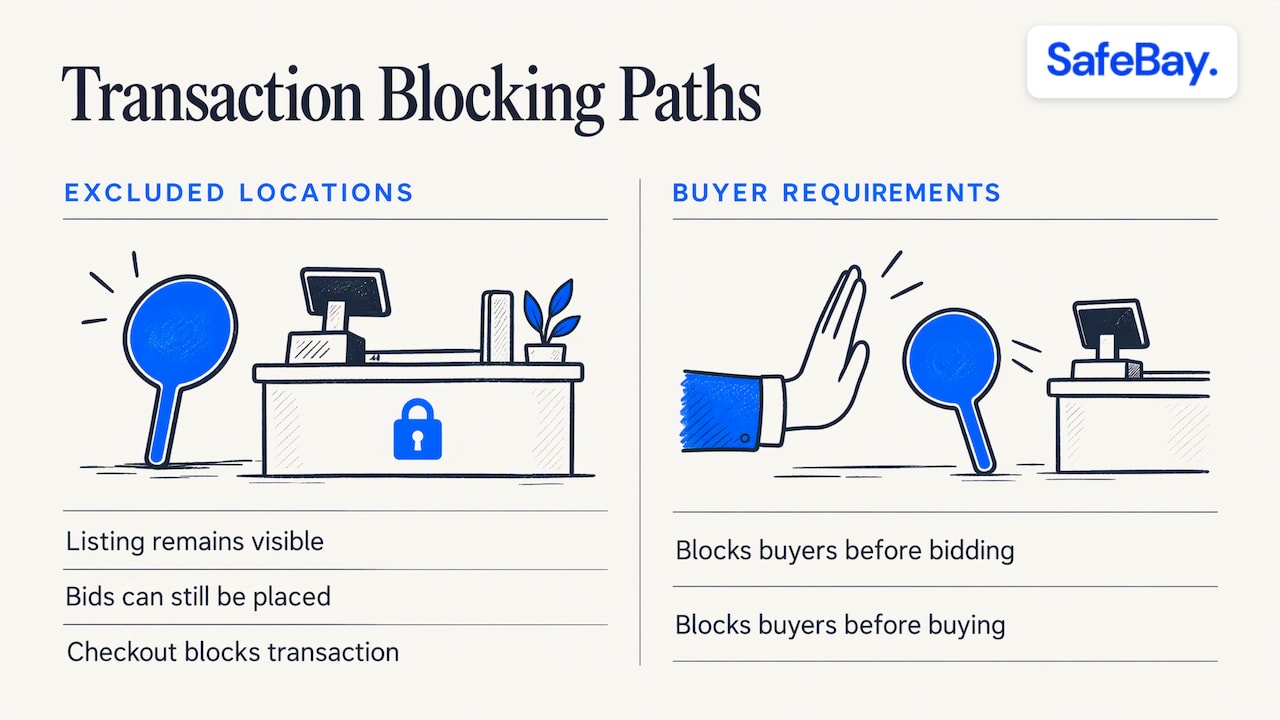
An excluded location is a country, region or domestic area where you decline to ship. According to eBay's buyer requirements help page, you can set exclusion lists for domestic regions and for international countries and regions, either as a default for all active listings or for individual listings. A buyer whose address falls in an excluded area cannot complete checkout.
The distinction that trips up many sellers is visibility. eBay's International selling policy explains that listings may appear on the same or a different eBay site depending on your shipping settings, so buyers in excluded places can still see the listing but cannot bid or buy. The exclusion blocks the transaction, not the page view.
The same buyer requirements page notes that a buyer may still bid or buy before checkout unless you add buyer requirements as well. That has a practical consequence for auctions: a bid from an excluded area can still be placed, and the problem appears only when the winner tries to pay. Buyer requirements close that gap by blocking those buyers up front.
Where to set exclusions
eBay's International selling policy describes three levels, and choosing the right one saves you from editing hundreds of listings later.
Default for all listings
Go to Shipping Preferences, select Edit next to Exclude shipping locations, and choose the countries or regions you will not serve. This applies to your listings as a standing default, which suits sellers whose items share the same restrictions, such as batteries or liquids that a carrier will not move to certain destinations.
A single listing
In the listing form, open the Shipping section and set the exclusions for that item only. Use this for the exception: an oversized appliance part you can ship domestically but not across a border, or a high-value item you will only send to the lower 48 states.
For domestic limits, think about what your carrier and your own risk tolerance actually allow. Rules about PO box delivery restrictions are a common example of why a seller might narrow a delivery area for specific items, and the per-listing setting is where that narrowing belongs.
Business policies
If you use business policies, eBay lets you exclude locations inside a shipping policy, and the exclusions then apply to every listing that uses the policy. For a catalog of appliance parts with a small number of shipping profiles, this is the cleanest approach: change the policy once and every listing that uses it follows.
| Level | Where | Best for |
|---|---|---|
| All listings | Shipping Preferences > Exclude shipping locations | Restrictions that never change |
| One listing | Shipping section of the listing form | One-off or heavy items |
| Policy | Business shipping policy | Catalogs organized by shipping profile |
When excluded locations are not working
The most common report from sellers, and the first result in searches for this problem, is that a country they excluded still receives orders. The usual cause is eBay International Shipping.
According to eBay's International Shipping Seller Center page, eligible items may ship through the program to locations you have excluded, unless you turn the eBay International Shipping toggle off. You find it under Account Settings > Shipping Preferences > Edit next to Exclude shipping locations. With the toggle off, your exclusions apply to all listings regardless of shipping service.
A short diagnostic
- Open Shipping Preferences and look for the enrollment status. The Seller Center page says it shows "Enrolled" when your account participates.
- If you are enrolled and want your own exclusions to govern, turn the toggle off in the Exclude shipping locations editor.
- Open one affected listing, choose Edit, and check that the excluded locations box lists every international location you intended before you revise it.
- If the Exclude shipping locations editor shows an empty list or the option is missing, try another browser or computer, update the browser, or clear cookies and cache. Sellers in a seller forum thread report this fixing the editor.
What eBay International Shipping covers
The same Seller Center page states that the program currently accepts only U.S. sellers, displays eligible listings automatically based on category, covers items valued up to $2,500 (excluding taxes, duties and delivery fees), and requires the item to be physically in the United States. Eligible accounts are enrolled automatically and notified by email and My eBay Messages, so a setting you never chose can be the reason your exclusions appear to fail.
Two further details matter if you also ship internationally yourself. Sellers who offer additional self-shipped international services must manually remove countries that cannot import their items in the Exclusions section of My eBay. And the program is available for Puerto Rico as an expanded domestic location: a seller who cannot ship there for any reason must opt out of eBay International Shipping entirely, according to the Seller Center page.
Why an address filter is only half the protection
Exclusions answer one question: where will this item go? Return fraud and false claims rarely depend on geography. A buyer in an allowed state can file an item-not-as-described claim, return a different item, or open a case that costs you a sale, and no excluded location stops that.
eBay's buyer requirements add some behavior-based filters. You can block buyers who have a history of canceled orders for non-payment or who are winning or have bought a specified number of your items in the last 10 days, and you can stop blocked buyers from contacting you. You can apply these to active and future listings or to future listings only. Our guide on how buyer requirements work and where they stop walks through the settings in detail.
The gap is history across sellers. A buyer who defrauded another seller last month arrives at your store with a clean record from your point of view. That is the problem SafeBay was built for: sellers report adverse buyer behavior with evidence, the reports are reviewed and shared among the community, and the SafeBay Companion extension syncs the resulting blocks to your eBay Blocked Buyers list. Each entry keeps its reason and date, private and public blocks are kept separate, and buyers can appeal, so the list stays accountable.
If you want to see how a bidder looks before you ship, the buyer status check shows the risk picture, and our list of buyer red flags helps you read the signals that no setting captures. For the mechanics of the native list, see how to block buyers on eBay.
The out-of-stock option for Good 'Til Canceled listings
Sellers who search for exclusions often need the out-of-stock policy at the same time, because both are listing-level controls that affect who can buy and when. eBay's multi-quantity listings page describes how it works.
Without the option, a listing ends when its quantity runs out. With it enabled, when quantity reaches 0 the listing stays active but is hidden from search results, and it reappears when you increase the quantity. You can still end the Good 'Til Canceled listing at any time. The page also says the option may help protect against a transaction defect for running out of stock.
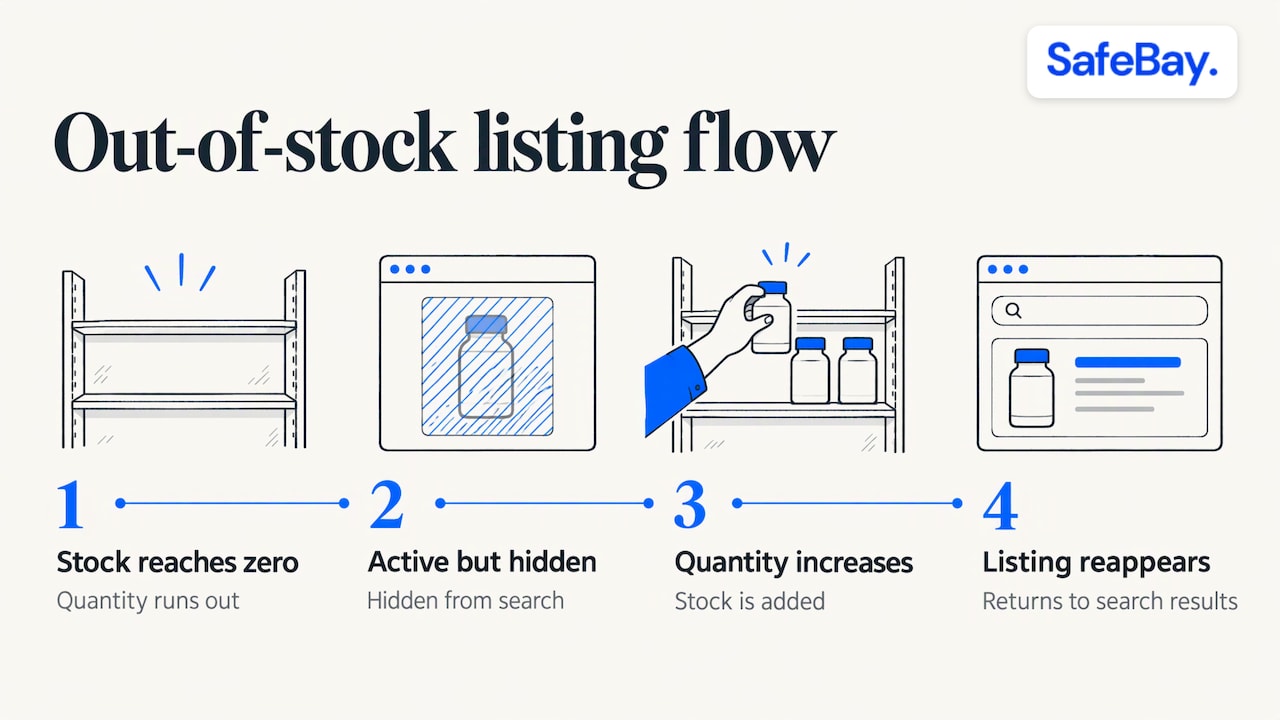
Turning it on
In Selling preferences, under Multi-quantity listings, select the toggle beside "Listings stay active when you're out of stock". It applies to all existing and future bulk listings until you disable it.
Restocking
Find the listing in My eBay or Seller Hub, choose Edit and update the quantity. Adding stock to the existing listing preserves its sales history and Best Match ranking, which a brand-new listing would have to rebuild. For appliance parts sellers whose fast-moving SKUs sell out and return with each supplier shipment, this is the main reason to use it.
Fees
Good 'Til Canceled listings incur a monthly insertion fee until the items sell or the listing ends. If quantity is 0 for an entire billing period with the option enabled, you may qualify for an insertion fee credit and an advanced listing upgrade fee credit. eBay ends the listing if quantity stays at 0 for 180 consecutive days, so a part you will not restock should be ended deliberately.
A practical routine for sellers
- Set default exclusions in Shipping Preferences for destinations you never serve.
- Decide about eBay International Shipping and set the toggle to match your intent.
- Use per-listing or policy exclusions for exceptions.
- Add buyer requirements so excluded-area buyers are stopped before bidding.
- Sync a behavior-based blocklist so repeat offenders cannot reach your listings.
- Enable the out-of-stock option for multi-quantity Good 'Til Canceled listings and restock through Edit.
Two things are worth adding for higher-value orders: signature confirmation and an understanding of what eBay Seller Protection covers. Exclusions reduce undeliverable orders, but protection against a false claim depends on how you document and ship.
Where SafeBay fits
SafeBay's Free plan costs $0 per month and includes basic features with limited AI usage. Basic is $9.95 per month, Pro is $59.95 per month, and Enterprise is $599.95 per month, with higher limits and advanced features on the paid tiers. The Companion extension that syncs blocks to eBay's Blocked Buyers list is free, and the same toolkit generates listing descriptions with AI inside eBay, which helps when you are rewriting shipping and compatibility details across a catalog. Start from the SafeBay plans or go directly to Companion.
You can also report a problem buyer with evidence, which is how the shared list grows, and use the free seller tools for titles and other listing work.
Perspective
Excluded locations are a geographic tool, and eBay sellers have treated them as a fraud tool because nothing else was available. Since 2008 sellers have been unable to leave negative feedback for buyers, so there is no public record of who files false claims or abuses returns.
We built SafeBay around that gap. A report carries evidence, a reviewer checks it, and the result is shared so that a buyer who defrauds one store is blocked in others. Private and public blocks stay separate, reasons and dates stay on record, and buyers can appeal, because a blocklist that cannot be corrected loses the trust of the sellers who rely on it.
Our recommendation is to use both layers: exclusions for where you ship, and a community-vetted blocklist synced through the free Companion extension for who you ship to.
Mike Brydko
FAQ
How do I opt out of eBay International Shipping so my exclusions apply?
Go to Account Settings > Shipping Preferences, select Edit next to Exclude shipping locations, and turn the eBay International Shipping toggle off. With it off, your exclusions apply to all listings regardless of shipping service. Eligible accounts are enrolled automatically, so check the toggle after any notice from eBay.
Can a buyer in an excluded location still see my listing?
Yes. Exclusions block bidding and buying, not visibility, according to eBay's international selling policy. Buyers with an excluded delivery address cannot complete checkout, and buyer requirements can stop them earlier.
What happens when a Good 'Til Canceled listing reaches zero quantity?
Without the out-of-stock option, the listing ends. With it enabled, the listing stays active but is hidden from search until you raise the quantity through Edit. eBay ends it if quantity stays at 0 for 180 consecutive days.
Do exclusions stop return fraud?
They limit where orders can go, but fraud depends on buyer behavior rather than address. A behavior-based blocklist such as SafeBay's, synced to your eBay Blocked Buyers list, addresses the buyer instead of the location.
Sources
- Setting buyer requirements | eBay
- International selling policy | eBay
- eBay International Shipping | Seller Center
- Multi-quantity listings and listings with variations | eBay
- Ebay international settings not enrolled, but receiving international orders | Sellers Ask Sellers
- PO Box Delivery Restrictions: What Ships, What Doesn't