To calculate eBay fees, take the total amount of the sale, multiply it by the final value fee percentage for your category, and add the fixed per-order fee, which is $0.30 for orders of $10.00 or less and $0.40 for orders over $10.00. Then add any insertion fees, ad fees and shipping label costs to see what you actually keep. This guide walks through each component, a worked example with real arithmetic, and the habits that stop fee surprises. If you prefer to skip the arithmetic, our free eBay fee calculator does the same steps for you.
The eBay fee formula in plain terms
eBay's fee structure has two phases. Insertion fees apply when a listing is created, and final value fees apply when an item sells, as eBay's seller fee overview describes. For most sellers the final value fee is the one that matters, because it is charged on every sale.
The final value fee has two parts:
- A percentage of the total amount of the sale. The percentage depends on the category, so a seller of electronics and a seller of clothing will not pay the same rate.
- A fixed per-order fee: $0.30 for orders of $10.00 or less, $0.40 for orders above that, per eBay's selling fees page.
Written as a formula:
Final value fee = (total sale amount x category rate) + per-order fee
The category rate is the variable you must look up. eBay publishes current rates by category on its selling fees page, and because rates can change, check that page before you price a new product line rather than relying on a figure remembered from last year.
What counts toward the total sale amount
The most common calculation mistake is applying the percentage to the item price alone. eBay bases the final value fee on the total amount of the sale, which includes the item price, handling charges, shipping collected from the buyer (with some exceptions), sales tax and other applicable fees.
In practice that means:
- Item price: the listed price or the winning bid.
- Shipping charged to the buyer: included in the fee base in most cases, so "free shipping" listings that fold the cost into the item price are charged on the same total.
- Handling charges: included.
- Sales tax: included in the total used for the calculation.
This is why a $50 item with $8 shipping costs more in fees than 13.6% of $50 would suggest. The fee base is larger than the sticker price.
A worked example with a final value fee
eBay's own documentation gives a useful reference point. In its example, an auction-style listing with a total amount of sale of $424 carries a final value fee of 13.6% plus $0.40, producing total fees of $58.41 and seller proceeds of $341.59, excluding shipping costs. The 13.6% there is eBay's example rate for that category and should not be assumed for yours.
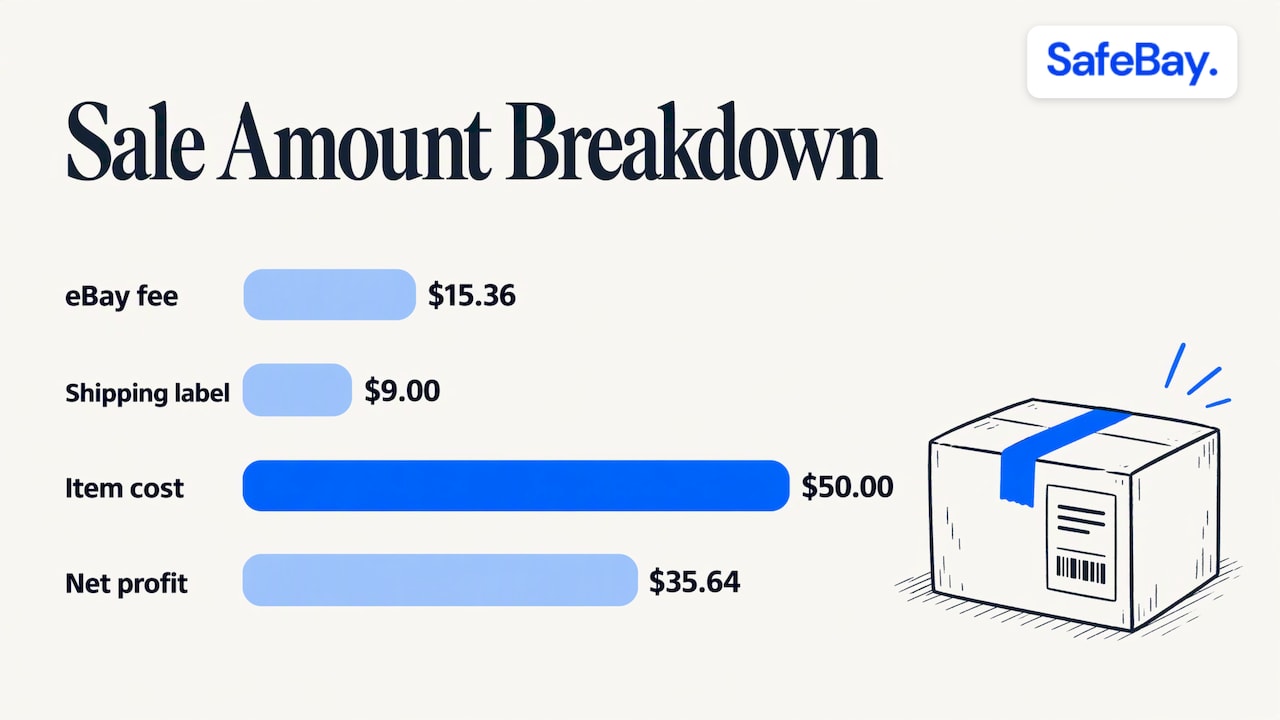
Now a simpler illustration of our own, using the same 13.6% purely as a placeholder rate and ignoring sales tax:
| Line | Amount |
|---|---|
| Item price | $100.00 |
| Shipping charged to buyer | $10.00 |
| Total sale amount | $110.00 |
| Final value fee percentage (13.6% x $110.00) | $14.96 |
| Per-order fee (order over $10.00) | $0.40 |
| Total final value fee | $15.36 |
| Proceeds before shipping label | $94.64 |
| Shipping label cost (assumed) | $9.00 |
| Proceeds after label | $85.64 |
| Cost of the item to you (assumed) | $50.00 |
| Net profit | $35.64 |
The margin on this sale is 35.64 divided by 110.00, or roughly 32% of the total sale amount. Had you calculated 13.6% on the $100 item price alone, you would have under-counted the fee by $1.36 on a single order. Across hundreds of orders that gap becomes real money.
Insertion fees: when listing is not free
Most casual sellers do not pay to list. eBay states that listing is free for most casual sellers, but if you list more than 250 items per month, you start paying a $0.35 insertion fee per listing, with category exclusions.
For a high-volume seller, this matters most on listings that do not sell. A relisted item that sits for weeks can generate repeated insertion fees without ever generating a final value fee. When you model profit across a catalog, count insertion fees against your sell-through rate rather than against sold items only. Our guide on sell-through rate for eBay sellers shows how to check that number before you source more stock.
Optional costs that change your real margin
The final value fee is the baseline. Optional listing upgrades, advertising programs and eBay Labels may also incur fees or costs, so a margin estimate that stops at the final value fee will usually be too optimistic.
Build a checklist for each product:
- Promoted listings or other ad fees: typically a percentage of the sale price when the sale comes through the ad. Model it as an extra line: item price x promotion rate.
- Listing upgrades: fixed charges that apply at the time of listing.
- Shipping labels: a real cost even when you charge the buyer for shipping. A sound ecommerce shipping strategy starts by deciding whether the buyer pays, you pay, or the cost is absorbed in the price.
- Refunds and returns: refunds to buyers and dispute fees are charged when they occur, as described in eBay's explanation of how fees are charged.
- Your own cost of goods: the purchase or production price, plus packaging.
The full profit formula becomes:
Net profit = gross sale amount - all eBay fees - ad fees - label cost - cost of goods
When each fee is charged
A frequent source of confusion is that your payout does not equal what the buyer paid. eBay explains that fees and selling costs are automatically deducted from the proceeds of your sales, and the timing depends on the type of charge:
| Charge type | When it is charged |
|---|---|
| Listing fees | At the time of listing, from Available and Processing funds |
| Transaction fees (such as final value fees and international fees) | At the time of sale, from the buyer's payment |
| Monthly fees | At the beginning of each month |
| Other selling costs (shipping labels, ad fees, refunds, dispute fees) | When incurred |
This timing is why a month with heavy listing and ad activity can look weaker in cash terms than the same month's sales suggest. Reconcile by order, not by deposit.
Where to see your actual fees in eBay
Calculations are estimates until you compare them with eBay's own records. eBay says you can view what you earned for each order after all fees and selling costs have been deducted in the Orders tab in Seller Hub, where the order details break down the buyer-paid amount and your earnings.
A practical routine:
- Estimate fees before you list, using the formula or a calculator.
- After the first few sales in a category, open the order details in Seller Hub and compare the real fee with your estimate.
- If the figures differ, check which components you left out: shipping in the fee base, sales tax, ad fees or a different category rate.
- Update your pricing template with the corrected assumptions.
For a longer walkthrough of every fee type, see our article on eBay fees and net proceeds, and for turning those costs into a listing price, our eBay pricing strategy guide.
Working backward: the price you need to charge
Sellers often know their target profit and need the listing price. Because the fee is a percentage of the total, the algebra is manageable. If your category rate is r, your fixed fee is f, your cost of goods and label is c and your target profit is p, then, ignoring ad fees and tax:
Total sale amount = (c + p + f) / (1 - r)
Using the placeholder rate of 13.6% (r = 0.136), a $0.40 fixed fee, $59.00 in goods and label costs and a $20.00 target profit: (59.00 + 20.00 + 0.40) / 0.864 = 79.40 / 0.864, which is about $91.90. That is the total the buyer pays including shipping, so subtract any shipping you charge separately to get the item price. If you run promoted listings, add the promotion rate to r.
Fee calculation habits that protect margin
- Use the total, not the item price. Always include shipping and tax in the fee base.
- Keep a category rate table. Rates vary by category, so record the rate for each product line and the date you checked it.
- Model ads as a separate scenario. Compare profit with and without promotion for each product.
- Count returns. A returned order is a sale with a fee, a label and often a refund, so build a return allowance into low-margin items.
- Review quarterly. eBay updates its fee schedule from time to time, and a stale assumption quietly erodes profit.
Fees are not the only threat to margin: transaction defects
Your fee estimate assumes the order completes normally. Orders that go wrong, through cancellations or unresolved buyer disputes, can add a transaction defect to your record. eBay's seller performance minimums for eBay.com include a maximum transaction defect rate of 2% of transactions within an evaluation period, so monitoring is an ongoing task. Watching your dashboard regularly, as eBay itself advises in its seller standards policy, lets you act before the next evaluation.
How to request defect removal
If a defect was not your fault, you have options. eBay says sellers who have listed or sold an item within the past 120 days can request defect removal through Seller Help. If a case was closed in the buyer's favor, you can appeal to the eBay Resolution Center within 30 days of the case closing, supplying documentation including any new information or communication with the buyer. If the decision is reversed, the final value fee is refunded and the defects for that transaction are removed automatically.
Gather your tracking records, message history and any evidence before you file, since a request that includes proof of delivery or of the buyer's behavior is easier to review. For related performance measures, our guide to the late shipment rate on eBay covers thresholds and fixes.
Our perspective
Fee arithmetic is the visible part of seller profitability. The less visible part is the cost of orders that never produce a clean sale: the return that comes back damaged, the false item-not-received claim, the buyer who repeats the pattern across several sellers.
eBay sellers have not been able to leave negative feedback for problem buyers since 2008, and that gap is why return fraud and false claims persist. In our view, a realistic margin model needs a line for those losses, and the practical way to reduce them is to stop selling to buyers who have already caused them elsewhere.
That is the reason we built SafeBay as a community-driven system. Sellers report adverse buyer behavior with evidence, the reports are reviewed, and confirmed problem buyers can be synced to your eBay Blocked Buyers list through our free Chrome extension. We separate private and public blocks, support appeals and keep the reasons and dates for each listing, so the process stays accountable.
Pair that with a clear fee estimate and you protect both sides of the equation: what you pay eBay and what you lose to avoidable disputes.
Mike Brydko
Estimate fees and screen buyers with SafeBay
We built a free eBay fee calculator that handles the fee base, fixed fee and profit steps described above, so you can check a price before you list. It sits alongside other free eBay seller tools on our site.
SafeBay offers a Free plan at $0 per month, a Basic plan at $9.95 per month, a Pro plan at $59.95 per month and an Enterprise plan at $599.95 per month, with details on the SafeBay pricing page. The free Chrome extension, SafeBay Companion, syncs the community blacklist to your eBay Blocked Buyers list, and you can look up a buyer on our buyer status checker. To track what your fee-adjusted sales look like over time, see our orders dashboard and sales statistics.
FAQ
How much do I get after eBay fees?
Subtract the final value fee (category percentage of the total sale amount plus $0.30 or $0.40), any ad or upgrade fees, and your shipping label cost from the amount the buyer paid. In eBay's example, a $424 sale produced $341.59 in proceeds after a $58.41 total fee, not including shipping. Seller Hub shows the actual earnings for each order.
Does eBay charge fees on shipping and sales tax?
Yes, in most cases. The final value fee is based on the total amount of the sale, which includes shipping collected from the buyer (with some exceptions) and sales tax. Always apply your percentage to that total, not to the item price alone.
Is it free to list on eBay?
For most casual sellers it is. According to eBay, listing more than 250 items per month triggers a $0.35 insertion fee per listing, with some category exclusions. Check eBay's seller fee page for your category.
How do I remove a defect on eBay?
Use Seller Help to submit a defect removal request if you listed or sold an item within the past 120 days. For a case closed in the buyer's favor, appeal in the Resolution Center within 30 days with supporting documentation. Some defects are removed automatically, for example when the buyer did not pay.