Most eBay competitor research starts from a product or a seller ID you already know, and leads you to the biggest sellers in the country. That is useful, but skips a simpler question: who is selling what you sell from your part of the country? eBay has no directory of sellers by zip code, so you build that list yourself. This guide shows how to do it by hand, how SafeBay's Rival Radar does it for you, and what to do with the list once you have it.
Key Takeaways
- To find nearby competitors on eBay, search for common items you sell, filter by distance from your zip code, sort by nearest first and note which sellers keep coming up.
- The sellers who appear across several of your searches are your real competitors. One match can be a coincidence.
- Rival Radar runs those searches for you and lists each seller's rating, store size, join date, matched items and distance.
- A list only helps if it changes something. Check prices, shipping, the items few sellers carry, who is paying for promotion and who just arrived.
- Rival Radar is included with SafeBay Pro and Enterprise, runs on the website and works with US zip codes.
Why competitors near you are worth knowing
eBay is a national marketplace, so a seller three states away can take your sale. Nearby sellers matter for a different reason: they start from the same place you do.
- The same distance to your buyers. A seller down the road reaches the same customers in about the same time, at about the same postage. If their delivery date or shipping price beats yours, geography is not the reason. It is handling time, carrier choice or a free-shipping decision, and those you can change.
- The same local buyers. If you offer local pickup, they are the other option a buyer nearby can choose.
- The same sources. Estate sales, auctions, liquidators and repair shops are local. A nearby seller with a growing store may be buying from the places you buy from.
- An early look at new arrivals. A new store with a large catalog a few miles away is easier to act on when you see it this year, not two years from now.
None of this replaces national research. eBay's Product research, in the Research tab of Seller Hub, covers the last three years of sales and is still the place to check what an item actually sold for. The nearby view answers a different question: who are you up against on equal terms?
How to find eBay competitors in your area by hand
You can do this with nothing but eBay's search. There is no filter for a state or a city, only a distance from your zip code, so that is what you work with.
- Pick five or six common items you sell. Use general terms, not exact models. A search for "camera lens" finds more of your competitors than one for a single lens.
- Search for the first item and limit the distance. Set the item location to a number of miles from your zip code. If you do not see the option, the Advanced link beside the search box lists every filter.
- Sort by distance, nearest first. The closest sellers now sit at the top of the results.
- Write down the sellers you see. A spreadsheet with one column per search works well.
- Repeat for your other items. Anyone who shows up in three or more searches is a real competitor. Someone who shows up once may just have one item in common with you.
- Open each store. Note the feedback, how many items are for sale and when the seller joined.
This is free and good enough for a one-time look. The trouble is the repetition: the work grows with every item and every seller, and the numbers are out of date the next time you want them.
Find them in one run with Rival Radar
Rival Radar is SafeBay's tool for this job. You open it from the Tools section of the SafeBay menu and tell it where to look.
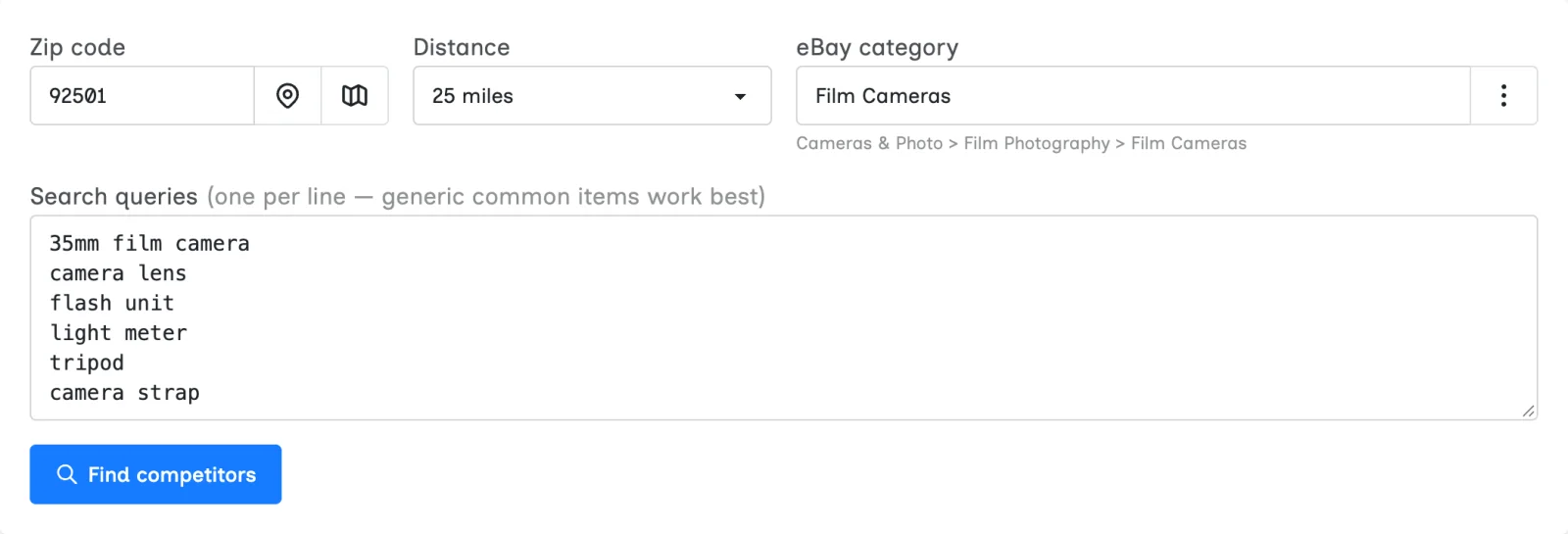
- Zip code. Type it, detect your location or pick a spot on a map.
- Distance. 10, 25, 50, 100 or 200 miles.
- eBay category. The category sets what counts as your market.
- Search queries. SafeBay suggests common items for the category. You can edit the list and use up to 15. General terms work best here too.
Press Find competitors and Rival Radar runs each search around your zip code, then merges the results into one list of sellers. The Min matches filter does what step 5 above does by hand: at its default of 3+, you see only the sellers who appeared in at least three of your searches.
How to read the results
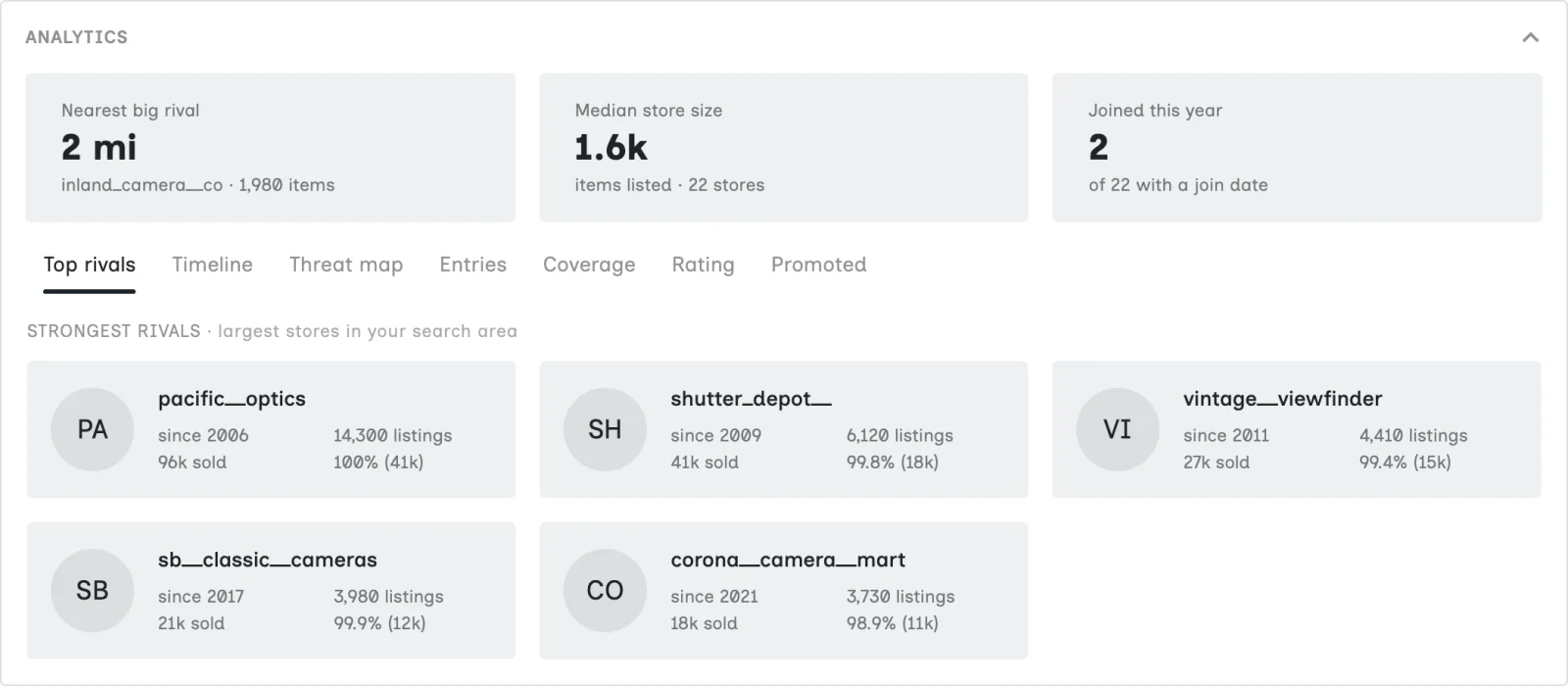
Three figures sit at the top: the nearest big rival (the closest store at or above the median size), the median store size in your area, and how many sellers joined eBay this year. Below them, Top rivals shows the five largest stores in the search.
The table below holds everyone who passed the filter, and you can sort it by any column. Each row shows the rating, items listed, total sold, the seller's join date, how many of their listings matched your searches and how far away they are. The tag beside the matched items shows which of your searches found them, and the link opens their store. Your own store is highlighted if it turns up.
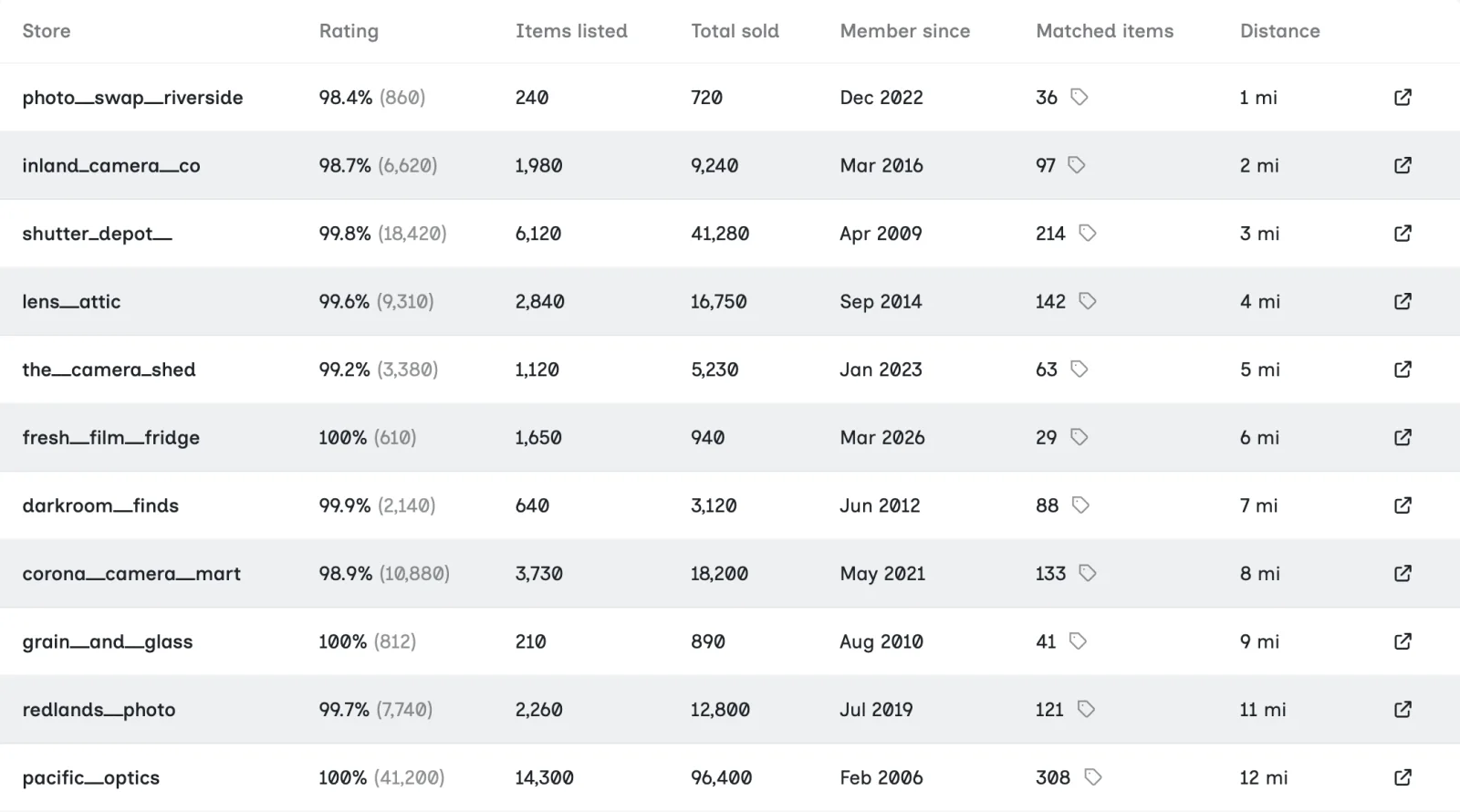
Matched items is the column to look at first. A store with 14,000 listings and a handful of matches is a big store that barely overlaps with you. A store with 800 listings, most of them matching, may be your closest competitor.
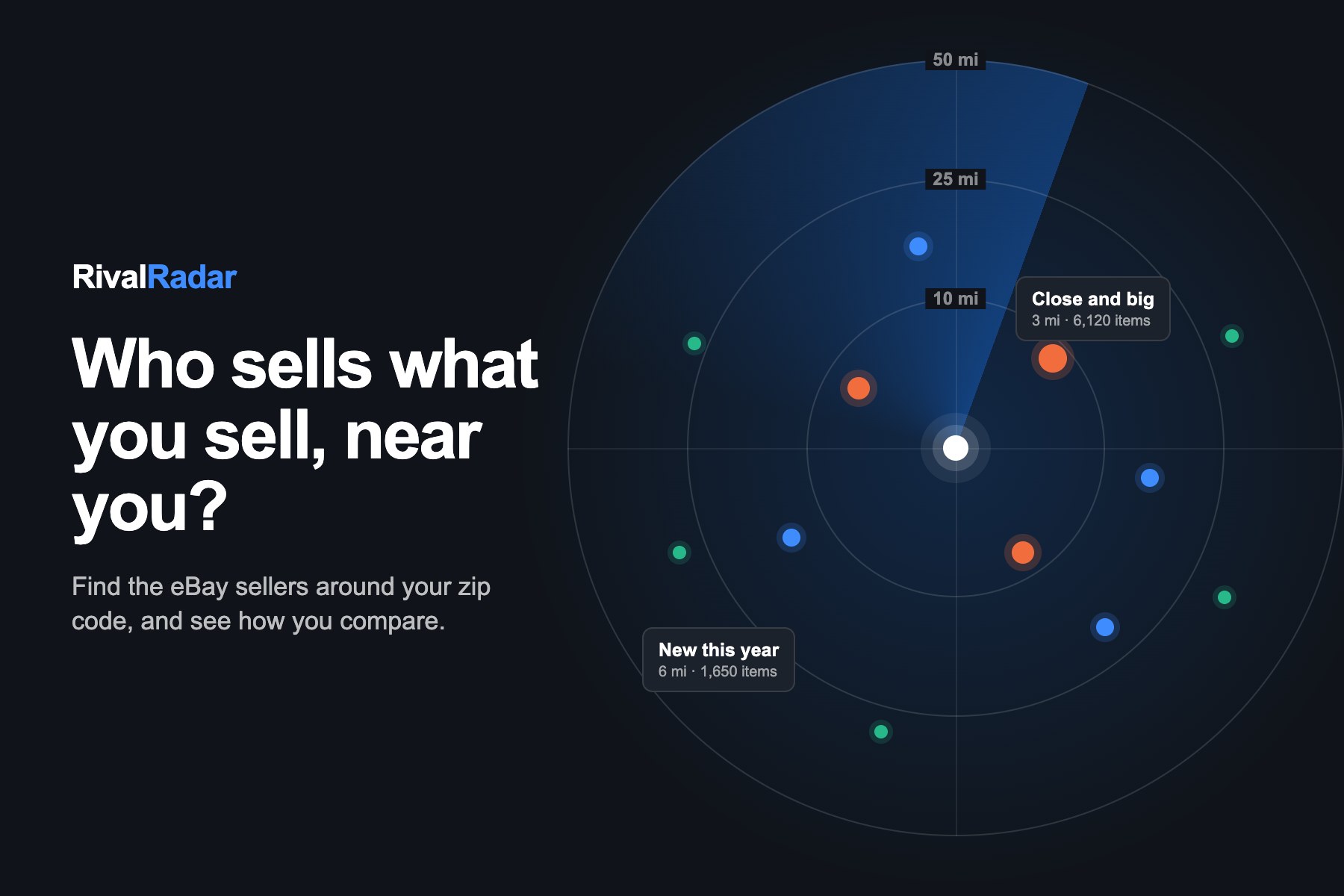
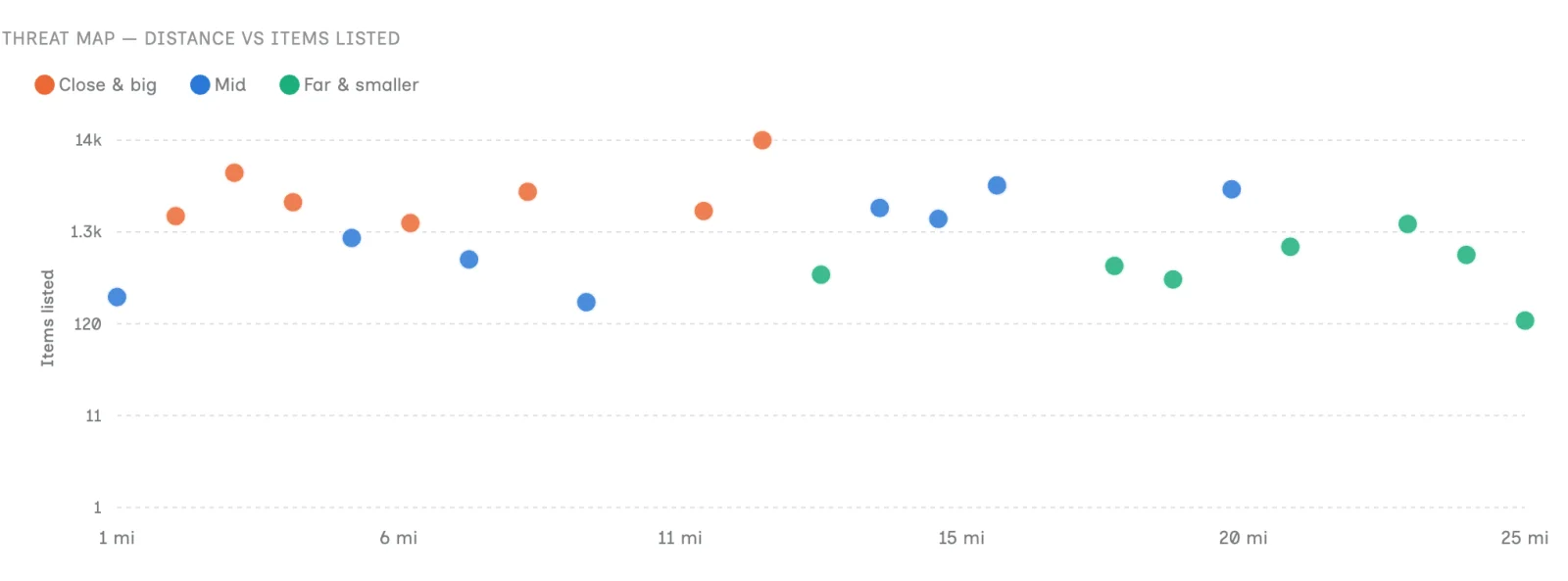
The Threat map puts distance against store size, so you can see at a glance who is both close and large. Sellers at or above the median size and at or under the median distance are marked "Close & big". Those are the stores to study first.
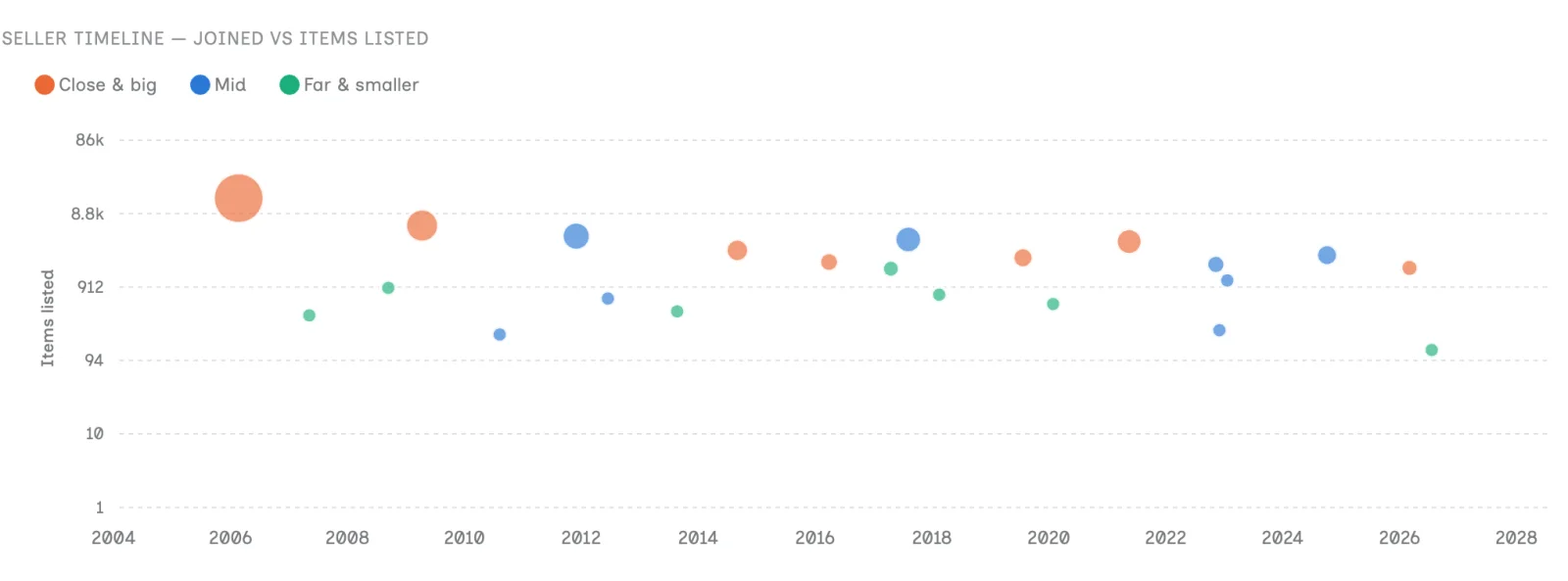
The Timeline plots when each seller joined eBay against the size of their store, so a young store with a large catalog stands out from the long-established ones.
What to do with your list of competitors
Finding competitors is the easy part. Here are the checks that tend to lead somewhere.
Compare the same items
Open two or three of your closest rivals and look at the items you both carry. Compare the price, the shipping and the delivery date a buyer sees, because that total is what the buyer is comparing. Look at their titles and photos too. If a rival charges more and still sells, as Total sold and their sold listings can tell you, the difference may be in the listing and not the price.
Close the shipping gap
Since a nearby seller ships from where you do, shipping is the fairest comparison you can make. If most of them offer free shipping or a faster handling time and you do not, you know what to test first.
Look for items few sellers carry
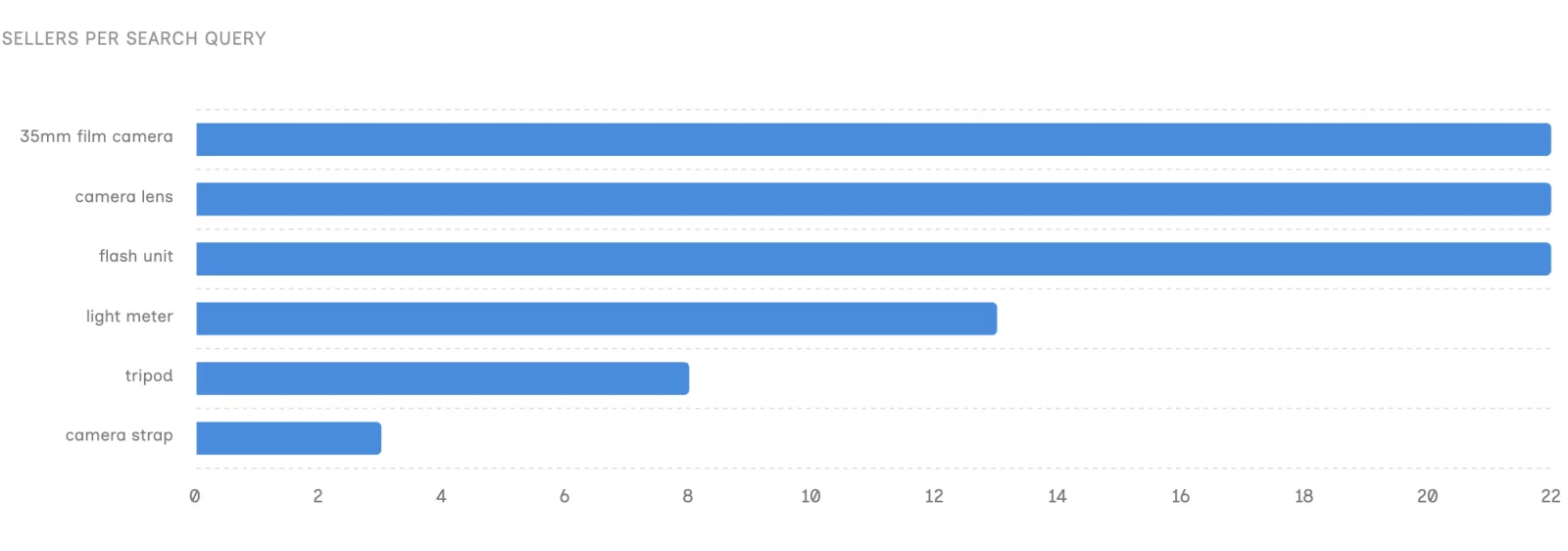
The Coverage tab counts how many sellers matched each of your searches. A term with few sellers near you is worth a closer look, as long as Product research shows real demand for it.
See who is paying for visibility
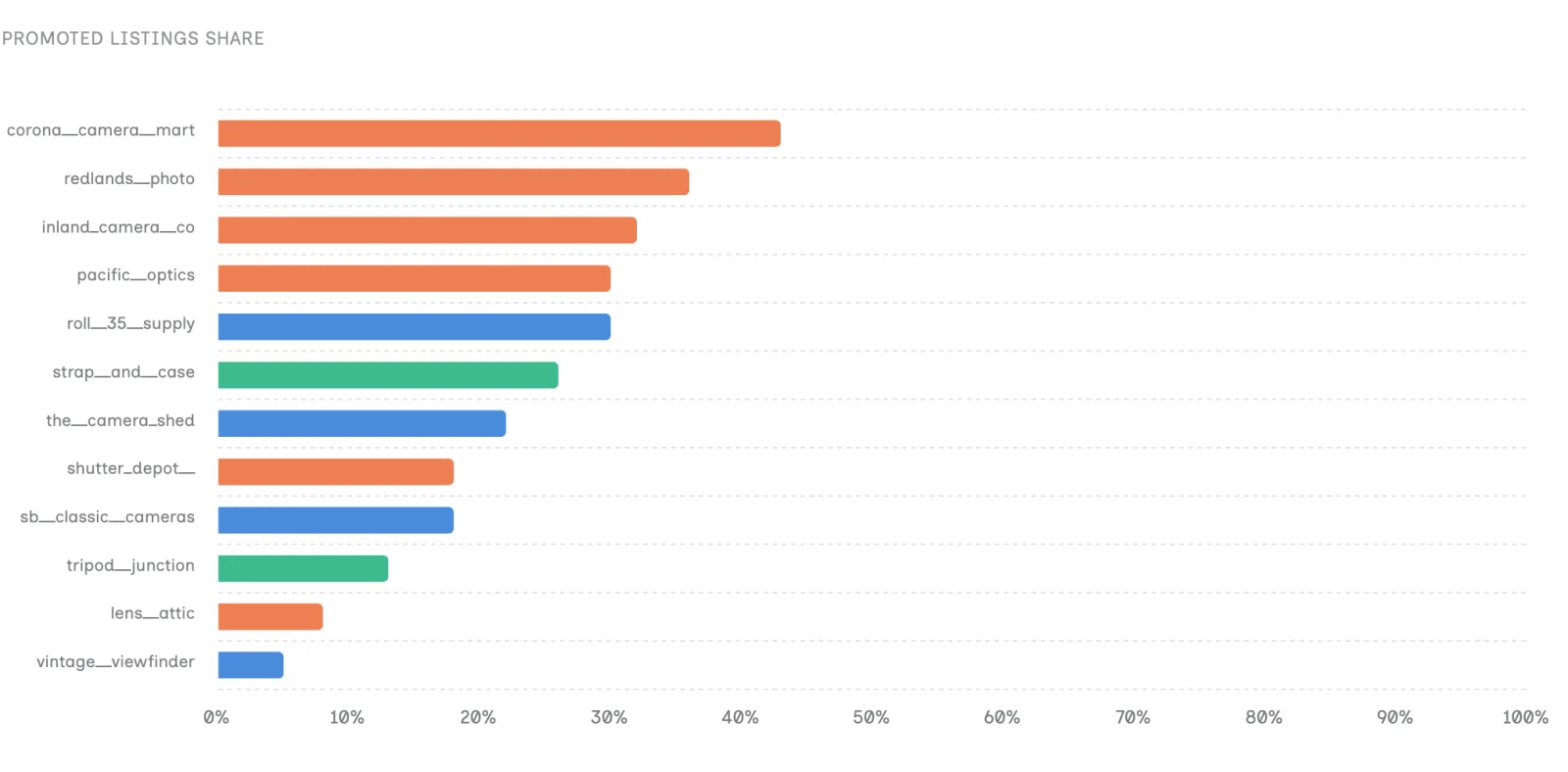
The Promoted tab shows what share of each seller's matched listings eBay flagged as promoted. If your nearest large rivals promote heavily and you do not, you are competing with their ad budget in search. If almost nobody near you promotes, a small test could be worth trying.
Keep your own listings in view
Whatever the comparison shows, it only pays off if your listings keep getting seen. SafeBay's Auto Relist can refresh older listings on a schedule, and the AI Listing Assistant in the SafeBay Companion helps you fix titles and item specifics when a rival's listing shows you what yours is missing.
Run it again
Each run is a snapshot. Repeat it every month or two, or after a change in your sales, and look for new names and stores that have grown.
What Rival Radar does not tell you
- Exact locations. The distance comes from the item location eBay reports for a listing. It is not a verified address, and it does not show you where a seller is on a map.
- Fine distances, without the Companion. eBay's API reports distance in 5-mile bands and nothing closer than 5 miles. The free SafeBay Companion extension reads eBay's exact figure, along with each store's logo and total sold. Without it, you still get the list, with rounded distances.
- Revenue or sales per item. Total sold is the count on a seller's store page. It says nothing about which items sold or for how much. Use Product research for that.
- Changes over time. It does not track a seller or alert you when something changes. You compare runs yourself.
- Anything outside the US. Searches use US zip codes and eBay's US marketplace, so it does not cover Canadian postal codes.
Frequently asked questions
How do I find eBay sellers near me?
Search for an item, set the item location to a number of miles from your zip code and sort by distance, nearest first. To get a list of sellers across several items at once, Rival Radar in SafeBay runs those searches and merges the results.
Can I search eBay by state or city?
Not directly. eBay's filters offer a distance from a zip code, not a state or a city. To cover a state, search from a zip code in the middle of it with a wide radius.
What does Rival Radar show about each competitor?
Their rating and feedback count, items listed, join date, how many of their listings matched your searches, which searches found them, how many of those listings are promoted and how far away they are. With the free SafeBay Companion extension, it adds the store's logo, total sold and a more exact distance.
Do competitors know when they appear in Rival Radar?
Rival Radar reads public listing and store information and sends nothing to the sellers it finds.
Which SafeBay plan includes Rival Radar?
Pro and Enterprise. The first paid plan on an account starts with 14 days free, by card. You can compare the plans here.
Does Rival Radar work in Canada?
Not yet. It works with US zip codes and eBay's US marketplace.
Can I use Rival Radar on my phone?
Yes, in your phone's web browser at safebay.store. It is not in the SafeBay phone apps.
Try it on your own zip code
A run usually finishes in under a minute. Create a SafeBay account, start a Pro plan (a first paid plan starts with 14 days free), then open Rival Radar from the Tools section of the menu and enter your zip code.